
RobotFX curates the best open-source MetaTrader code to inspire your trading automation.
This library reduces routine actions when working with input parameters.
Let's divert a little bit to the lines highlighted in the code.
Trade practice shows that it is convenient to save/read input parameters in string form, so that you can quickly and clearly see the sets of input parameters you are interested in (found).
Amount = 1, Count = 2, Period = 3, Koef = 4.5, Log = 6.7, Flag = true
Amount = 2, Count = 3, Period = 4, Koef = 4.56, Log = 7.89, Flag = false
For example, there are two sets of input parameters in the text above.
OOP-classics of working with input parameters.
input int inAmount = 1;
input int inCount = 2;
input int inPeriod = 3;

input double inKoef = 4.56;
input double inLog = 7.89;

input bool inFlag = true;

struct INPUT_STRUCT
{
  int Amount;
  int Count;
  int Period;

  double Koef;
  double Log;

  bool Flag;

  string ToString( void ) const
  {
    string Str = NULL;

  #define  TOSTRING(A) Str += (::StringLen(Str) ? ", " : NULL ) + #A + " = " + (string)(this.A);
    TOSTRING(Amount);
    TOSTRING(Count);
    TOSTRING(Period);

    TOSTRING(Koef);
    TOSTRING(Log);

    TOSTRING(Flag);
  #undef  TOSTRING

    return(Str);
  }

  // Didn't start writing.
  int FromString( const string Str )
  {
    return(0);
  }
} inInputs = {inAmount, inCount, inPeriod, inKoef, inLog, inFlag};

#include <fxsaber\Input_Struct\Example_OnTick.mqh>

void EXAMPLE::OnTick( void )
{
  // System Code...
 // this.Inputs contains input parameters.
}
The above cumbersome code is the same empty EA, but only with the addition (highlighted text) of working with input parameters. The code is unpleasant, and even without implementation of the important INPUT_STRUCT::FromString method.
If you want to add/remove one input parameter, you will have to make corresponding changes in five places of this code. And so it is every time!
OOP-alternative of working with input parameters.
.
#include <fxsaber\Input_Struct\Input_Struct.mqh> // Structure of input parameters.
INPUT_STRUCT inInputs;

MACROS_INPUT(int, Amount, 1);
MACROS_INPUT(int, Count, 2);
MACROS_INPUT(int, Period, 3);

MACROS_INPUT(double, Koef, 4.56);
MACROS_INPUT(double, Log, 7.89);

MACROS_INPUT(bool, Flag, true);

#include <fxsaber\Input_Struct\Example_OnTick.mqh>

void EXAMPLE::OnTick( void )
{
  // System Code...
 // this.Inputs contains input parameters.
}
There is noticeably less highlighted text. At the same time, all methods are implemented.
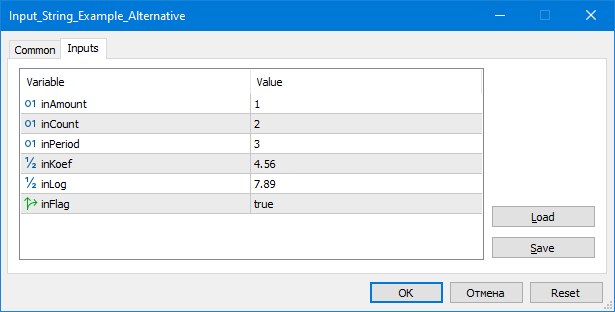
Usage scenarios.
- Minimal time and error probability when changing a set of input parameters.
- More time devoted to trade logic rather than technical features.
- Saving/reading input parameter sets via string.
- Significant simplification of writing complex systems (portfolios, etc.).
- Easy connection of custom optimisation algorithms.
Note that with the OOP approach, a lot of repetitive text can be hidden in mqh files - as is done in both examples above. OOP can also be concise.
Features.
- The proposed input parameter structure is simple, which greatly extends the applicability.
- "Modified" structures can be passed into each other via the assignment operator. And always have the same size.
- The library is cross-platform.
Reduce lag and improve accuracy with the NonLagMA Expert Advisor for MT4/MT5. Discover it.
Build better strategies with RobotFX professional tools – check them out.
47932


