
Discover expert developed MetaTrader tools that can complement professional solutions.
The code was created because the main strategy tester did not meet my expectations.
My EAs trades on all symbols and everything depends on the sum of pips, not on the currency. Additionally, symbols have different pip values, so I needed to systematise the results. Another issue is that the standard tester uses current swap points, which made the results seem random to me. In recent months, swap points have changed more than before. In addition, brokers have different swaps. My tester systematised everything.
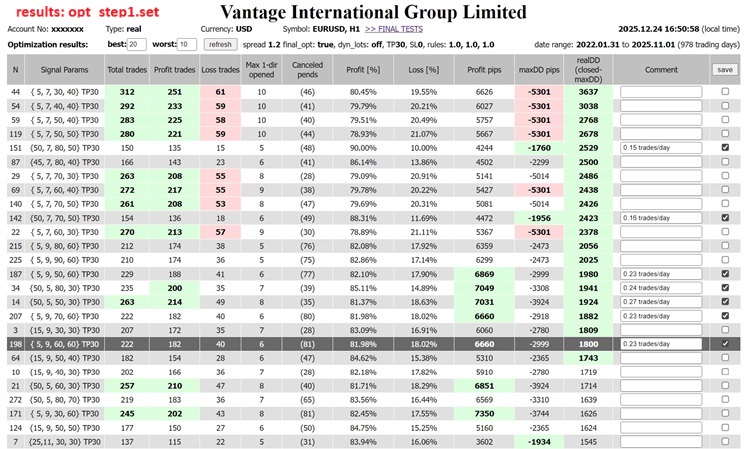
The results are pre-filtered: rule1,2,3. Of course, you can add your own.
- rule1 is in the maxDD function and depends on Lots.
- rules2 and 3 are checked in the AnalyzeTrades function before being sent for save.
This EA is just an empty sketch with ready-to-use functions. The JavaScript functions are in a separate file. You can change them as you wish, the file will not be overwritten.
You can check it in two ways. Insert the contents of OnTick() from MACD sample.mq4 and adjust the variables, or faster download the working EA ShortTrendReversal and apply the attached optimisation set.
procedure sequence:
- set optimisation parameters
- enable StrategyTester in pips
- set filters
- disable “test selected results”
run optimisation
open the html file, sort, select/deselect results, save the .csv file to csv_done folder
- deselect optimisation parameters
- enable “test selected results”
- select “stage1 results array”
run optimisation
For ShortTrendReversal the two steps above are in the attached .set files.
Finally, before you enable optimisation, disable genetic optimisation. Additionally, if you change the optimisation parameters in the first step, you must clear the tester's cache, as the tester skips calculations, and these are essential.
below windows script for cleaning tester cache and last created file
rem @echo off
set mt4_path="full_path_to_metatrader4\tester\files\ShortTrendReversal"
del %mt4_path%\..\..\caches\*.* /P
del %mt4_path%\..\..\history\*.* /P
for /F %%a in ('dir /B /O:-D /A:-D /T:C %mt4_path%\*.html') do del /P "%mt4_path%\%%a"&goto deldone
:deldone
for /F %%a in ('dir /B /O:-D /A:-D /T:C %mt4_path%\csv_done\*.html') do del /P "%mt4_path%\csv_done\%%a"&goto deldone
:deldone
pause

Protect profits effectively with the smart Trailing Stop Expert Advisor. Advanced trailing options for MT4/MT5. See it in action.
Build better strategies with RobotFX professional tools – check them out.
62861


