
New free code from MQL5: indicators, EAs, and scripts for traders.
Overview
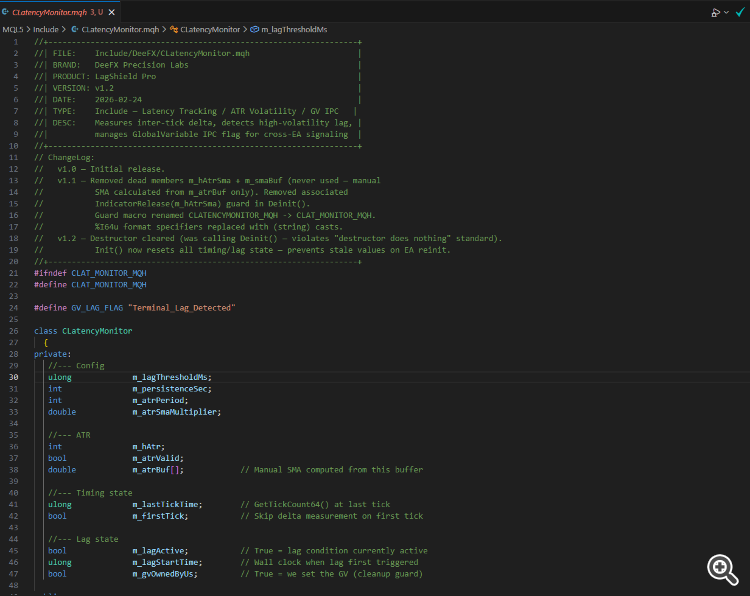
CLatencyMonitor is a lightweight MQL5 include-file library ( #include ) developed by DeeFX Precision Labs as part of the LagShield Pro product suite. It provides three tightly integrated capabilities in a single reusable class:
- Real-time inter-tick delta measurement using GetTickCount64() .
- A self-normalising ATR volatility gate that suppresses false lag alerts during normally fast high-volatility periods.
- Cross-EA inter-process communication (IPC) via a named GlobalVariable flag, allowing any number of Expert Advisors on the same terminal to react to a confirmed lag event.
Drop the file into MQL5/Include/DeeFX/ and add a single #include to any EA or service that needs latency awareness.
The Problem It Solves
Execution-sensitive EAs can suffer silent fill degradation or risk miscalculation when the terminal's tick feed lags behind the market. Standard MQL5 provides no built-in mechanism to:
- Detect abnormally large gaps between consecutive ticks at runtime.
- Distinguish genuine feed lag from the naturally wider tick spacing that occurs during high-volatility bursts (news events, open/close spikes).
- Notify other EAs running simultaneously on the same terminal so they can pause, hedge, or alert the trader.
CLatencyMonitor addresses all three gaps with a single, dependency-free class.
How It Works
Inter-tick delta
On every call to OnTick() , the class computes the elapsed milliseconds since the previous tick. The first tick is used only to seed the timer — no spurious alert is raised at startup.
ATR volatility gate
Before declaring a lag, the class checks whether the current ATR value exceeds AtrSmaMultiplier × SMA(ATR, AtrPeriod) . The SMA is calculated manually from the raw ATR buffer, making the threshold instrument-agnostic and self-normalising across all pairs and timeframes. If the ATR handle is unavailable or history is insufficient, the gate fails open (lag detection remains active) so protection is never silently disabled.
Persistence and GlobalVariable IPC
A repeating timer calls CheckPersistence() . Once a lag condition has remained active for longer than PersistenceSec seconds, the class performs a read-before-write check on the named GlobalVariable "Terminal_Lag_Detected" and sets it to 1.0 only if no other EA has already claimed it. Ownership is tracked internally; when the lag clears, only the owning instance resets the flag.
Clean lifecycle
Init() resets all timing and lag state, preventing stale values across OnDeinit / OnInit cycles. Deinit() releases the ATR indicator handle and deletes the GlobalVariable only if owned. The destructor is intentionally empty — explicit resource management follows the MQL5 standard.
Integration Example
#include <DeeFX/CLatencyMonitor.mqh>

input ulong InpLagThresholdMs    = 500;
input int   InpPersistenceSec    = 3;
input int   InpAtrPeriod         = 14;
input double InpAtrSmaMultiplier = 1.5;

CLatencyMonitor g_latency;

int OnInit()
  {
   if(!g_latency.Init(InpLagThresholdMs, InpPersistenceSec,
                      InpAtrPeriod, InpAtrSmaMultiplier,
                      _Symbol, _Period))
      return INIT_FAILED;

   EventSetTimer(1);   // 1-second timer for persistence checks
   return INIT_SUCCEEDED;
  }

void OnDeinit(const int reason)
  {
   EventKillTimer();
   g_latency.Deinit();
  }

void OnTick()
  {
   bool newLag = g_latency.OnTick();
   if(newLag)
      Comment("DeeFX | LAG DETECTED — trade execution paused");
  }

void OnTimer()
  {
   bool persistent = g_latency.CheckPersistence();
   if(persistent)
      Alert("DeeFX | Persistent lag > ", InpPersistenceSec, "s — GV flag set");

   if(!g_latency.IsLagActive())
      Comment("");
  }
Any other EA on the same terminal can read the shared flag independently:
// In a second EA — no include required
if(GlobalVariableGet("Terminal_Lag_Detected") >= 1.0)
   Print("Terminal lag signal received — skipping order placement.");
Parameters / Accessors
Init() parameters
- lagThresholdMs: Inter-tick delta in milliseconds above which a lag candidate is raised. Default: 500 .
- persistenceSec: Seconds a lag condition must persist before the GlobalVariable IPC flag is set. Default: 3 .
- atrPeriod: Lookback period for the ATR indicator and its manual SMA. Default: 14 .
- atrSmaMultiplier: Multiplier applied to the ATR SMA to form the high-volatility threshold. Default: 1.5 .
- symbol: Chart symbol passed to iATR() ; typically _Symbol .
- tf: Timeframe passed to iATR() ; typically _Period .
Public methods
- bool Init(...): Initialises the ATR handle and resets all state. Returns true even if the ATR handle fails (non-fatal; gate is disabled but timing continues).
- bool OnTick(): Call from OnTick() . Returns true on the tick a new lag condition is first triggered.
- bool CheckPersistence(): Call from OnTimer() . Returns true when an active lag has exceeded PersistenceSec . Manages the GlobalVariable flag automatically.
- void Deinit(): Releases the ATR handle and clears the GlobalVariable if owned. Call from OnDeinit() .
Read-only accessors
- ulong LastDeltaMs(): Milliseconds elapsed since the last recorded tick. Returns 0 before the first tick.
- bool IsLagActive(): Returns true while a lag condition is in progress.
- bool IsAtrValid(): Returns true if the ATR handle was created successfully and the volatility gate is operational.
GlobalVariable IPC
- Flag name: "Terminal_Lag_Detected" (defined as GV_LAG_FLAG ).
- Set to 1.0 when persistent lag is confirmed; reset to 0.0 (or deleted) when lag clears.
- Read-before-write guard prevents one EA from overwriting a flag already owned by another instance.
Changelog
- v1.0 — Initial release.
- v1.1 — Removed unused members m_hAtrSma and m_smaBuf ; ATR SMA is now computed manually from m_atrBuf only. Removed the associated IndicatorRelease(m_hAtrSma) guard in Deinit() . Guard macro renamed from CLATENCYMONITOR_MQH to CLAT_MONITOR_MQH . %I64u format specifiers replaced with explicit (string) casts for cross-compiler compatibility.
- v1.2 — Destructor cleared (previously called Deinit() , violating the "destructor does nothing" standard). Init() now explicitly resets all timing and lag state to prevent stale values when an EA reinitialises without a full terminal restart.
Protect profits effectively with the smart Trailing Stop Expert Advisor. Advanced trailing options for MT4/MT5. See it in action.
Thanks for reading. Discover premium MetaTrader solutions at RobotFX.
70046


