
Explore the latest free tools from the MQL5 community. Here's a new indicator, expert advisor, or script for MetaTrader.
Overview
CExecutionSafety is a lightweight MQL5 include class designed to protect Expert Advisors from executing trades under poor network or execution conditions.
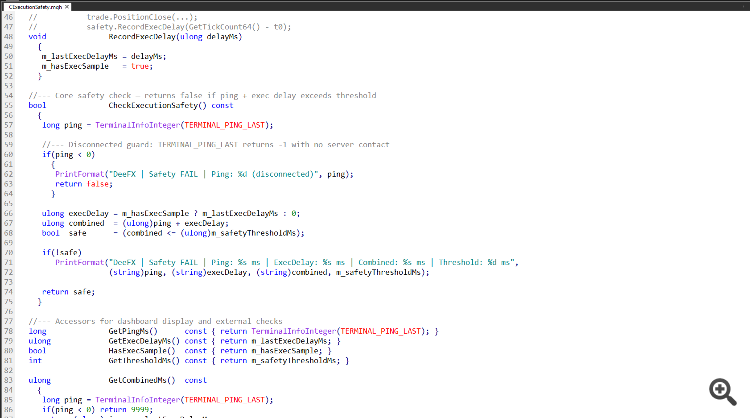
It measures two latency components live terminal ping and real wall-clock execution delay and blocks trade attempts when their combined value exceeds a configurable threshold.
The Problem It Solves
Most EAs execute blindly regardless of network conditions. A spike in ping or broker-side execution lag during a critical order can result in slippage, requotes, or failed fills.
CExecutionSafety introduces a pre-trade safety gate that prevents execution when conditions are degraded.
How It Works
The class uses two data sources:
- TERMINAL_PING_LAST: reads the most recent ping recorded by MetaTerminal (in milliseconds)
- RecordExecDelay(): accepts a wall-clock measurement you wrap around any CTrade operation
These two values are summed and compared against your configured threshold. If the combined latency exceeds the threshold, CheckExecutionSafety() returns false and prints a diagnostic log entry.
Disconnection Guard
When the terminal has no server contact, TERMINAL_PING_LAST returns -1. The class detects this and automatically returns false, preventing trade attempts on a disconnected terminal.
Integration Example
Include the file and instantiate the class in your EA:
#include <DeeFX/CExecutionSafety.mqh> CExecutionSafety safety; int OnInit() { safety.Init(150); // 150ms combined threshold return INIT_SUCCEEDED; } void OnTick() { if(!safety.CheckExecutionSafety()) return; ulong t0 = GetTickCount64(); trade.PositionClose(ticket); safety.RecordExecDelay(GetTickCount64() - t0); }
Accessors
The following read-only accessors are available for dashboard display or external logic:
- GetPingMs(): current terminal ping in ms
- GetExecDelayMs(): last recorded execution delay in ms
- GetCombinedMs(): ping + exec delay combined (returns 9999 if disconnected)
- HasExecSample() : true once at least one measurement has been recorded
- GetThresholdMs(): configured safety threshold
Changelog
- v1.0 — Initial release
- v1.1 — Guard macro renamed. %I64u format specifiers replaced with (string) casts
- v1.2 — Init() return type changed void → bool. State reset on reinit to prevent stale samples
Reduce lag and improve accuracy with the NonLagMA Expert Advisor for MT4/MT5. Discover it.
Complement community code with advanced automation from RobotFX.
70033


