
Discover expert developed MetaTrader tools that can complement professional solutions.
Overview
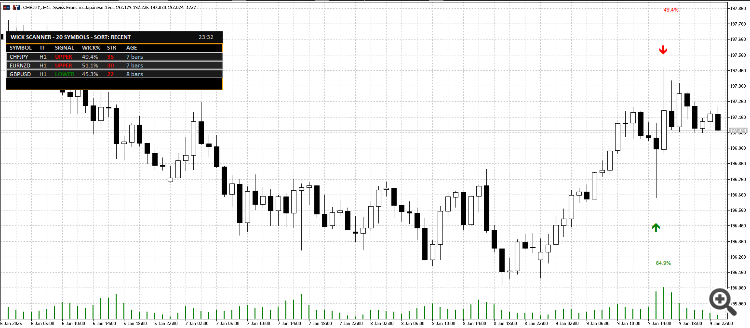
This is a scanner + visualizer. It does not place trades.
What the Indicator Detects
A signal is produced when a candle meets configurable rejection rules, including:
-
Dominant wick (upper or lower) as a percentage of the full candle range
-
Minimum candle range filter to avoid tiny/noisy candles
-
Minimum body size to avoid meaningless “needle” bars
-
Opposite wick cap to avoid “indecision” candles with large wicks on both sides
-
Optional ATR filter so signals occur only during sufficient volatility
-
Optional Trend Context score to penalize signals occurring in weak locations inside the recent range
The result is a set of rejection signals that is designed to be realistic, not overly sensitive.
Key Features
-
Multi-Symbol Scanner
-
Scan symbols from Market Watch or from a custom comma-separated list
-
Limit the number of scanned symbols for performance control
-
-
Multi-Timeframe Support
-
Scan the current chart timeframe or a fixed timeframe
-
Optional additional scans for M15 and H4
-
-
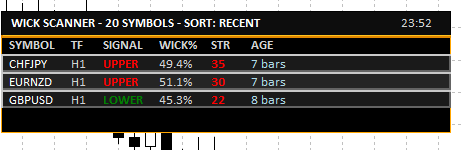
Professional Dashboard UI
-
Clean dark theme dashboard with consistent spacing and alignment
-
Displays: Symbol, Timeframe, Signal Type, Wick %, Strength, Age
-
Sorting modes: Most Recent / Highest Wick% / Highest Strength
-
Shows a compact signal age (bars ago or time for very recent signals)
-
-
Click-to-Switch Chart
-
Click a dashboard row to instantly switch the chart to that symbol + timeframe
-
-
On-Chart Markers (Optional)
-
Draw arrows on the chart for detected signals
-
Optional wick percentage labels
-
Maximum marker count for performance and readability
-
-
Alerts (Optional)
-
Popup / Push / Email alerts
-
Cooldown control to avoid repeated alerts for the same symbol/timeframe
-
Typical Use Cases
-
Watchlist scanning for rejection candles at important levels
-
Quick filtering before manual confirmation (S/R, trend structure, session timing, liquidity sweeps)
-
A dedicated “setup radar” on a secondary monitor
Notes and Best Practice
-
A wick rejection candle is a trigger, not a complete strategy.
-
For higher quality trade decisions, combine signals with:
-
Support/Resistance zones
-
Trend structure (HH/HL or LH/LL)
-
Higher timeframe bias
-
Session timing / volatility conditions
-
Inputs (What You Can Configure)
Detection Settings
-
Wick threshold (% of candle range)
-
Minimum candle range (points)
-
Minimum body percentage
-
Maximum opposite wick percentage
-
ATR-based validation (period + multiplier)
-
Trend context scoring (lookback + threshold)
Scanner Settings
-
Market Watch symbols or custom symbol list
-
Scan timeframe selection (or current chart timeframe)
-
Optional extra timeframes (M15 / H4)
-
Bars to check + refresh interval
-
Optional limit for maximum displayed signals
UI & Alerts
-
Dashboard position, offsets, row height, font size
-
Marker visibility, label visibility, max markers
-
Alert channels and cooldown
Summary
If you trade wick rejections and want a faster workflow, Wick Rejection Scanner Dashboard helps you:
-
scan more charts in less time,
-
reduce noise using practical filters, and
-
focus on the best candidates via strength scoring and sorting.
Reduce lag and improve accuracy with the NonLagMA Expert Advisor for MT4/MT5. Discover it.
Build better strategies with RobotFX professional tools – check them out.
68101


