
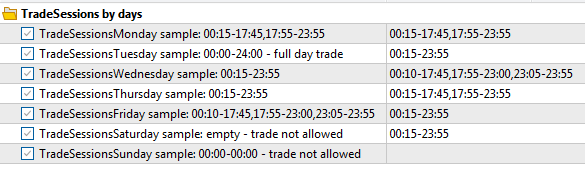
And this is how it will be output in the log:
TradeSessionsTuesday=00:15-23:55
TradeSessionsWednesday=00:10-17:45,17:55-23:00,23:05-23:55
TradeSessionsThursday=00:15-17:45,17:55-23:55
TradeSessionsFriday=00:15-23:55
TradeSessionsSaturday=00:15-23:55
TradeSessionsSunday=
EURUSD : real ticks begin from 2022.05.10 00:00:00, every tick generation used
2022.01.10 00:05:00 Day: 1 Trade sessions: 1: 00:15-17:45, 2: 17:55-23:55
2022.01.10 00:05:00 Day: 2 Trade sessions: 1: 00:15-23:55
2022.01.10 00:05:00 Day: 3 Trade sessions: 1: 00:10-17:45, 2: 17:55-23:00, 3: 23:05-23:55
2022.01.10 00:05:00 Day: 4 Trade sessions: 1: 00:15-17:45, 2: 17:55-23:55
2022.01.10 00:05:00 Day: 5 Trade sessions: 1: 00:15-23:55
2022.01.10 00:05:00 Day: 6 Trade sessions: 1: 00:15-23:55
2022.01.10 00:05:00 Market closed. OnTick return
...
If the end time of the session is less than the start time, for example 20:00-8:00, then the session will continue until 8:00 of the next day. This can be useful in cases when the trading session is in a different time zone from the server time.
The time of trading sessions can also be specified in the code without inputs. The LoadFromInputs() function is created for this purpose. It can be called without Inputs, but directly from the code with a string array, as in the example.
string s=["00:15-17:45,17:55-23:55","00:00-24:00",....]
void LoadFromInputs(string &s[]){...}
If the Expert Advisor is multicurrency and different instruments have different trading session times, you can make a separate instance of TRADE_SESSIONS for each instrument and call LoadFromInputs() with session data and check isSessionTrade(). To do this, you will have to modify the code similar to this example.


