
New free code from MQL5: indicators, EAs, and scripts for traders.
MT4's Account History tab is hard to analyse. Trade History Exporter writes one row per closed trade to a CSV file you can open in a spreadsheet.
Columns: ticket, symbol, type, lots, open time, open price, close time, close price, points, profit, commission, swap, net, duration, stop loss at close, MAE points, MFE points, magic number and comment.
How the figures are worked out
Reduce lag and improve accuracy with the NonLagMA Expert Advisor for MT4/MT5. Discover it.
- A trade closed in several parts is one row. MT4 gives the rest of a part-closed trade a new ticket with the comment "from #..."; the script follows those links back to the first ticket, and only joins parts with the same symbol, side and open time. The close price is the lot-weighted average.
- Commission and swap from every part are added up, so "Net" is the real result.
- MT4 does not keep the stop loss a trade was opened with, so the file shows the stop loss at close (there is no R multiple column, because it could not be worked out honestly).
- MAE (maximum adverse excursion) and MFE (maximum favourable excursion) are the largest move against and in favour of the trade, in points, from M1 bars. This is an approximation: the first and last minute can include prices just before the entry or just after the exit, and the bars are built from Bid prices, so for sell trades the spread is not included. MT4 keeps little M1 history, so for older trades they are left blank.
- Brokers' archive summary rows (for example "Archived Transactions") are not trades and are left out; the report says how many.
- Dates are written as yyyy-mm-dd hh:mm:ss (server time). The file is UTF-8 with a byte order mark. A comment that starts with =, +, - or @ gets a ' in front, so a spreadsheet does not run it as a formula.
Important: the script reads the history the terminal has loaded. In the Account History tab, right-click and choose All History first if you want everything.
Inputs
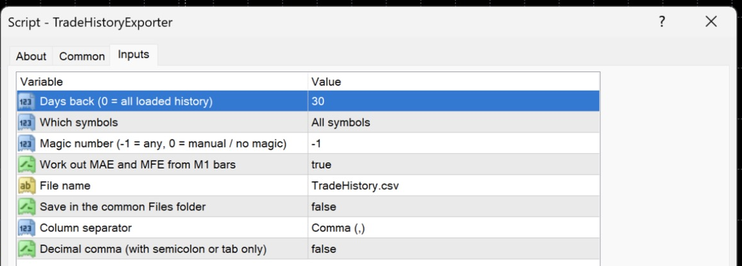
The script's inputs
- Days back: 0 = all loaded history.
- Which symbols: all symbols or this chart's symbol only.
- Magic number: -1 = any, 0 = no magic number (usually manual trades), any other number = only that magic number.
- Work out MAE and MFE from M1 bars: true by default.
- File name.
- Save in the common Files folder (shared by all terminals) instead of this terminal's MQL4\Files folder.
- Column separator: comma, semicolon or tab.
- Decimal comma: writes 1,0950 instead of 1.0950. Used only with the semicolon or tab separator.
When it finishes, a message shows the file's full path, the number of trades, the number of winners, the net result, and how many rows were left out and why.
Complement community code with advanced automation from RobotFX.
80132


