
Explore the latest free tools from the MQL5 community. Here's a new indicator, expert advisor, or script for MetaTrader.
What it does
Daily Loss Guard is a risk-protection utility. It does not trade: it supervises the whole account (all EAs and manual trades) and reacts when one of two loss limits is reached.
Reduce lag and improve accuracy with the NonLagMA Expert Advisor for MT4/MT5. Discover it.
| Limit | How it is measured |
|---|---|
| Daily loss | Start-of-day base minus current equity. The base is the balance or the equity at the start of the trading day (your choice). Limit in % of the base or in money. |
| Total drawdown | Static: reference balance minus current equity (reference = the value you enter, or the balance when the EA first started). Trailing: highest equity reached minus current equity. Limit in % or in money. |
Equity includes floating profit and swap, so a position that is deep in the red counts before it is closed.
When a limit is touched
- Every open position is closed and every pending order is deleted (only those matching the optional filter).
- The account is locked until the next trading day (the day-reset time is configurable). While locked, any new position or order is closed or deleted again, immediately after the trade event and also on every timer tick.
- If a close fails (requote, no connection, market closed), it is retried several times in the same pass and then on every following tick until nothing is left.
- On the next trading day the lock is released and the daily base is taken again. The total-drawdown limit is checked again at once: if the account is still beyond it, the guard locks again.
Early warning
At a configurable percentage of a limit (80% by default) the EA writes to the Experts log, shows an Alert and, optionally, sends a push notification. The same alerts are sent when a limit is hit, and when AutoTrading is switched off (the guard cannot close trades without it).
Panel
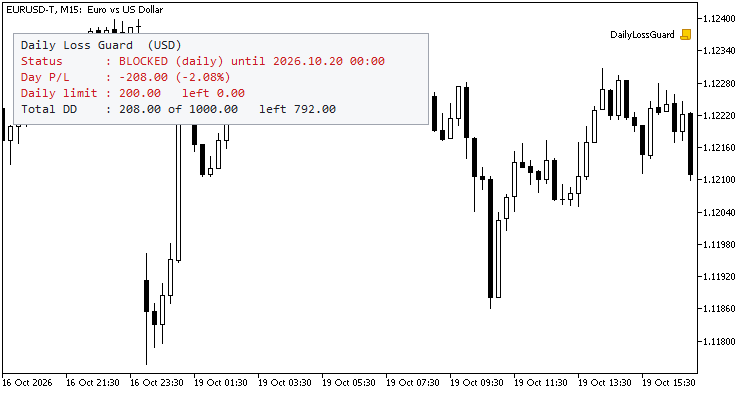
A small panel on the chart shows the status (ACTIVE / WARNING / BLOCKED until ...), today's profit or loss, the daily limit with the margin left, and the total drawdown with the margin left. Light or dark theme, any corner. The panel never shows the account number, name or broker.
Inputs
- Daily loss: enable, percent or amount, value, base (balance or equity at the start of the day).
- Total drawdown: enable, percent or amount, value, static or trailing, static reference balance.
- Trading day: reset hour and minute in broker server time.
- Early warning: percentage, Alert, push.
- Filter: magic numbers and symbols (comma separated, empty = everything).
- Closing: attempts per pass, pause between attempts, maximum slippage.
- Panel: show, corner, offsets, font size, dark theme.
- State: "forget the saved state at start".
- Strategy Tester demo: random trades to try the guard (ignored outside the tester).
Notes
- The limits always use the equity of the whole account. The filter only decides which positions and orders are closed and blocked; if you filter, other trades keep running and keep counting in the equity.
- The symbol filter compares exact symbol names, as they appear in the Market Watch (including any broker suffix).
- If the EA is started in the middle of a day it rebuilds the balance at the start of the day from the deals of that day. With the equity base this is an estimate (floating profit at the start of the day cannot be known), and the panel marks it as "est." until the next day.
- Deposits and withdrawals are not trading results: they are not counted when the start-of-day balance is rebuilt.
- State (day base, lock, highest equity, reference balance, warning flags) is saved in global variables of the terminal, per account. Terminal global variables are deleted by the terminal after four weeks without access.
- The guard needs AutoTrading enabled and the market open to be able to close trades. It cannot act while the terminal is closed or disconnected; check the rules of your prop firm, which may measure the limits differently (server time, balance or equity, trailing or static).
- It is a protection tool, not a guarantee: gaps, slippage and a closed market can make the final loss larger than the limit.
- Not financial advice; it reports and reacts to numbers, it does not predict anything.
Try it in the Strategy Tester
Switch on "Open random trades to try the guard" in the Strategy Tester (any symbol, any timeframe, a small daily limit such as 1%). The EA opens trades with a fixed lot, hits the limit, closes everything, keeps closing the trades the demo keeps opening during the locked day and releases the lock on the next day. It also checks, once, that the saved state can be written and read back. Use only the tester or a demo account to try it.
Testing
Run in the Strategy Tester (EURUSD M15, 19-22 October 2026, demo mode on, 2% daily limit, warning at 70%): the early warning fired at 70% of the limit, the limit was hit and every position and pending order was closed or deleted at once, the trades the demo mode kept opening during the locked day were closed again each time, the lock was released at the start of the next trading day, and the saved state passed the write / read-back check. In one case, with demo positions carried over midnight, the daily loss was already well past the limit at the first check of the new day: the guard locked and closed at once, which shows why the limit is a protection, not a guarantee.
Complement community code with advanced automation from RobotFX.
79035


