
Fresh MQL5 code release – perfect for enhancing your MT4/MT5 strategies.
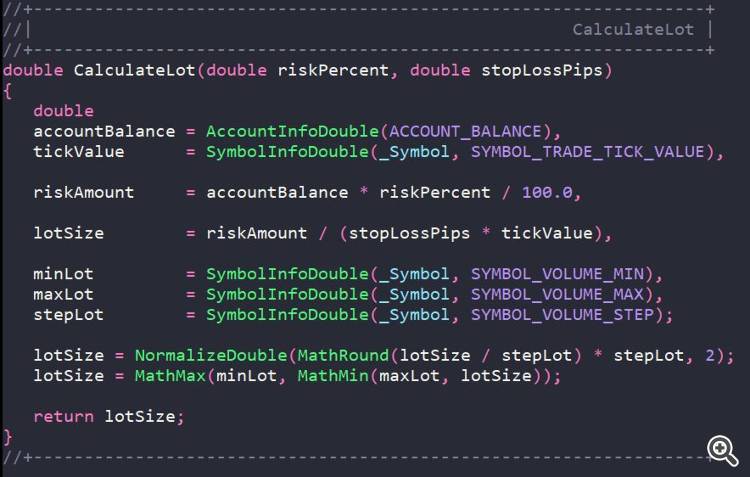
The CalculateLot function is designed to automatically calculate the trading lot size based on risk management principles. It allows a trader to specify the percentage of the account balance he is willing to risk in a trade and, based on this, determine the optimal position volume.
Syntax
Recover from drawdowns intelligently with the Auto Recovery Expert Advisor for MT4/MT5. Perfect for hedging strategies. Learn more.
double CalculateLot(double riskPercent, double stopLossPips);
Parameters
Параметр        Тип     Описание
riskPercent     double  Процент от текущего баланса счета, которым трейдер готов рискнуть. Указывается в абсолютном значении (например, 2.0 = 2% от баланса).
stopLossPips    double  Расстояние до уровня Stop Loss в пунктах. Для 5-значных котировок указывается количество стандартных пунктов (например, 1000 = 1000 пунктов = 100 пипсов).
Return value
The function returns the normalised lot volume ( double ), which:
-
Conforms to the rounding rules to the volume step ( VOLUME_STEP );
-
Does not exceed the maximum allowed volume ( VOLUME_MAX );
-
Is not less than the minimum allowed volume ( VOLUME_MIN ).
If the calculated value exceeds the allowed limits, the function returns a limited value (minLot or maxLot).
Operating algorithm
-
Obtaining account and symbol parameters
-
Current balance ( ACCOUNT_BALANCE )
-
Tick value ( SYMBOL_TRADE_TICK_VALUE )
-
Minimum, maximum and step of lot change
-
-
Calculation of risk amount in deposit currency
riskAmount = баланс × (риск% / 100) -
Calculation of lot volume
lotSize = riskAmount / (stopLossPips × tickValue)
-
Normalisation and validation
-
Rounding to the nearest step ( VOLUME_STEP )
-
Minimum and maximum value validation
-
Examples of use
Example 1. Basic use in an Expert Advisor
//+------------------------------------------------------------------+
//| |
//+------------------------------------------------------------------+
void OnTick()
{
   //--- Set risk 1.5% of balance and stop loss 500 pips
   double lot = CalculateLot(1.5, 500);

   //--- Check that the lot is calculated correctly
   if(lot > 0.0)
     {
      //--- Get current prices
      double ask = SymbolInfoDouble(_Symbol, SYMBOL_ASK);

      //--- Calculate levels
      double sl = ask - 500 * _Point;
      double tp = ask + 1500 * _Point;

      //--- Open position
      trade.Buy(lot, _Symbol, ask, sl, tp);
     }
}
Example 2. Use in a script with error checking
//+------------------------------------------------------------------+
//| |
//+------------------------------------------------------------------+
void OnStart()
{
   double riskPercent  = 2.0;   // Risk 2% of the balance
   double stopLossPips = 1000;  // Stop loss 1000 points

   double lot = CalculateLot(riskPercent, stopLossPips);

   //--- Output information about the calculation
   Print("=== Lot calculation results ===");
   Print("Account Balance: ", AccountInfoDouble(ACCOUNT_BALANCE));
   Print("Risk, %: ", riskPercent);
   Print("The amount of risk: ", AccountInfoDouble(ACCOUNT_BALANCE) * riskPercent / 100.0);
   Print("Stop loss, points: ", stopLossPips);
   Print("Ticking cost: ", SymbolInfoDouble(_Symbol, SYMBOL_TRADE_TICK_VALUE));
   Print("Calculated lot: ", lot);
   Print("================================");

   if(lot <= 0.0)
     {
      Alert("Error: Lot calculation failed. Check the risk and stop loss parameters.");
     }
}
Level up your trading with professional RobotFX expert advisors and indicators. Visit www.robotfx.org for proven MT4/MT5 tools.
71010


