
RobotFX curates the best open-source MetaTrader code to inspire your trading automation.
In Tester during optimisation you may encounter passes crashing due to memory shortage.
There is a method to calculate such emergency passes. However, it is difficult to evaluate all the many variants of input parameters for heavy memory consumption by the Expert Advisor.
Recover from drawdowns intelligently with the Auto Recovery Expert Advisor for MT4/MT5. Perfect for hedging strategies. Learn more.
You need to find potentially problematic configurations of input parameters of an existing Expert Advisor. And then figure out the causes.
This simple library allows you to track the dynamics of changes in memory consumption in a rather simple way.
Example.
To illustrate, let's take a laconic EA and add a few lines to it (highlighted).
#property tester_no_cache

#define  MEMORY_TESTER_OPTIMIZATION   // Operation in Tester optimisation mode.
#include <fxsaber\Memory\Memory.mqh> // Memory Consumption Monitoring.

input int inMaxMB = 10;

void OnTick()
{
  static MqlRates Rates[];

  const int SizeMB = (ArraySize(Rates) * sizeof(MqlRates)) >> 20;

  if (SizeMB < inMaxMB)
    ArrayResize(Rates, ((SizeMB + 2) << 20) / sizeof(MqlRates)); // Increase the array by ~megabytes.
}

double OnTester()
{
  return(gMemory.GetMax()); // Maximum memory consumption during programme execution.
}
The Expert Advisor simply increases its array.
Result.
The picture shows the result of the optimisation.
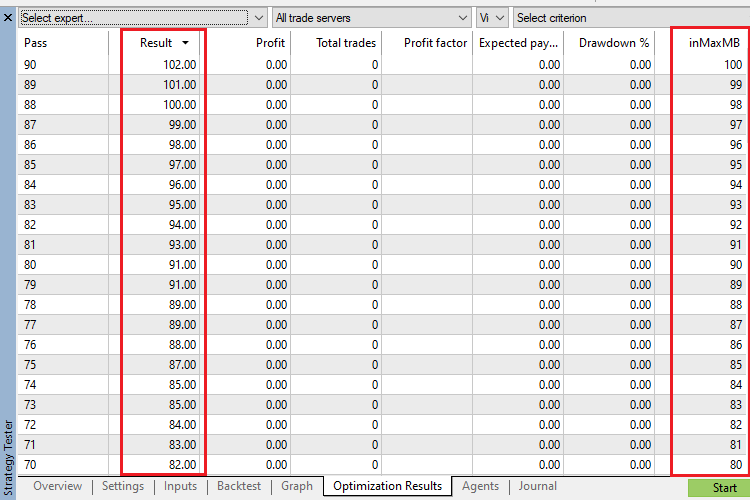
The memory consumption measurements are similar.
A single pass of the top set will produce this.
Core 1  OnTester result 102
Core 1  2026.02.10 23:58:58   MQL_MEMORY_USED: Min = 0 Max = 102 Last = 0
Core 1  EURUSD,M1: 80954 ticks, 1437 bars generated. Environment synchronized in 0:00:00.020. Test passed in 0:00:01.781.
Core 1  EURUSD,M1: total time from login to stop testing 0:00:01.801 (including 0:00:00.020 for history data synchronization)
Core 1  202 Mb memory used including 23 Mb of history data, 64 Mb of tick data
Scenarios.
The library allows you to find excessive memory consumption by the Expert Advisor and further investigate the causes in debug mode.
The less resources the Expert Advisor consumes, the more opportunities for optimisation: increase in the number of testing agents - speed of optimisation.
Complement community code with advanced automation from RobotFX.
69335


