
Alternative for EAToMath library https://www.mql5.com/en/code/61283
Records ticks in real ticks mode and reads them in maths mode calling your strategy with each recorded tick.
Reason for creation: MQ tester, writes tick data files to each agent every time the optimiser is run. I have 36 agents writing 10GB each for one of the tools and the test period - a total of 360GB on a 480GB drive. This process takes about 1 hour before each optimisation. Typical SSDs have a lifespan of 500-1000 write cycles. By rewriting 360GB every time the resource will be exhausted very quickly. This library writes only 1 file and then all 36 agents will read data from this one file. All this was the reason for writing the library: we use only 1 file + saving 1 hour for writing data to each agent + acceleration in comparison with MQ tester and even with Virtual in real ticks mode.
The problem was investigated simultaneously with fxsaber (the author of EAToMath), each with his own version. My code is more clear to me, so I use it.
For trading operations MT4Orders library is used https://www.mql5.com/en/code/16006
For virtual trading it is necessary to use Virtual library https://www.mql5.com/en/code/22577
To view trading results you can use MT4Orders QuickReport https://www.mql5.com/en/code/47816 or Report
To compress ticks TickCompressorhttps://www.mql5.com/en/code/66201
To remove possibly unnecessary ticks Control_Trade_Sessions library https://www.mql5.com/en/code/48059 is connected, for example, if a quote session is larger than a trading session. It can also be deleted if all ticks are used, i.e. sessions coincide.
Differences from EAToMath:
Pros:
- The code is shorter and simpler, only 5 plug-in libraries. If you need to modify it, it will be easier to understand.
- Data are compressed better due to a different algorithm https://www.mql5.com/en/code/66201. When saving only time_msc, ask and bid - up to 86% of ticks are saved as 3 char numbers, i.e. 3 bytes. Average size per tick = 3.266 Bytes when saving BTCUSDT tick data for 2023.
When saving with volumes average = 4.835 Bytes. And when saving full tick = 8.439 Bytes. Below is the table with the test results.
Additionally, you can use the built-in ZIP archiving. The file size is reduced by 2 times. Such a file takes 245 Mb, while the sum of file sizes in .tcs for 2023 takes 364 Mb, i.e. compression is 1.5 times better than in MQ. And the speed of tick generation in the maths mode is ~2 times faster. See the table below.
- There are more options of saving:
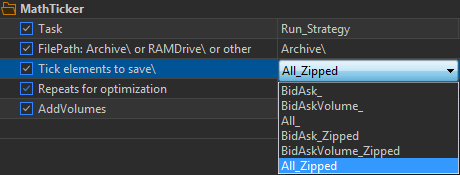
- The file can be saved to either SSD or RAM disc by making a link in the system. Files can take up a lot of space and RAM drive may not be enough, so you can choose to save to the primary drive. SSD and RAM read speeds are about the same, I've read that the SSD caches up to 5% of the full capacity of the most frequently requested data.
There is a bit of wear and tear on the SSD when reading, as you have to overwrite memory cells more often than when storing without reading. I don't know the exact numbers, but for example 1 overwrite per 10 reads or per 1000 reads.... But this is of little significance compared to the wear of the disc by the MQ tester.
Cons:
- Connecting Virtual has to be done yourself (instructions here https://www.mql5.com/en/code/22577), EAToMath will pass your strategy to Virtual itself.
The speed for the BidAsk variant is comparable to EAToMath. Other variants are slower because they either contain more data or have additional ZIP compression.
Usage Features:
You cannot use the standard functions Symbol(), Digits( ) (=4), Point() (=0.0001) in the strategy, as they will produce default values, not related to the symbol under test. Instead of them use _Symbol, _Digits, _Point which are overridden on values read from the file. Also, new constants _TickSize and _TickValue with values from the recorded symbol have been added - they are necessary for correct calculation of profit, commission and swaps in the deposit currency.
The order of work with the testing period selected when saving ticks:
- Select the testing mode by real ticks, the required instrument and testing dates. Set the Task variable to one of Save and select the option of saving ticks. Start the tester. After that a file with ticks will be created in the specified folder.
- Set the Task variable to Run_Strategy. You can leave the mode by real ticks to compare later. Start the tester. Calculations are made by real ticks, not from the file. Get the result.
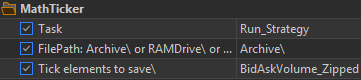
- Set the testing mode to mathematical calculations. Start the tester. Calculations are made by ticks from the file. Compare with the result from step 2. It should be the same, but several times faster.
The order of work with the archive:
- Create an archive with all ticks from the history: Select the mode of testing by real ticks, the required instrument. Set testing dates from <= first tick to >= last tick in the available history. Set the Task variable to one of Save...To_Archive and select the option of saving ticks. Start the tester. After that a folder with the name of the tool will be created in the specified folder where the files with ticks for each year will be saved. The last year can be overwritten as necessary, for this purpose select only the current year in the dates to avoid overwriting the previous years.
- Set the test mode to Maths. Set the Task variable to Run_Strategy_Fron_Archive.
- In the MathTicker: using the full archive group, set:
Instrument - to Instrument name (must match the name of the folder where its ticks are stored), start and end date of the test.
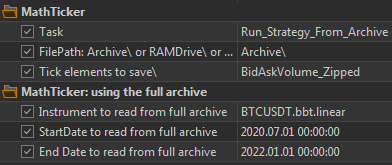
- Start the tester. Calculations are made by ticks from the required annual files. Due to the fact that the work is done not with one file, but with several, it is a little slower, because it takes time to open and close files. For example, instead of 1.7 seconds it will take 2.7 seconds to generate ticks for 3 years.
- The sum of ticks obtained by the Expert Advisor below may differ by a small value of one first tick. When testing on custom characters in real ticks mode, the first tick produces only Ask or Bid (if you didn't save both). When testing from archive, they are both restored from previous ticks.
An example of the simplest Expert Advisor to estimate the speed of work:
#property tester_no_cache
#include <Forester\MathTicker.mqh> // connecting trade in maths mode
input int rep=0;//Repeats for optimisation
sinput bool AddVolumes=true;
void OnInit(){}

void OnTick(){
   static MqlTick Tick;
   if (SymbolInfoTick(_Symbol, Tick)){
      #ifdef _MathTick_
         if(MathTick.SaveTick(Tick)){ return; }//if we save ticks, then exit and do not trade.
      #endif
       Strategy(Tick);
   }
}
double Sum = 0;int tk=0;
void Strategy(MqlTick& Tick){ // the simplest strategy - used to compare reading speed with EAToMath
   Sum += Tick.bid+Tick.ask+(AddVolumes?Tick.volume_real:0.0); tk++;
   //if(tk<100){Print(Tick.time," " ",Tick.ask," ",Tick.bid," ",Tick.last," ",Tick.volume_real," ",Tick.flags);}
}

ulong StartTime  = GetMicrosecondCount();
double OnTester(){
   #ifdef _MathTick_ // run with MathTick - it counts symbol parameters from the file with ticks. For tests in mat mode
      if(MathTick.SaveTicksEnd()){return 0;}// close the file after recording ticks and exit
      if(MathTick.ReadSymbolVars()){
         MathTick.Ticker();// in mat mode will feed all ticks to Strategy(MqlTick &Tick).
      }
   #endif
   Print("ticks: ",tk);
   long work_time = (long)(GetMicrosecondCount() - StartTime)/1000;
   //return(NormalizeDouble(work_time, 1)); // to get the speed of work and
   return Sum;// to compare the calculation results
}
You can toggle 1 setting:
//#define RestoreFlags // восстановить флаги тика из изменения ask, bid, volume - добавит 7% к времени генерации тиков 931 вместо 869 мс
When generating ticks, statistics about tick compression will be displayed.
Below are printouts of statistics, volumes and time of tick generation.
-----------
MQtester without volumes
pass 1 returned result 4345830621850.311523 in 0:00:08.232
| C ZIP compression | |
|---|---|
|
AskBid. File size: 225 mb -------------------- Statistics: -------------------- 3 bytes: 86.6%, 62644158 ticks 4 bytes: 0.6%, 412167 ticks 5 bytes: 12.7%, 9185484 ticks 6 bytes: 0.0%, 15274 ticks 11 bytes: 0.1%, 46214 ticks 12 bytes: 0.0%, 1 ticks 24 bytes: 0.0%, 1 ticks Total: 72303299 ticks, 236108596 bytes. Average: 3.266 bytes per tick final balance 0.00 USD pass 10 returned result 4345830621850.311523 in 0:00:01.485 no normalisation pass 1 returned result 4345830621850.311523 in 0:00:00.892 |
AskBid_Zipped. File size: 106 mb -------------------- Statistics: -------------------- 3 bytes: 86.6%, 62644158 ticks 4 bytes: 0.6%, 412167 ticks 5 bytes: 12.7%, 9185484 ticks 6 bytes: 0.0%, 15274 ticks 11 bytes: 0.1%, 46214 ticks 12 bytes: 0.0%, 1 ticks 24 bytes: 0.0%, 1 ticks Total: 72303299 ticks, 236108596 bytes. Average: 3.266 bytes per tick UnZipped size:236108596. Zipped size:111720863. ZIP compression: 47.3% pass 10 returned result 4345830621850.311523 in 0:00:02.548 no normalisation pass 2 returned result 4345830621850.311523 in 0:00:01.890 |
MQ tester with volumes
pass 1 returned result 4345879117123.356445 in 0:00:07.962
| C ZIP compression | |
|---|---|
|
AskBidVolume. File size: 333 mb -------------------- Statistics: -------------------- 4 bytes: 60.4%, 43684907 ticks 5 bytes: 1.1%, 809676 ticks 6 bytes: 33.5%, 24194111 ticks 7 bytes: 4.9%, 3548666 ticks 8 bytes: 0.0%, 7909 ticks 12 bytes: 0.1%, 40022 ticks 13 bytes: 0.0%, 17964 ticks 14 bytes: 0.0%, 2 ticks 19 bytes: 0.0%, 41 ticks 32 bytes: 0.0%, 1 ticks Total: 72303299 ticks, 349571243 bytes. Average: 4.835 bytes per tick pass 1 returned result 4345879117123.356445 in 0:00:02.803 no normalisation pass 4 returned result 4345879117123.356445 in 0:00:01.659 |
AskBidVolume_Zipped. File size: 204 mb -------------------- Statistics: -------------------- 4 bytes: 60.4%, 43684907 ticks 5 bytes: 1.1%, 809676 ticks 6 bytes: 33.5%, 24194111 ticks 7 bytes: 4.9%, 3548666 ticks 8 bytes: 0.0%, 7909 ticks 12 bytes: 0.1%, 40022 ticks 13 bytes: 0.0%, 17964 ticks 14 bytes: 0.0%, 2 ticks 19 bytes: 0.0%, 41 ticks 32 bytes: 0.0%, 1 ticks Total: 72303299 ticks, 349571243 bytes. Average: 4.835 bytes per tick UnZipped size:349571243. Zipped size:214897079. ZIP compression: 61.5% pass 2 returned result 4345879117123.356445 in 0:00:04.260 no normalisation pass 2 returned result 4345879117123.356445 in 0:00:03.096 |
|
All. File size: 582 mb -------------------- Statistics: -------------------- 8 bytes: 61.5%, 44494583 ticks 9 bytes: 33.5%, 24194111 ticks 10 bytes: 4.9%, 3548666 ticks 11 bytes: 0.0%, 7909 ticks 15 bytes: 0.1%, 40022 ticks 16 bytes: 0.0%, 17964 ticks 17 bytes: 0.0%, 2 ticks 22 bytes: 0.0%, 41 ticks 44 bytes: 0.0%, 1 ticks Total: 72303299 ticks, 610166056 bytes. Average: 8.439 bytes per tick pass 2 returned result 4345879117123.356445 in 0:00:03.768 no normalisation pass 1 returned result 4345879117123.356445 in 0:00:02.256 |
All_Zipped. File size: 245 mb -------------------- Statistics: -------------------- 8 bytes: 61.5%, 44494583 ticks 9 bytes: 33.5%, 24194111 ticks 10 bytes: 4.9%, 3548666 ticks 11 bytes: 0.0%, 7909 ticks 15 bytes: 0.1%, 40022 ticks 16 bytes: 0.0%, 17964 ticks 17 bytes: 0.0%, 2 ticks 22 bytes: 0.0%, 41 ticks 44 bytes: 0.0%, 1 ticks Total: 72303299 ticks, 610166056 bytes. Average: 8.439 bytes per tick UnZipped size:610166056. Zipped size:257105213. ZIP compression: 42.1 % pass 1 returned result 4345879117123.356445 in 0:00:05.388 no normalisation pass 10 returned result 4345879117123.356445 in 0:00:03.936 |
The size of the .tcs files for the same year 2023:
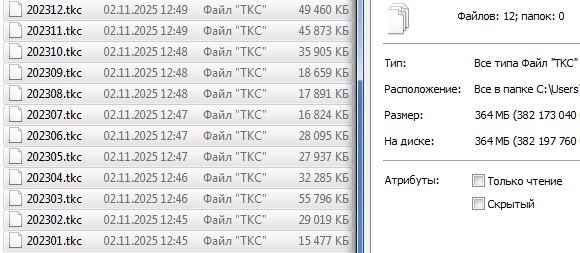
All variants with ZIP, even full tick saving are more compact (3.5 to 1.5 times).
Expert Advisor example for virtual trading and report output:
#property tester_no_cache

#include <MT4Orders.mqh> // https://www.mql5.com/en/code/16006
#include <Forester\MathTicker.mqh> // connecting trade in maths mode

#define  ORDER_CURRENCY_DIGITS 2 // Digits setting for calculating the profit/commission/swap when placed in the trading history.
#define  VIRTUAL_LIMITS_TP_SLIPPAGE // Limiters and TPs are executed at the first acceptance price - positive slippages
#define  ORDER_COMMISSION -0 // Commission assignment = Lots * ORDER_COMMISSION.
#include <fxsaber\Virtual\Virtual.mqh> // https://www.mql5.com/en/code/22577


#define  REPORT_TESTER             // The tester will automatically record reports
#define  REPORT_BROWSER            // Creating a report with browser startup - requires DLL permission.
#define  USE_highcharts //- You can download and try out all Highcharts products for free. Once your project/product is ready for launch, purchase a commercial licence. https://shop.highcharts.com/
#include <MT4Orders_QuickReport.mqh>//


enum VirtTyp {MQ_Tester=0,Virtual1=1,Virtual2=2};
sinput VirtTyp tester1=1;//Tester 1
sinput VirtTyp tester2=2;//Tester 2

input int rep=0;//Repeats for optimisation

bool isOptimization = false, isTester=false; double balInit=0;
VIRTUAL_POINTER Virtual[10];

void OnInit(){
   Virtual[0] = 0; // 0 - real trading environment
   Virtual[1] = VIRTUAL::Create(AccountBalance()); // Created virtualisation 1.
   Virtual[2] = VIRTUAL::Create(AccountBalance()); // Created virtualisation 2.
   //Virtual[tester1].Select();
   isOptimization = MQLInfoInteger(MQL_OPTIMIZATION) ;
   isTester = MQLInfoInteger(MQL_TESTER);
   balInit=AccountBalance();
}

void OnTick(){
   //Virtual[0].Select();
   VIRTUAL::NewTick();// send the tick to the current virtual machine
   static MqlTick Tick;
   if (SymbolInfoTick(_Symbol, Tick)){
      #ifdef _MathTick_
         if(MathTick.SaveTick(Tick)){ return; }//when writing ticks will exit the function, Strategy() will not be called
      #endif
       Strategy(Tick);//trading
   }
}

void Strategy(MqlTick& Tick){ // the simplest strategy - used to compare reading speed with EAToMath
   if(Tick.ask==0 || Tick.bid==0){return;}//MQ tester trades on a failed tick, Virtual does not. Prohibition for MQ as well
   if(tester1>0){Virtual[tester1].Select(); VIRTUAL::NewTick(Tick);}//select virtualisation 1 and send a tick
   if(tester2>0){Virtual[tester2].Select(); VIRTUAL::NewTick(Tick);}//select virtualisation 2 and send a tick
   if(isNewHour(Tick.time)){//the first tick of every hour
      if(GetHour0(Tick.time) % 2==0){// buy at even hours in tester 1
         Virtual[tester1].Select();//select virtualisation 1
         OrderSend(_Symbol, OP_BUY, 1, Tick.ask, 0, Tick.ask - 100 * _Point, Tick.ask + 100 * _Point);
      }else{//sell at odd hours in tester 2
         Virtual[tester2].Select();//select virtualisation 2
         OrderSend(_Symbol, OP_SELL, 1, Tick.bid, 0, Tick.bid + 100 * _Point, Tick.bid - 100 * _Point);
      }
   }
}

double OnTester(){
   #ifdef _MathTick_ // run with MathTick - it will read symbol parameters from the tick file. For tests in mat mode
      if(MathTick.SaveTicksEnd()){return 0;}//return after ticks saving
      if(MathTick.isMath && MathTick.ReadSymbolVars()){
         if(tester1==0){Alert("   >>>>>>>>>   Virtual tester 1=MQ. In math mode can be used only virtual tester.   <<<<<<<<");return 0;}
         if(tester2==0){Alert("   >>>>>>>>>   Virtual tester 1=MQ. In math mode can be used only virtual tester.   <<<<<<<<");return 0;}

         SYMBOL_BASE sb; sb.Point=_Point; sb.Digits=_Digits; sb.Symbol=_Symbol; sb.SymbolID=0; sb.TickSize=_TickSize; sb.TickValue=_TickValue / _TickSize;//this.TickValue_ /= this.TickSize_; //as in SetSymbol() in \fxsaber\Virtual\Symbol_Base.mqh
         Virtual[1].Select(); VIRTUAL::SetSymbolBase(sb); Virtual[2].Select(); VIRTUAL::SetSymbolBase(sb);
         //minFreezeLevel = _minFreezeLevel*_Point; minStopLevel = _minStopLevel*_Point;

         Virtual[tester1].Select();
         MathTick.Ticker();// in mat mode will feed all ticks to Strategy(MqlTick &Tick).
      }
   #endif

  double ret_val=0;
  for (int v = 0 ; v <= VIRTUAL::Total(); v++){
    if(Virtual[v].Select()){
      if(v > 0){
         VIRTUAL::Stop();
         #ifdef _MathTick_ // run with MathTick - it will read symbol parameters from the tick file. For tests in mat mode
            if(MathTick.isMath){ VIRTUAL::CalcSwaps( MathTick.swapShort, MathTick.swapLong, 0, MathTick.swap3days ); }//swaps from the tick file
            else{VIRTUAL::CalcSwaps( _Symbol, 0 );}
         #else
           VIRTUAL::CalcSwaps( _Symbol, 0 );//calculate swaps - all trades have one swap, i.e. if 2+ different instruments, they will both have the swap of the main symbol.
         #endif
      }// close incomplete trades at the price of the last tick, as in the tester

      if( !isOptimization){QuickReport("report_"+(string)v, true, v,false,true);}
      Print((string)v+" AccountBalance = ",AccountBalance(), "   AccountEquity = ",AccountEquity());
      double prib=AccountBalance()-balInit;
      ret_val += prib; //
  }}
  return ret_val;// to compare the calculation results
}


bool isNewHour  (datetime &t){ static int next_h=-1; if(t < next_h){ return false; } else { next_h = (GetHour0(t)+1)*3600;return true;}}
int GetHour0    (datetime &t){return((int)( t / 3600));}//current hour from 1 Jan 1971
This example creates 2 virtual machines with different trading. On even hours one tester is buying, the other one is selling on odd hours.
It is a complex example with 2 testers, it can be simplified if you need to work with one tester.
You can also select the MQ tester and compare it with the results of virtual testers to control the correctness of calculations. Only the commission may not coincide, because there are many different commissions, and only one variant is programmed in the virtual tester.


