
Fresh MQL5 code release – perfect for enhancing your MT4/MT5 strategies.
It places no orders and does not change any broker symbol.
What it does
Protect profits effectively with the smart Trailing Stop Expert Advisor. Advanced trailing options for MT4/MT5. See it in action.
- Creates the custom symbol from a broker symbol, so it has the same contract specification, or updates one you already have.
- Finds the time, bid and ask columns by their names, and recognises comma, semicolon or tab as the separator.
- Reads epoch seconds or milliseconds, 2024-01-31, 2024.01.31, 31.01.2024 and 20240131, with or without milliseconds. Date and time can be in one column or two.
- Moves UTC times to the server time most brokers use (UTC+2, UTC+3 during US summer time), or by a fixed number of hours.
- Writes whole days at a time, and the first and last day of the file only as far as its ticks reach. Monthly or yearly files can be imported one after the other without a hole where they meet.
- Counts the lines it could not read, the lines out of order and the ticks whose ask is below the bid, and reports them.
How to use it
- Put the CSV into the folder MQL5\Files of the terminal (File - Open Data Folder).
- Open a chart of the broker symbol, drop the script on it and enter the file name.
- Wait for DONE in the Experts log. A line that starts with ERROR says what went wrong.
- Choose the new symbol in the Strategy Tester with "Every tick based on real ticks".
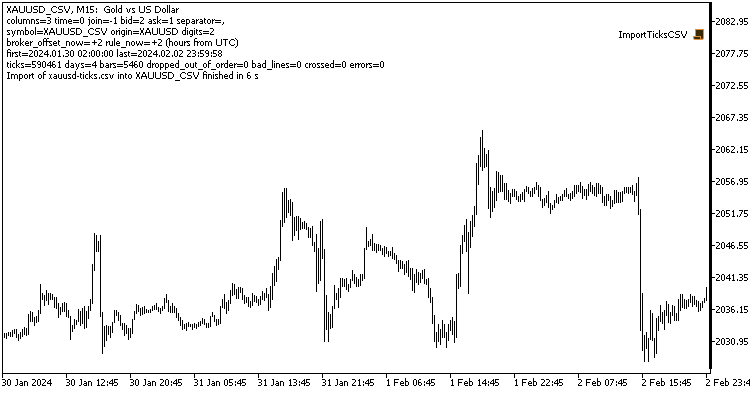
The picture shows four days of gold: 590,461 ticks and 5,460 one-minute bars, imported in six seconds.
Inputs
- InpFile: the CSV file in MQL5\Files. Its first line must name the columns.
- InpSymbol: the custom symbol to create or update. Blank means the origin's name plus _CSV.
- InpOrigin: the broker symbol to copy. Blank means the chart's symbol.
- InpNYClose: UTC to server time, UTC+2 and UTC+3 in US summer (default true).
- InpFixedShift: hours to add instead, when InpNYClose is off. Use 0 if the times are already server time, as in a tick export from MetaTrader 5.
Good to know
- The log shows the broker's shift from UTC right now beside the shift the script uses. If they differ, set your own. The PC clock must be right for this check. The summer-time rule is the one in force since 2007.
- In a date written 03.04.2024 or 03/04/2024 the day is read first, then the month.
- For a Forex symbol the name must begin with the same six letters as the origin (EURUSD_CSV): MetaTrader takes its currencies from them. The script refuses another name.
- Prices are rounded to the digits of the broker symbol.
- The tester needs some history before the first tested day, so it may start later than the first tick. Import a little more than you want to test.
- Prices and spreads of another source are not your broker's. Confirm a result on your broker's own ticks for the months it keeps.
The result also goes to ImportTicksCSV_result.txt in MQL5\Files. To see how far back your broker's own ticks reach, use Tick Depth Probe.
Questions and ideas: post in the comments.
Build better strategies with RobotFX professional tools – check them out.
79981


