
Discover expert developed MetaTrader tools that can complement professional solutions.
Tick-Based Spread Distribution Profiler (MQL5 Indicator)
Core Idea
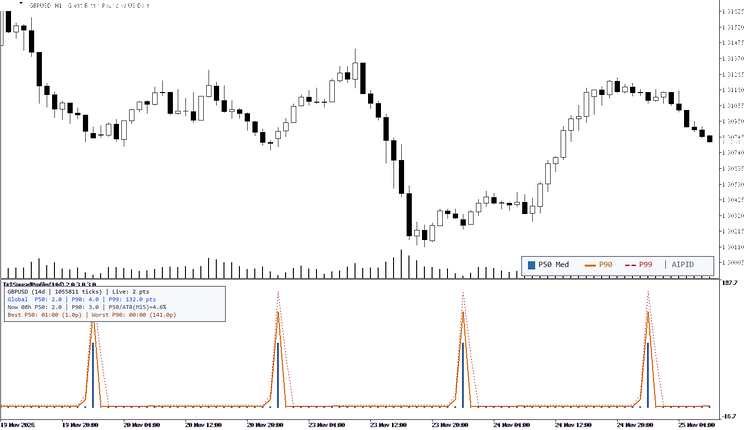
Most retail spread indicators only show the current live spread or bar-level minimum spreads stored in M1 bars, completely hiding rollover widening, news spikes, and fat-tail execution risk. Tick-Based Spread Distribution Profiler extracts real historical Bid/Ask ticks from your broker using CopyTicksRange() across InpLookbackDays and builds an empirical 24-hour spread distribution (P50, P90, P99) in a separate indicator subwindow.
To handle multi-week tick histories safely without memory overflow and without biasing early days in the sample, each Broker Server hour uses an unbiased deterministic reservoir sample (InpMaxSamplesPerHour).
How to Interpret the Indicator
1. Three Subwindow Plots (in Broker Points):
- Hourly P50 Median (Blue Histogram): Typical spread experienced during each hour of the day.
- Hourly P90 (Orange Line): 90th percentile spread. Useful for setting an EA's MaxSpread filter just above active-session P90 so 90% of liquid ticks execute while illiquid spikes are blocked.
- Hourly P99 (Crimson Dotted Line): Extreme tail spread during rollover or macro events.
2. Closed-Bar Spread / ATR Friction Ratio:
- Evaluates iATR strictly on the last closed bar (shift=1) of InpAtrTimeframe and reports P50 / ATR (%).
- Helps intraday and scalping traders check whether broker spread friction consumes too large a fraction of typical candle range (e.g., > 15% - 20%).
3. Compact Subwindow HUD:
- Displays total profiled ticks, live spread, global P50/P90/P99, current hour P50/P90, Spread/ATR ratio, and Best P50 / Worst P90 server hours.
External Input Parameters
- InpLookbackDays (default 14): Number of days of historical broker ticks to request via CopyTicksRange().
- InpMaxSamplesPerHour (default 50000): Maximum reservoir sample size per server hour (00..23) for bounded memory usage.
- InpAtrTimeframe (default PERIOD_M15): Reference timeframe for the closed-bar ATR friction calculation.
- InpAtrPeriod (default 14): ATR averaging period evaluated at shift=1 (zero repainting).
- InpRefreshMinutes (default 60): Minutes between full tick-history recalculations (never runs on every tick).
- InpShowSummaryHUD (default true): Toggles the summary panel inside the indicator subwindow.
- InpExportCSV (default false): Exports the 24-hour profile (Min, P50, P90, P99, Max, tick counts) to MQL5\Files\SpreadProfile_<Symbol>.csv.
Recommended Usage
Attach to any symbol and timeframe (commonly M15 or H1). Requires the broker to provide historical ticks for the selected symbol. All handles and graphical objects are cleanly released in OnDeinit().
Protect profits effectively with the smart Trailing Stop Expert Advisor. Advanced trailing options for MT4/MT5. See it in action.
Build better strategies with RobotFX professional tools – check them out.
80032


