
Fresh MQL5 code release – perfect for enhancing your MT4/MT5 strategies.
Daily Open Line with Distance in Points
The idea behind it
The daily open is one of the simplest and most watched reference prices. It splits the day into two halves: above the open the day is "bullish", below it the day is "bearish". Many intraday traders use it as a bias filter, as a support or resistance level and as a mean-reversion anchor: a large distance from the open often means an extended move.
This indicator draws the open of the current day (and optionally of several previous days) and writes next to it how many points the price is away from today's open. You no longer need to measure the distance with a ruler tool.
The lines are built only once at the start and when a new daily bar appears. On each tick only one label is updated, and only if its text actually changed, so the load on the terminal is minimal.
Trade Renko charts automatically using the advanced Renko Expert Advisors. Clean trends, better entries. Discover them here.
How to interpret it
- Open line (dashed) - a horizontal line at the open price of the day. The line of the current day can be extended to the right, the lines of the previous days cover only their own day.
- Label - placed on the line at the last bar, in the format DO 1.08520 +35 pts: the open price of today and the signed distance from the current Bid price to it, in points.
- Positive distance (price above the open) - the label uses InpAboveColor.
- Negative distance (price below the open) - the label uses InpBelowColor.
- Previous days - the lines of earlier days show where the day opened and how price reacted to the open level in the past.
External variables (inputs)
| Input | Default | Purpose |
|---|---|---|
| Daily open | ||
| InpDaysBack | 3 | Number of days to draw, including today (1 to 30) |
| InpExtendRight | true | Extend today's line to the right of the last bar |
| Line | ||
| InpLineColor | clrWhite | Color of the open lines |
| InpLineStyle | STYLE_DASH | Style of the open lines |
| InpLineWidth | 1 | Width of the open lines (1 to 5) |
| Distance label | ||
| InpShowLabel | true | Show the label with the open price and the distance |
| InpAboveColor | clrWhite | Label color when the price is above the open |
| InpBelowColor | clrGray | Label color when the price is below the open |
| InpLabelSize | 9 | Label font size (6 to 40) |
Recommended use
- Use it on intraday timeframes (M1 to H4) of any symbol. It also works on D1 and higher charts, but there the lines are short.
- The "day" is defined by the daily bars of your broker's server time. Brokers with different server time zones show a slightly different daily open; for example, a New York close broker opens the day at 17:00 New York time.
- The distance is in points ( _Point ), so on 5-digit Forex symbols 10 points equal 1 pip. The distance uses the current Bid price.
- If the daily history is not loaded yet, the indicator retries automatically on the next tick.
- All objects use the prefix DailyOpen_ and are removed when the indicator is deleted from the chart. Do not attach two copies to the same chart because they would share the object names.
- It is a chart indicator only and does not trade, so it works the same on netting and hedging accounts.
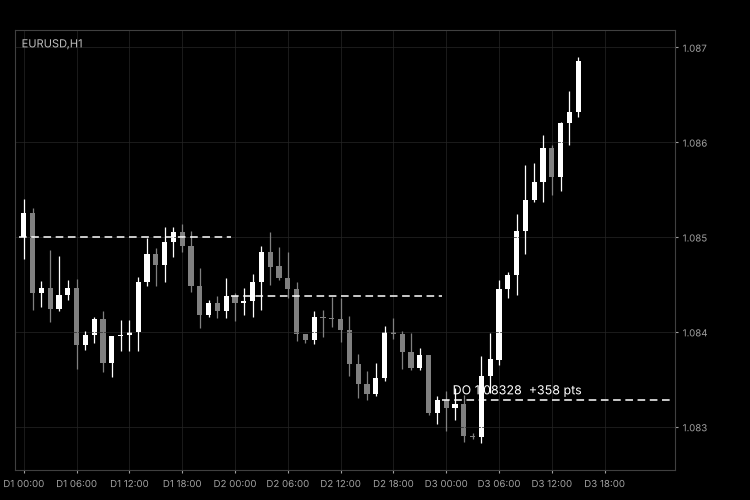
Fig. 1. DailyOpenLine on an H1 chart with default settings (black and white image per Code Base guidelines).
Build better strategies with RobotFX professional tools – check them out.
79537


