
Discover expert developed MetaTrader tools that can complement professional solutions.
What it does
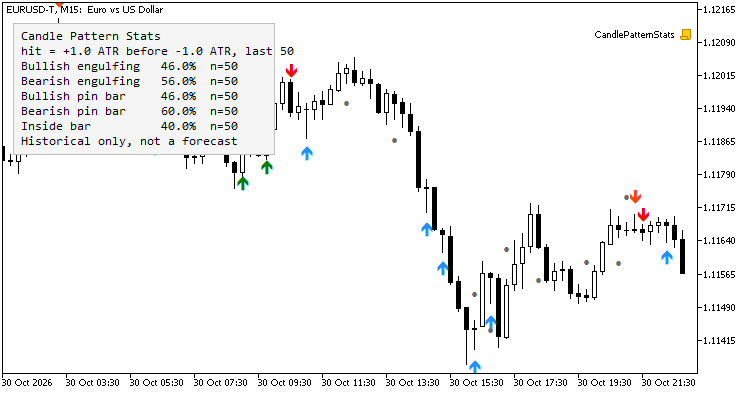
On every closed bar the indicator checks five patterns and draws an arrow when one is found:
- Bullish / bearish engulfing: the body of the bar covers the body of the previous bar, in the opposite direction, and is larger.
- Bullish / bearish pin bar: the dominant wick is at least Pin bar: dominant wick % of the bar range and the body is at most Pin bar: body % of the range. Both limits are inclusive: a bar exactly on the limit counts.
- Inside bar: high below the previous high and low above the previous low. The direction of the case is the direction of the mother bar (the previous bar). A mother bar with no body (open = close) is ignored.
- A pattern is only marked if the range of the signal bar (the mother bar for the inside bar) is at least Minimum bar range times the ATR (Wilder).
- Optional trend filter: bullish cases only if the close is above the EMA, bearish only if below.
Classic MACD strategy made fully automatic – the MACD Expert Advisor for MT4 handles it all. Check it out.
The rolling statistic
Each pattern occurrence opens a case at the close of the signal bar. The take level is entry +/- X * ATR in the pattern direction and the adverse level entry -/+ Y * ATR , both using the ATR of the signal bar. The case is resolved by the first of the following bars that reaches one of the levels: reaching X first is a hit, reaching Y first is a miss. If both levels are reached inside the same bar the case counts as a miss (the order inside the bar is unknown). If neither level is reached within Bars to wait bars the case is discarded and is not counted either way.
The panel shows, per pattern, hits / resolved cases over the last N resolved cases and the number of cases in the sample. A case counts only from the bar where it is resolved, so the value on any bar uses nothing from the future; reloading the indicator gives the same history.
This is a description of what happened on the loaded history of that symbol and timeframe. It does not include spread, commission or slippage, it depends on the chosen X, Y and N, and it says nothing about what the next occurrence will do. Small samples are noisy: look at the number of cases next to every percentage. Not financial advice.
No repainting
Only closed bars are evaluated, each bar once. The bar being formed has no arrow and no signal. Alerts fire once per closed bar, and nothing is alerted for the existing history when the indicator is attached.
Buffers (iCustom)
| Buffer | Content |
|---|---|
| 0 | Arrow price, bullish engulfing (EMPTY_VALUE if none) |
| 1 | Arrow price, bearish engulfing |
| 2 | Arrow price, bullish pin bar |
| 3 | Arrow price, bearish pin bar |
| 4 | Arrow price, inside bar |
| 5 | Signal bullish engulfing: 1 on the bar with the pattern, else 0 |
| 6 | Signal bearish engulfing: -1 / 0 |
| 7 | Signal bullish pin bar: 1 / 0 |
| 8 | Signal bearish pin bar: -1 / 0 |
| 9 | Signal inside bar: 1 if the mother bar is bullish, -1 if bearish, 0 none |
| 10-14 | Rolling hit rate in % (0-100) for patterns 0-4 as known at that bar close; EMPTY_VALUE until the pattern has a resolved case |
| 15-19 | Number of resolved cases in the rolling sample (0..N) for patterns 0-4 |
Read shift 1 for the last closed bar; shift 0 (the forming bar) always has signal 0. Passing only the indicator name uses the default inputs. Example:
int h = iCustom(_Symbol, PERIOD_H1, "CandlePatternStats");
double sig[1], rate[1], n[1];
if(CopyBuffer(h, 5, 1, 1, sig) == 1 && sig[0] > 0.0 &&
   CopyBuffer(h, 10, 1, 1, rate) == 1 && CopyBuffer(h, 15, 1, 1, n) == 1)
   PrintFormat("Bullish engulfing, hit rate %.1f%% over %d cases", rate[0], (int)n[0]);
Inputs
- Definitions: ATR period, minimum bar range (ATR), pin bar wick % and body %, enable each family.
- Trend filter: on/off, EMA period.
- Statistics: X (ATR), Y (ATR), N (sample), bars to wait.
- Look: panel on/off, top-left or bottom-left, offsets, colours, arrow distance.
- Alerts: popup, push, sound and file name.
Notes
- Works on any symbol and timeframe. The first ATR-period bars of the history have no patterns.
- Inside bar statistics follow the direction of the mother bar; if you prefer a different convention, the signal buffer tells you the direction used.
- The indicator is deterministic: attaching it twice to the same history gives the same arrows and the same numbers.
- Read-only: it does not open, modify or close trades.
Testing
The signals, arrows, rolling hit rates and sample sizes were exported for the whole EURUSD M15 history of a demo account (694,770 bars, about 288,000 patterns) and recomputed with an independent Python implementation of the same rules: every value matched (0 differences in 3.47 million bar/pattern cells). The Python reference itself was checked against a brute-force forward scan on random data. Only closed bars are evaluated, so the values do not change after the bar closes.
Complement community code with advanced automation from RobotFX.
79037


