
Discover expert developed MetaTrader tools that can complement professional solutions.
What it does
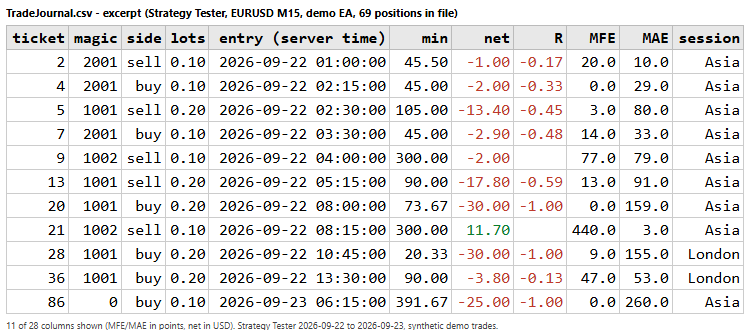
The terminal history lists deals: a position closed in two parts appears as three lines, and a netting reversal as one deal that closes one position and opens another. This tool rebuilds the positions from the deals and writes one CSV row per closed position.
Recover from drawdowns intelligently with the Auto Recovery Expert Advisor for MT4/MT5. Perfect for hedging strategies. Learn more.
| Column | Meaning |
| ticket | Position identifier. |
| symbol, magic, comment, side, volume | Taken from the opening deal. Volume is the total volume opened. |
| entry_time, entry_price | First entry (volume-weighted price if the position was scaled in). Broker server time. |
| exit_time, exit_price | Last exit time; volume-weighted exit price when closed in parts. |
| duration_min, duration | Time in the market. |
| sl, tp | Initial stop loss and take profit from the opening order. Empty when none was set with the order (a stop added later by modification is not known). |
| gross_profit, commission, swap, net_profit | Summed over all deals of the position. Commission includes fees. |
| risk_money, r_multiple | Money lost if the initial SL was hit, and net result divided by it. Empty when there was no SL. |
| mfe_points, mae_points | Maximum favourable / adverse excursion in points, from the M1 bars between entry and exit. |
| mfe_money, mae_money | The same excursions in account currency for the traded volume. |
| m1_bars | Number of M1 bars used. |
| session, weekday | Session and weekday of the entry. |
| close_reason | SL, TP, Expert, manual, stop out, etc. |
Why it is useful
- A one-row-per-trade file is the starting point for any analysis outside MT5: distribution of R, average MFE and MAE per strategy, results by session or weekday, how much of the favourable move was captured.
- MFE and MAE help to review stop and target placement: how far trades went against you before winning, and how much profit was left on the table.
- The magic number column and filter let you separate several Expert Advisors that trade on the same account.
Inputs
- Period: all history, custom dates (From / To, the To day is included) or the last N days. The period applies to the exit time.
- Magic numbers: empty for all, or a list such as 1001,2000-2999. Use 0 for manual trades.
- Symbols: empty for all, or a list such as EURUSD,XAU*,*JPY.
- File name, Save in (this terminal MQL5\Files, or the common folder), Column separator (; or ,), Decimal mark (point or comma; decimal comma needs the ; separator), UTF-8 signature (helps Excel with accented comments).
- Calculate MFE / MAE: can be switched off for a faster export.
- Server time = UTC + N hours, and the UTC hours where the London and New York sessions start and end. Asia is every other hour. Defaults: London 07-12, New York 12-21 (UTC). Server DST changes are not tracked: adjust the offset if you need it exact.
- Re-export every N minutes: live charts only (0 = export once when the EA is attached).
How to use it
- Live or demo chart: attach the EA to any chart. It writes the file immediately and, if you set a repeat interval, refreshes it. Close the file in Excel before the next export or the terminal cannot overwrite it. The EA does not need AutoTrading.
- Strategy Tester: the tester runs one Expert Advisor at a time, so to export the result of your own EA add two lines to it: #define TJE_LIBRARY and #include "TradeJournalExporter.mq5" (put both files in the same folder), then call this in OnDeinit: TJE_Config c; c.Defaults(); c.folder = TJE_FOLDER_COMMON; string path; TJE_Export(c, path); In the tester the folder MQL5\Files belongs to the test agent, so the common folder is easier to find. When the EA is run on its own in the tester it exports the (empty) history of that run.
Notes and limits
- MFE and MAE use the high and low of M1 bars, which are Bid prices. The entry bar and the exit bar are used in full, so an excursion can be overstated by at most the range of one M1 bar. It is an analysis estimate, not a tick-exact figure. If the terminal cannot provide M1 history back to the entry (for example a very long trade beyond the bar limit of the terminal) the excursion columns of that row stay empty.
- Positions that are still open are not exported. A netting reversal is written as two rows: the closed position and the new one when it closes; commission of the reversing deal is split by volume.
- The whole account history is read, so positions opened before the chosen period are complete. Rows are in the order the positions were closed.
- Monetary values are in the account currency and follow the broker contract specification (OrderCalcProfit).
- The account number, name and balance are never written.
- Not financial advice; it reports what already happened.
Complement community code with advanced automation from RobotFX.
79024


