
Explore the latest free tools from the MQL5 community. Here's a new indicator, expert advisor, or script for MetaTrader.
Spread Session Recorder writes the spread of one or many symbols to CSV files from a single chart, and keeps ready-made tables per hour of the day and per trading session.
Suitable symbol and timeframe: any. It works on ticks, so the chart timeframe does not change the result. Attach it to one chart, for example EURUSD M1, and list the symbols you want in "Symbols".
What it records:
- Every tick is counted, not one snapshot per second. Each row (default 60 seconds) holds the number of ticks, the seconds covered by quotes, the minimum, the time-weighted average and the maximum spread in points, plus the last bid and ask.
- Several symbols from one chart: list them in "Symbols" (comma separated), leave it empty for the chart symbol, or type * for every Market Watch symbol (up to 50).
- Each row carries a session label: ASIA, LONDON, LONDON_NY, NEWYORK, ROLLOVER or OFF. Session hours are inputs in GMT; the server's GMT offset is detected or can be set.
- A summary file per symbol and month: one line per hour of the day (GMT) and per session, with rows, hours covered, ticks, minimum, time-weighted average, average of the row maximums, maximum and when that maximum happened.
Restart-safe:
- When it starts again (terminal restart, new chart, changed inputs) it reads its own CSV, rebuilds the tables, and fills the hours it missed from the terminal's tick history (up to "Backfill hours"). No duplicate rows and no lost rows.
- If a CSV is open in a program that locks it, rows wait in memory and are written when the file is free.
- Quotes older than "Stale seconds" are not counted, so a closed market does not pull the average down or up.
Files: MQL5\Files\SpreadRecorder\SYMBOL_yyyymm.csv and SYMBOL_yyyymm_summary.csv (or the common folder if you choose it).
Row columns: time_server, time_gmt, symbol, session, ticks, covered_s, min_pts, avg_pts, max_pts, bid, ask
Summary columns: group, key, rows, hours_covered, ticks, min_pts, avg_pts, avg_row_max_pts, max_pts, max_at_server
Uses: compare brokers or account types, find the hours when spread is wide before you trade or set a spread filter, check rollover widening, keep evidence of spread spikes.
How it was checked: a built-in self-test (30 checks, run with "Self test" = true in the Strategy Tester), a 5-day real-tick tester run on three symbols checked by an independent script, a per-minute comparison against raw ticks for one day (every minute matched), and a live demo chart run stopped and started again with no duplicate rows.
Inputs: Symbols, Row seconds, Backfill hours, Stale seconds, Folder, Common folder, Summary minutes, session hours (GMT), GMT offset, rollover window, panel position, font and colours.
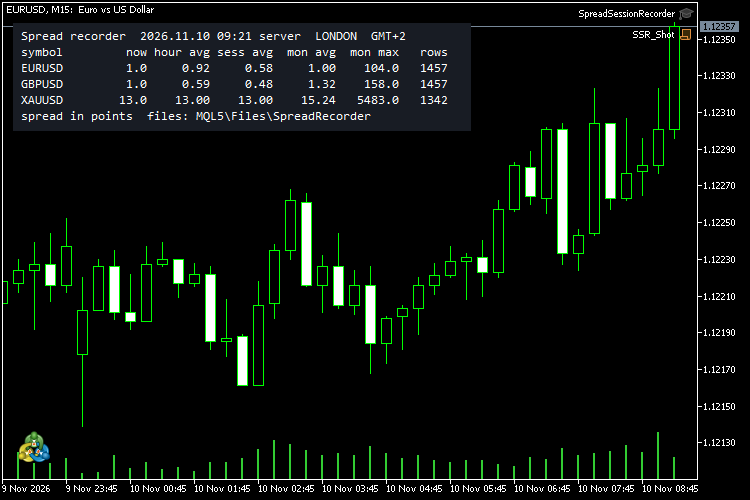
The panel on the chart shows the current session and, per symbol (up to 20 lines), the spread now, the average for this hour of the day, for the current session and for the month, the month's maximum and the number of rows.
The EA does not open, close or modify any order or position.
Smooth out market noise with the Heiken Ashi Expert Advisor for MT4 and MT5. Reliable trend-following automation. Details here.
Thanks for reading. Discover premium MetaTrader solutions at RobotFX.
79460


