
Explore the latest free tools from the MQL5 community. Here's a new indicator, expert advisor, or script for MetaTrader.
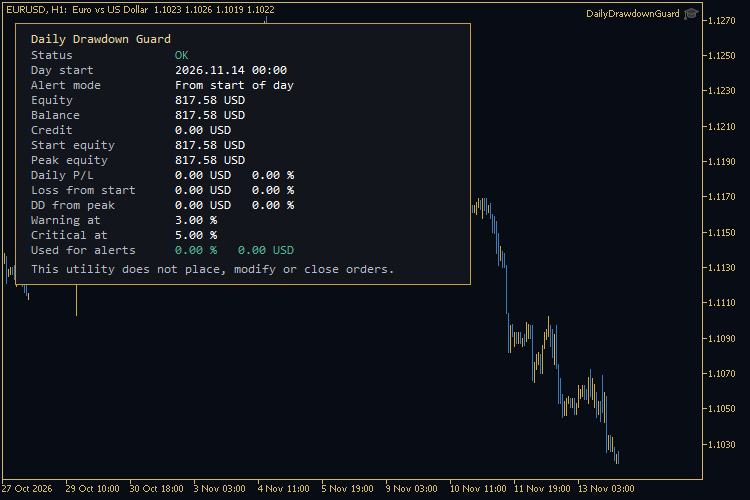 Daily Drawdown Guard is a MetaTrader 5 utility. It watches the daily loss of the account and raises a warning or a critical alert when a limit you chose is reached. It does not place, modify or close orders, and it does not stop other Expert Advisors.
What it measures
At the start of each trading day (a chosen hour and minute in broker server time, midnight by default) the utility stores the equity and the balance. During the day it also tracks the highest equity reached since that start.
The panel shows:
Experience adaptive trading with the Fluid Expert Advisor for MT4/MT5. Dynamic money management and trend detection. Click for info.
- Status: OK, WARNING or CRITICAL.
- Day start, in server time.
- The alert mode.
- Current equity, balance and credit.
- Start-of-day equity and the intraday equity peak.
- Daily profit or loss, in money and as a percent of start-of-day equity.
- Loss from the start of the day, in money and in percent.
- Drawdown from the intraday peak, in money and in percent.
- The warning and critical limits.
- The value that is currently used for alerts.
Credit is shown as a separate line. A broker credit bonus increases equity, but it is not cash. If the account has a credit, read the daily loss against both equity and balance; a percent of equity can look smaller than the same money relative to the cash balance.
Alert modes
You choose which figure is compared with the limits:
- Daily loss from the start of the day (the default). This is the usual “daily loss cap” measure.
- Drawdown from the intraday equity peak.
- Whichever of the two percentages is larger.
Each mode can use a percent limit, an optional money limit, or both. The warning must be below the critical level when both are set. Each level fires only once per trading day. After a restart during the same day the start, the peak and the “already alerted” flags are restored from terminal global variables, so the same alert is not repeated.
Alerts can be a terminal alert window, a sound, and an optional push notification to a MetaQuotes ID. The utility never sends orders and never closes a position for you. If you need to flatten, you do that yourself.
Inputs
Limits
- Alert mode (from start, from peak, or either).
- Warning and critical percent (defaults 3.0 and 5.0).
- Optional warning and critical money amounts (0 = do not use).
Day
- Hour and minute of the trading-day reset, server time (default 00:00).
Alerts
- Terminal alert, sound file, push notification.
Panel
- Show or hide the panel, corner, offsets, font size and colours.
Requirements
- Platform: MetaTrader 5.
- Attach the Expert Advisor to one chart. The figures are account-wide, not symbol-specific.
- No DLL calls, no WebRequest and no internet connection.
- The utility can sit on the same chart as a separate trading Expert Advisor; it will not open, modify or close a position of its own.
- AutoTrading is not required.
About the author
Author of Golden Sniper XAU: https://www.mql5.com/en/market/product/207995
Level up your trading with professional RobotFX expert advisors and indicators. Visit robotfx.org for proven MT4/MT5 tools.
79526


