
Explore the latest free tools from the MQL5 community. Here's a new indicator, expert advisor, or script for MetaTrader.

The script on a USD/JPY chart, reading a demo account with 44 closed trades: the whole range is above zero.
How to read the result
- The whole range is above zero: on this sample the edge looks real.
- The range includes zero: the result could still be luck.
- The whole range is below zero: the losses are larger than luck explains.
- Fewer than 30 trades (you can change the number): the script says the sample is too small to judge. With very few trades the bootstrap can only reshuffle the trades you already have, so it never sees the losses that haven't happened yet, and the range comes out too narrow.
The result is printed in the Experts tab of the Toolbox and shown in the top left corner of the chart. The chart you run it on does not matter, because the script reads the whole account history rather than the chart's symbol. Run it again with other settings to replace the text, for example to check one Expert Advisor or only the last 30 days.
Reduce lag and improve accuracy with the NonLagMA Expert Advisor for MT4/MT5. Discover it.
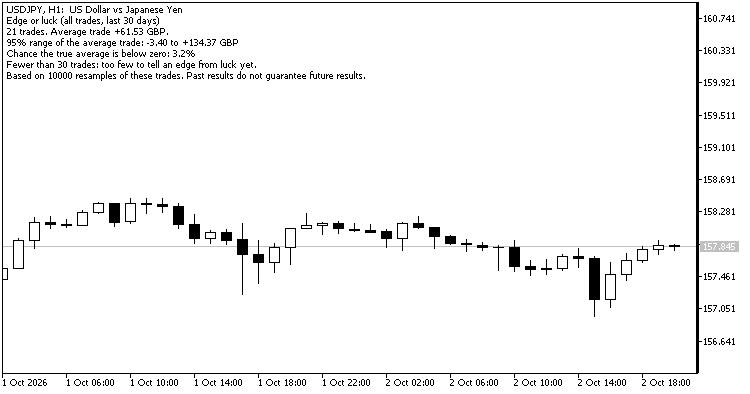
The same account, last 30 days only: 21 trades, so the script does not give a verdict yet.
How trades are counted
A trade is every deal of one position, counted once the position is closed. Its net result is profit plus commission, fee and swap, as recorded in your broker's deal history, so it matches what you were charged. Deposits, withdrawals and charges booked outside trades are left out, and so are positions that are still open. On a netting account, a position that is reversed counts as one trade.
Parameters
- Magic number: -1 for all trades, 0 for manual trades only, or the magic number of one Expert Advisor.
- Symbol: leave empty for all symbols.
- Only trades closed in the last N days: 0 for the whole history.
- Resamples: 1,000 to 100,000 (default 10,000).
- Fewest trades for a verdict: default 30.
Notes
- The script only reads the history. It never opens, changes or closes a trade, so you can run it next to live Expert Advisors.
- The random numbers start from a fixed seed, so running the script twice on the same history gives the same answer.
- The test describes trades that already happened. It cannot tell you whether the market will keep behaving the same way, and past results do not guarantee future results.
- YuRaLytics Trade Analyzer, free in the Market, runs the same test for every Expert Advisor and symbol at once in a chart panel. It also checks drawdowns and losing streaks and shows what commission and swap cost you.
Thanks for reading. Discover premium MetaTrader solutions at RobotFX.
77941


