
Discover expert developed MetaTrader tools that can complement professional solutions.
What it does
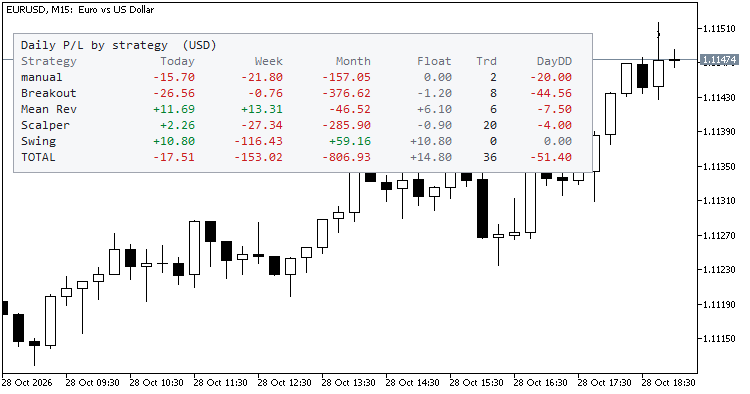
Daily P/L by Magic Number turns the account history and the open positions into a compact table on the chart:
| Column | Meaning |
| Strategy | Magic number, or the name you gave it. manual = magic 0. |
| Today / Week / Month | Closed result (profit + swap + commission + fees) plus floating P/L of that strategy's open positions (can be switched off). |
| Float | Floating P/L of the open positions right now. |
| Trd | Trades closed today. |
| DayDD | Largest intraday drop from the day's peak (closed results plus floating, tracked while the indicator runs). |
Trade the powerful Traders Dynamic Index strategy automatically with this dedicated TDI Expert Advisor. More details.
The last row, TOTAL, adds up everything shown. Colours: green for profit, red for loss, grey for zero.
Why it is useful
- Running several EAs on one account? The terminal shows a single balance curve. This table shows who contributed what, today and over the week and month.
- Spot a misbehaving EA early: a strategy with a large DayDD or an unusual loss today is visible at a glance.
- Manual trades are separated from EA trades instead of being mixed in.
- Works with hedging and netting accounts, any symbol and any timeframe. Put it on one chart; it covers the whole account.
How the periods are defined
- Day, week and month follow the broker server time. The week starts on Monday and the month on the 1st.
- The indicator reads history from the first day of the current week or month, whichever is earlier, so it stays light on large accounts.
- The intraday drawdown combines the closed-trade curve of the day with floating values sampled while the indicator is running. If the terminal was closed for part of the day, the floating part of that period cannot be reconstructed.
Inputs
- Names : optional list "magic=name;magic=name", e.g. 1001=Breakout;1002=Grid .
- Show manual trades (magic 0) : show or hide the manual row.
- Add floating P/L to Today / Week / Month : on by default.
- Max strategy rows , Refresh every N seconds .
- Panel corner , X/Y offset , Font size , Dark theme .
Notes
- Read-only: no orders are sent, modified or closed; there are no buffers and no alerts.
- The account number, name, broker and balance are never drawn.
- Totals are in the account currency (shown in the title).
- Open and closed deals made by other EAs on the same account are included, as they are in the account history.
- Not financial advice; it reports what already happened.
Try it in the Strategy Tester
Because it reads the deal history of whatever account it runs on, you can also load it in the Strategy Tester to check the table before using it on a demo or live account.
Level up your trading with professional RobotFX expert advisors and indicators. Visit robotfx.org for proven MT4/MT5 tools.
78977


