
RobotFX curates the best open-source MetaTrader code to inspire your trading automation.
Currency Exposure and Leverage Monitor splits every open position of the account into the currencies it is made of and shows how much you really hold of each currency, in account money. A buy on EURUSD is long EUR and short USD; a buy on GBPUSD and a buy on gold are also short USD. Three positions that look independent can be one large bet against a single currency, and the position list does not show it. The panel also shows the effective leverage of the account and how much equity changes when a currency moves by 1%. It is an analysis tool only: it never sends, modifies or closes orders, and as an indicator it runs on the same chart as a trading Expert Advisor.
Features
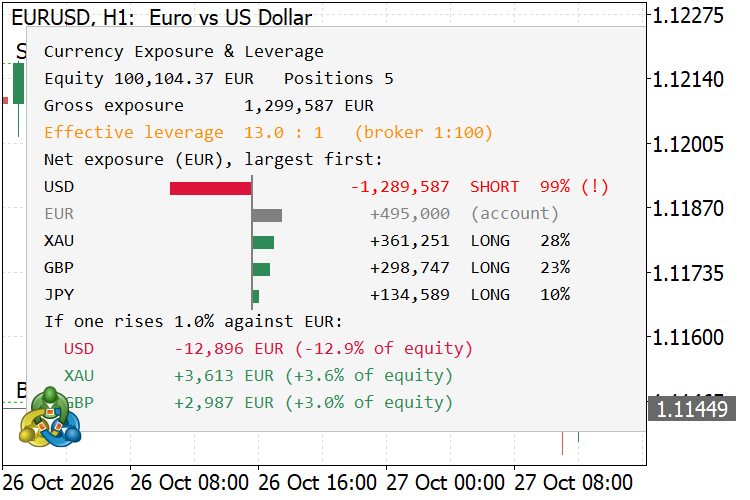
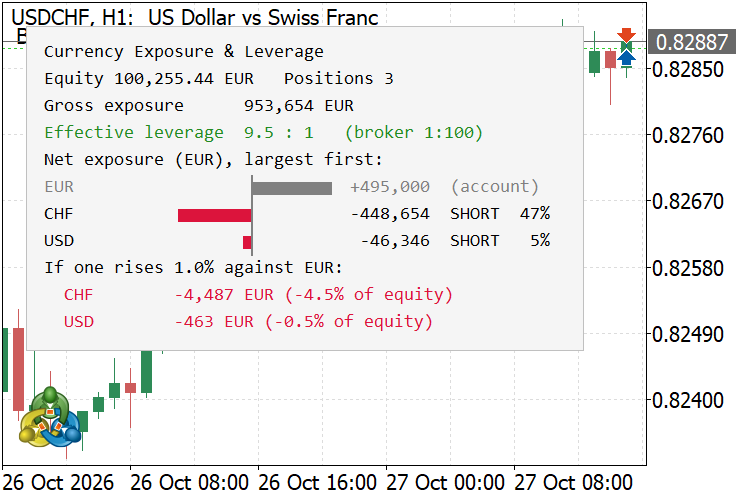
- Net exposure per currency — every position is split into the bought and the sold currency; legs are added up per currency and shown in account money, largest first, as bars around a zero axis (long to the right, short to the left) with the amount and the share of gross exposure.
- Effective leverage — gross notional of all positions divided by equity, for example 12.9 : 1, next to the leverage the broker allows. The value is colored green, orange or red against two thresholds you set.
- Sensitivity — for the three largest exposures the panel shows how much equity changes when that currency rises by 1% (or any percentage you set) against the account currency, in money and in percent of equity.
- Concentration warning — a row is marked with (!) when one currency is more than 50% (adjustable) of the gross exposure.
- Hidden offsets made visible — opposite legs cancel out: a buy on EURUSD and a buy on USDCHF leave almost no USD, but a long EUR / short CHF position that the list of trades does not show.
- Metals, crypto and CFDs — gold, silver and crypto pairs are split like currencies (XAU, BTC). Indices, shares and commodities whose base and profit currency are the same are shown as asset rows (for example US500).
- Tooltip per row — hover a row to see which positions it is made of.
- Magic number filter — show the whole account or only the positions of one Expert Advisor. Several copies can run on one chart, each with its own magic number and corner.
- Display scaling — the panel follows the screen DPI, so it keeps its proportions on scaled displays.
How to use
- Attach the indicator to any chart. The symbol of the chart does not matter: the panel covers all open positions of the account.
- Read the top lines: equity, gross exposure and effective leverage.
- Look at the bars: the longest bar is the currency your account depends on most. A row marked (!) holds most of the risk.
- Read the sensitivity lines before adding a trade: they show what a normal 1% move in that currency would do to your equity.
Inputs
Input | Default | Description |
|---|---|---|
| Magic number filter (-1 = all positions) | -1 | Only positions with this magic number are counted; -1 counts the whole account. |
| Sensitivity: currency move, % | 1.0 | Size of the currency move used in the sensitivity lines. |
| Effective leverage warning level (x:1) | 10 | From this effective leverage the value turns orange. |
| Effective leverage high level (x:1) | 20 | From this effective leverage the value turns red. |
| Concentration warning, % of gross exposure | 50 | A currency above this share of the gross exposure is marked with (!). |
| Show account currency row | true | The account currency carries no exchange-rate risk; it is shown in gray and can be hidden. |
| Maximum rows in the table | 10 | Smaller rows are summarized as "+N more". |
| Panel corner | Left upper | Chart corner of the panel. |
| Panel font size | 9 | Font size of the panel text; the whole layout scales with it. |
| Panel text color / Panel background color | Black / WhiteSmoke | Panel colors; the light background keeps the text readable on dark charts. |
| Long exposure bar color / Short exposure bar color | SeaGreen / Crimson | Bar colors. |
| Refresh interval, seconds | 1 | Timer refresh; the panel is redrawn only when positions, prices or equity have changed. |
Notes
- Exposure is the notional value of the positions at the current price, converted to the account currency. For forex, metals and CFDs it is volume × contract size × price, converted with the rate of the profit currency taken from a forex symbol in Market Watch; for futures the tick value of the contract is used. The tick value that some brokers report for CFDs does not match the contract, so it is not used for them.
- The conversion rate comes from a forex pair in Market Watch quoted in, or based on, the profit currency. When there is none, the broker's tick value is used instead. A position is listed as skipped only when its symbol has no prices yet. Bonds (priced in percent of face value) are skipped as well.
- Sensitivity is a linear estimate at current rates: it does not include swaps, commissions, correlation between currencies or changes of other rates.
- For CFDs on indices, shares and commodities the currency risk applies only to the floating profit, not to the whole notional, so they are shown as assets and not split into currencies.
- Pending orders are not included.
- Single file, no external dependencies. Compiles with 0 errors and 0 warnings.
Screenshots
Unique stair-step trend trading with the Stairsteps Expert Advisor. Innovative approach for consistent results. Learn more.
Build better strategies with RobotFX professional tools – check them out.
78944


