
Discover expert developed MetaTrader tools that can complement professional solutions.
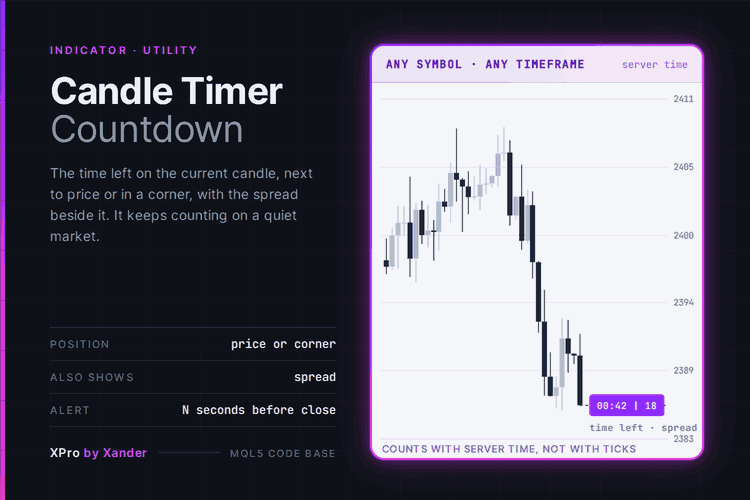
A countdown to the close of the current candle on Gold (XAUUSD), EURUSD or any chart, shown next to the price or in a fixed corner. It counts with TimeTradeServer, the broker server clock, so it keeps running when the market is quiet and no ticks arrive.
The format follows the timeframe: minutes and seconds on intraday charts, hours, minutes and seconds from H1, and days plus hours on D1 and above. The current spread can sit beside the timer, and the text changes color in the last seconds of the candle.
An optional pop-up or sound alert fires once per candle, the number of seconds you choose before the close. It is one text object that is created once and rewritten every half second. No canvas, no buffers, nothing else on the chart.
Recover from drawdowns intelligently with the Auto Recovery Expert Advisor for MT4/MT5. Perfect for hedging strategies. Learn more.
Settings
Display
- Where to show the timer (next to the current price): next to price moves with the bid, or choose a fixed corner of the chart.
- Corner (right upper), Horizontal offset (10 px) and Vertical offset (30 px): used only in corner mode.
- Bars to the right of the last candle (2): how far from the last candle the timer sits in price mode.
- Show the spread (true): current spread in points after the time.
- Show symbol and timeframe (false): for example EURUSD M15 before the time.
- Font (Arial), Font size (10), Text color (silver).
- Text color in the last seconds (orange red) and Last seconds that change the color (10, 0 turns it off).
Alerts
- Alert this many seconds before the close (0 = off): one alert per candle.
- Pop-up alert and Sound alert (both false), Sound file (alert.wav).
Indicator settings
- Object prefix (XP_CTC_): the timer object starts with it, and only that object is removed when you take the indicator off. To show two timers on one chart, for example one next to price and one in a corner, give each copy its own prefix.
What it needs
- MetaTrader 5, any symbol, any timeframe, any account type. It is an indicator, it does not trade.
- The time comes from the trade server clock, so the countdown matches the candles of your broker, not the clock of your computer.
- On weekends and outside the trading session the last candle does not close, so the timer stops at 00:00 until the next candle opens.
Make it yours
Put it on the chart you trade the open of the next candle on: M5 or M15 on XAUUSD, EURUSD, GBPUSD, US30, NAS100 or BTCUSD. Scalpers who wait for a candle close before entering can set the alert to 5 or 10 seconds and stop watching the clock. If you trade Smart Money Concepts or price action, the countdown tells you when a BOS or CHoCH will be confirmed on close. The update routine is short and has no dependencies, so the time-left calculation can go straight into your own EA or panel.
About this code
Open source. Use it as it is, adapt it, build your own version on top of it.
New versions and new tools are announced first on my MQL5 channel: https://www.mql5.com/en/channels/xander
Questions, suggestions and your own backtests are welcome in the Xander Lab group: https://www.mql5.com/en/messages/02eec85e4364dd01
More tools on my profile: https://www.mql5.com/en/users/09151993a
Provided as is, use at your own risk.
Related
- Smart Money Concepts BOS CHoCH
- Partial Close Multi TP Manager
- Basket Pair Closer
- XPro Trade Panel
- XANDER Grid XAUUSD
Changelog
- v1.0 - 2026-10-25 - Initial release
Level up your trading with professional RobotFX expert advisors and indicators. Visit robotfx.org for proven MT4/MT5 tools.
78884


