
New free code from MQL5: indicators, EAs, and scripts for traders.
Portfolio Allocation Planner
Before configuring a basket, see which target weights fit your broker's minimum lots. This free open-source tool turns an explicit hypothetical notional budget and percentages into a chart dashboard. It shows the minimum-lot notional, lots rounded down, calculated allocation, target shortfall and status of each row. Recalculate on demand, hover for details, paginate longer baskets and optionally export the displayed snapshot to CSV.
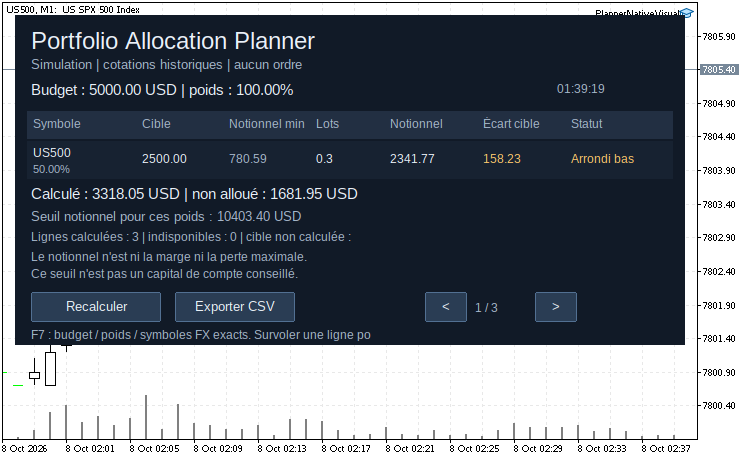
Native MT5 snapshot: hypothetical 5,000 USD notional budget, weights 50/30/20, quote age limit = 0 (historical quotes permitted). Page 1/3: US500 rounded down to 0.3 lot.
Capture MT5 réelle : budget notionnel hypothétique de 5000 USD, poids 50/30/20, limite d’âge = 0. Page 1/3 : US500 arrondi à 0,3 lot.
Capture price channel breakouts with the Price Channel Expert Advisor. Precise entries and exits. Explore now.
Install and use
- Copy PortfolioAllocationPlanner.mq5 to MQL5/Experts and compile with F7 in MetaEditor.
- Select the exact broker symbols in Market Watch and wait for quotes.
- Attach the utility to a separate chart without a trading EA. It is an interface EA with no trading function.
- Enter InpBudget, the explicit InpBudgetCurrency, comma-separated InpSymbols and matching InpWeightsPct. Use a decimal point; total weights must be greater than zero and at most 100%. Weights are not normalized. Empty symbols uses the chart symbol with one weight.
- Click Recalculate for a new snapshot; press F7 to change inputs. Choose PAP_FR or PAP_EN for the panel language.
- CSV export is off by default. Enable InpAllowCSVExport and click Export CSV to create a uniquely named UTF-8 semicolon-separated file in MQL5/Files.
InpPanelMaxWidth caps the panel width (default 1100 pixels, minimum 580 pixels). The panel also adapts to the chart window; longer portfolios use pages when available height is limited.
What the results mean
Long-side notional is Ask × contract size × an explicit currency conversion rate. Volume is rounded down on the broker lot-step grid, capped by the per-order maximum and static directional limit. Below-minimum targets stay at zero lots. The minimum notional budget estimate is the largest minimum-lot notional / target weight among resolved positive rows. It is not a recommended account deposit; unresolved rows make the basket incomplete, and the estimate does not guarantee exact weights or accepted orders.
The broker profit currency determines the native notional currency. For a different budget currency, supply exact already selected direct/inverse Forex symbol names in InpFXSymbols. Q/B uses Ask and B/Q uses 1/Bid. The route is verified from base/profit currency metadata; names and cross rates are never guessed. Quotes older than InpMaxQuoteAgeSeconds (120 by default) are unavailable; 0 explicitly permits historical estimates.
Supported calculation modes: Forex, Forex No Leverage, CFD, CFD Index, CFD Leverage, Exchange Stocks and Exchange Stocks MOEX. Futures, bonds, options and custom/synthetic symbols are unsupported. Notional is neither margin nor maximum loss. Existing exposure, session availability, funds, commission, swap, slippage and liquidity are outside scope. Static directional caps do not account for existing positions.
No orders are sent and no account number, balance, equity or positions are read. Only uniquely prefixed objects belonging to this tool are drawn and removed. Chart settings, other chart objects, Market Watch selection and terminal globals are unchanged. Files are written only after CSV opt-in and an explicit export click. No DLL, WebRequest or external library. Original utility by Fabien Martino; MIT license is included in the source.
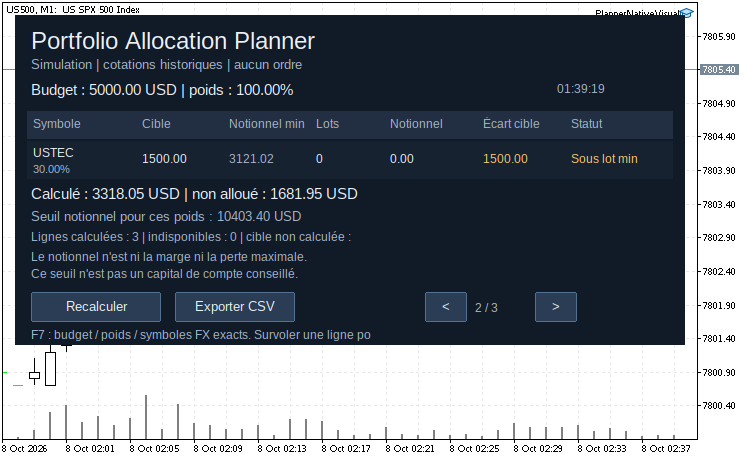
Same snapshot, page 2/3: USTEC target is below the broker minimum lot; calculated volume remains zero.
Même instantané, page 2/3 : allocation USTEC sous le lot minimum du courtier ; le volume reste à zéro.
Guide français
Avant de configurer un panier, vérifier quels poids sont représentables avec les lots minimaux du courtier. Saisir un budget notionnel hypothétique et des pourcentages : le tableau affiche les lots arrondis vers le bas, le notionnel obtenu, l'écart à la cible et les lignes sous le lot minimal. Aucun ordre envoyé et aucun solde réel utilisé.
- Copier le fichier dans MQL5/Experts et compiler avec F7 dans MetaEditor.
- Sélectionner les symboles exacts dans Market Watch et attendre leurs cotations.
- Attacher l'outil à un graphique séparé sans EA de trading.
- Saisir le budget notionnel et sa devise explicite, les noms exacts séparés par virgules et les poids correspondants. Employer un point décimal et un total entre 0 exclu et 100% inclus, par exemple 50,30,20. Les poids ne sont pas normalisés.
- Cliquer Recalculer pour un nouvel instantané ; F7 modifie les paramètres. Le panneau français est activé par défaut.
- Pour exporter, activer InpAllowCSVExport puis cliquer Exporter CSV. Le fichier UTF-8 avec séparateur point-virgule est créé dans MQL5/Files.
InpPanelMaxWidth fixe la largeur maximale du panneau (1100 pixels par défaut, 580 pixels minimum). Le panneau s’adapte également à la fenêtre du graphique ; les portefeuilles longs utilisent plusieurs pages lorsque la hauteur est limitée.
Cible = budget × poids. Notionnel min = valeur d'un lot minimal. Lots = volume arrondi vers le bas sans dépasser la cible ni les plafonds statiques. Sous le lot minimal, le volume reste à zéro. Notionnel et Écart cible montrent l'allocation représentable et la partie manquante. Une ligne indisponible ne produit pas de montant inventé. Survoler les lignes pour les détails ; les portefeuilles longs utilisent plusieurs pages.
Le seuil notionnel pour ces poids concerne une simulation d'au moins un lot minimal par ligne calculée à poids positif. Ce n'est pas un capital de compte conseillé. Une devise, une formule ou une cotation indisponible rend le panier incomplet. Les arrondis et plafonds peuvent empêcher les poids exacts même au-delà du seuil.
Pour convertir, fournir dans InpFXSymbols les noms exacts de paires Forex directes ou inverses déjà sélectionnées. Une paire Q/B utilise Ask ; une paire B/Q utilise 1/Bid. L'outil vérifie les devises dans les métadonnées et n'invente ni suffixe ni cross multiétape. Le seuil d'âge de 120 secondes est modifiable ; 0 autorise explicitement une estimation historique.
Les modes Forex, Forex sans levier, CFD, CFD index, CFD avec levier et actions sont acceptés. Futures, obligations, options et symboles personnalisés sont exclus. Le notionnel n'est ni la marge ni la perte maximale. Positions existantes, fonds disponibles, séances, commission, swap, slippage et liquidité sont exclus. L'outil modifie uniquement ses propres objets de panneau et, après accord dans les paramètres et clic, crée le CSV. Aucun solde, equity, position, paramètre de graphique, objet tiers ou sélection Market Watch n'est modifié.
Build better strategies with RobotFX professional tools – check them out.
78141


