
New free code from MQL5: indicators, EAs, and scripts for traders.
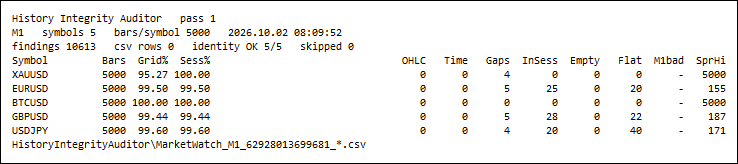
The same tool on M1 with the spread limit at 20 points: Flat and SprHi now carry numbers, InSess finds holes on pairs that were clean on M15, and the M1bad column prints - because on M1 there is nothing below the audited period, so the cross-check reports itself as off - the result table never shows a zero for something it did not measure.
Verifying the report independently
Never miss news-driven moves – use the News OCO Expert Advisor to place pending orders safely around economic releases. Find out more.
The counters above are checked by something that shares no code with the tool. A Python script reads only the raw material - the bar dump and the session dump the EA writes - recomputes every counter of the OHLC, time, gap, empty/flat and spread checks from the definitions above, and compares the result with the EA's own summary file.
Over the runs behind this article - 15 symbol/period audits across M1, M15 and W1 - it compared 215 counters and reported 0 mismatches, including the ten in-session openings of the gap above, recounted from the bar times and the session table alone.
Two things that recount does not cover. The M1 cross-check is not in those 215 counters: the script can pull the M1 series out of the terminal itself and rebuild the bars, but that path was not run for the numbers here, so compared 5000 / mismatched 0 rests on the EA's own count. And a counter that is zero on both sides is confirmed only as a zero - across every run there was no impossible OHLC value, no non-increasing or off-grid time, no gap that was not a whole number of periods, no empty bar, no M1 mismatch, no window inside the M1 coverage without an M1 bar in it, and no deviation for the tolerance to swallow. Those branches were never seen firing on the data measured here.
What pins the definitions of the defects this broker never produces is a second, smaller test of the recount script itself: a 12-bar synthetic history with the defects written in by hand and the expected counts written beside them - 29 assertions, no terminal involved. The EA applies the same predicates in the same order, and that it does is a reading of the two sources side by side rather than a measurement. The fixture is still where two of the decisions in this tool come from: that an inverted bar must produce five findings rather than one, because with the interval turned inside out the open and the close are each both above the high and below the low; and that a single undivided coverage figure was close to meaningless.
The tool also audits its own arithmetic and prints both sides of each identity, so the report can be checked without any Python at all:
audit 1        : bars 25000 + missing 8102 = 33102, expected_openings 33102 -> OK
audit 1        : expected_openings 33102, grid openings in the audited spans 33102 -> OK (5 symbols OK, 0 not)
audit 2        : C1 0 + C2 0 + C3 85 + C4 0 + C5 0 + C6 0 = 85, findings total 85 -> OK
audit 2        : findings handed to the report 85, rows in the findings file 85, dropped by the guard 0 -> OK
Inputs
| Input | Default | What it does |
|---|---|---|
| Symbols: empty = chart symbol, * = Market Watch, else a list separated by , or ; | empty | A symbol the terminal does not know is skipped with one journal line at normal level and gets no counter row at all, so a recount can never pair a bar dump with a row that measured nothing. |
| Timeframe to audit (0 = current chart period) | Current | Any timeframe from the list. The grid check switches itself off from D1 upwards, where openings are not on a fixed second grid, and the gap check switches itself off on MN1, where the distance between two openings is not a constant. |
| Bars to audit per symbol (closed bars, newest first) | 5000 | Closed bars only. The forming bar changes by definition and would be reported as a defect of the market rather than of the history. |
| C1: check OHLC consistency | true | high < low, open or close outside the bar's own range, any of the four prices at or below zero. One finding per bar per violated predicate. |
| C2: check bar open times (order, duplicates, grid) | true | A time that does not increase from one bar to the next, and an opening that is not a multiple of the period. |
| C3: check missing bars against the quote sessions | true | The check that produces the headline figure. It needs the symbol's session table; without one, gaps are reported as unclassified rather than as explained. |
| C4: count empty (no ticks) and flat bars | true | tick_volume == 0, and open == high == low == close with ticks in it. |
| C5: rebuild each bar from M1 and compare | true | The expensive check, and worth a warning: on M15 over 5 000 bars it costs about a second for five symbols, but on W1 over a 55-year history it needs one M1 request per four bars and took over seven minutes for four symbols, almost all of it inside the terminal's own history requests. Switch it off for a first pass over a long history. |
| C5: ignore deviations up to this many points | 0.0 | A tolerance for a broker whose higher timeframes are built with rounding. 0 reports every difference. |
| C6: flag bars with spread above this (0 = off) | 0 | Counts the bars above the limit. The zero-spread count, the maximum and the mean spread are reported whether or not a limit is set. |
| Journal: example findings printed per check | 5 | How many real rows of each check are printed in full, so the journal shows the defects themselves and not only their number. |
| Write one CSV row per finding | true | The findings file: one row per defect with the bar time, so the report can be audited instead of believed. |
| Also dump every audited bar (for an independent recount) | false | Writes the bars exactly as the terminal served them, plus the session table, which is what makes an independent recount possible. Switching it off deletes the dump of an earlier run, with one journal line per file: a 5 000-bar dump sitting next to a 500-bar counter row is exactly the silent wrong number this tool exists to catch. |
| Draw the result table on the chart | true | In a non-visual tester it switches itself off with a journal line instead of failing. |
| Panel corner | Left upper | Anchor corner of the table. |
| Panel font size | 8 | The table is wider than a single chart label can show, so it is drawn as several label columns; lower the size on a small chart. |
| Panel X offset, px | 10 | Position. |
| Panel Y offset, px | 18 | Position. |
| Re-audit every N minutes (0 = audit once) | 0 | For leaving it on a chart. It uses the terminal's own clock, so the same setting behaves in the Strategy Tester. |
The report
Everything the tool measured goes to the journal as one block, and the same numbers go to CSV. Below is that block for the run in the table above, verbatim, with the per-symbol part shown for XAUUSD only — the other four symbols repeat the same ten lines.
=== History Integrity Auditor ============================================ symbols : 5 (Market Watch) period : M15 bars per symbol: 5000 (closed bars, newest first) checks : C1 on C2 on C3 on C4 on C5 on C6 limit 0 points C5 tolerance : 0.00 points journal examples per check: 5 refresh : once file prefix : HistoryIntegrityAuditor\MarketWatch_M15_62879570657522_*.csv symbol 1 of 5 : XAUUSD symbol 2 of 5 : EURUSD symbol 3 of 5 : BTCUSD symbol 4 of 5 : GBPUSD symbol 5 of 5 : USDJPY =================================================================== HistoryIntegrityAuditor: pass 1 starts on 5 symbol(s), M15, server time 2026.10.02 08:07:11 HistoryIntegrityAuditor: C3_GAP example 1 of 5: XAUUSD M15 bar 2026.07.17 21:00:00 gap class=explained in_session=0 196 [... examples 2 to 5 of the same check ...] === History Integrity Auditor - result of pass 1 ======== Symbol Bars Grid% Sess% OHLC Time Gaps InSess Empty Flat M1bad SprHi XAUUSD 5000 68.10 99.80 0 0 55 10 0 0 0 - EURUSD 5000 72.25 100.00 0 0 10 0 0 0 0 - BTCUSD 5000 100.00 100.00 0 0 0 0 0 0 0 - GBPUSD 5000 72.25 100.00 0 0 10 0 0 0 0 - USDJPY 5000 72.25 100.00 0 0 10 0 0 0 0 - XAUUSD M15: 5000 bars from 2026.07.17 20:30:00 to 2026.10.02 07:45:00, 76.47 days, 10 sessions, point 0.001, 0 opening(s) behind the server time XAUUSD M15: quote sessions Sun 22:01-24:00 | Mon 00:00-20:58, 22:00-24:00 | Tue 00:00-20:58, 22:00-24:00 | Wed 00:00-20:58, 22:00-24:00 | Thu 00:00-20:58, 22:00-24:00 | Fri 00:00-20:58 XAUUSD M15: grid openings 7342 = bars 5000 + missing 2342, identity OK, grid coverage 68.10%, session coverage 99.80% XAUUSD M15: C1 on, total 0 (high<low 0, open>high 0, open<low 0, close>high 0, close<low 0, non positive 0) XAUUSD M15: C2 on, total 0 (not increasing 0, off grid 0), steps that are not a whole number of periods 0 XAUUSD M15: C3 on, gaps 55 (explained 54, unexplained 1, unclassified 0), missing 2342, in session 10, unclassified 0, largest gap 196 slots after 2026.07.17 20:45:00 XAUUSD M15: C4 on, empty 0, flat 0 XAUUSD M15: C5 on, M1 coverage 2026.06.23 03:04:00 to 2026.10.02 08:07:00, compared 5000, mismatched 0, window empty 0, out of coverage 0, max deviation 0.0000 points XAUUSD M15: C6 limit off, spread zero 0, above limit -, max 238 points, mean 175.1568 points XAUUSD M15: findings of this symbol 55 [... the same ten lines for EURUSD, BTCUSD, GBPUSD and USDJPY ...] symbols : 5 audited, 0 skipped totals : bars 25000, missing 8102, in session 10, findings 85 audit 1 : bars 25000 + missing 8102 = 33102, expected_openings 33102 -> OK audit 1 : expected_openings 33102, grid openings in the audited spans 33102 -> OK (5 symbols OK, 0 not) audit 2 : C1 0 + C2 0 + C3 85 + C4 0 + C5 0 + C6 0 = 85, findings total 85 -> OK audit 2 : findings handed to the report 85, rows in the findings file 85, dropped by the guard 0 -> OK file overview : HistoryIntegrityAuditor\MarketWatch_M15_62879570657522_overview.csv (5 rows) file findings : HistoryIntegrityAuditor\MarketWatch_M15_62879570657522_findings.csv (85 rows) files summary : 5 file(s), 5 row(s); sessions 5 file(s), 35 row(s); bars 5 file(s), 25000 row(s) file pattern : HistoryIntegrityAuditor\MarketWatch_M15_62879570657522_<symbol>_{summary,sessions,bars}.csv panel : 1452 x 294 pixels, 16 labels, widest line 119 characters ===================================================================
Note SprHi - in the table and above limit - in the C6 line. The spread limit was 0, which means the check is off, so the column prints a dash and not a zero. The tool applies that rule to every column of the result table and every figure of the per-symbol lines: a check that did not run prints -, a check that ran and found nothing prints 0, and the two are never the same character. It matters more than it looks — with the gap check off, a coverage figure computed as bars / (bars + missing) would read a confident 100.00 %.
Five files come out of a run, in MQL5\Files\HistoryIntegrityAuditor\:
- <prefix>_overview.csv — one row per symbol of the list, including the symbols that could not be audited, with their status.
- <prefix>_findings.csv — one row per defect: symbol;period;check;bar_index;bar_time;field;detail;value.
- <prefix>_<symbol>_summary.csv — every counter of one symbol, 62 columns, including the arithmetic identity.
- <prefix>_<symbol>_sessions.csv — the symbol's quote sessions as the broker declares them, which is the input that decides whether a gap is explained.
- <prefix>_<symbol>_bars.csv — optional, the audited bars exactly as the terminal served them.
The last two are what make the report checkable by something other than this tool, which is the subject of the section above. The prefix carries the symbol tag, the timeframe and the chart id, so two charts cannot overwrite each other's evidence, and a tester run writes into the agent's own sandbox rather than over a live run's files.
How to use it
- Attach it to a chart of the symbol and timeframe you actually test on, set the number of bars to at least the range your backtests use, and read the journal.
- Start with session coverage and missing in session. Those two numbers decide whether your backtests ran on the market or on a sketch of it.
- Sort the C3_GAP rows of the findings file by the hour in bar_time. Holes concentrated at one hour of the day are usually a server or a session problem; holes spread evenly are usually an incomplete download.
- Press Refresh in the terminal's Symbols dialog (or delete the history and let it re-download) and run the audit again. The difference between the two runs is what your terminal was missing locally rather than what the broker lacks.
- Switch the M1 cross-check on for the timeframe your EA trades. A mismatch that is still there after a history refresh is worth a question to the broker: it means two of its own series disagree.
- Re-run it after changing broker, server, or anything about how history is fetched. Data quality is a property of a particular terminal at a particular time, not of a symbol.
Limits, stated plainly
- It audits the history your terminal holds, which is the history your tests use — not whatever the broker's server could still send. Refreshing the history can change every number here, and step 4 above exists for exactly that reason.
- A gap the session table calls explained can still be a real hole, because the session table is also the broker's statement. The tool shows both figures so the two claims can be compared instead of blended.
- The M1 cross-check can only speak where the M1 history reaches. It is silent, by design, about older bars, and the count of windows it skipped is printed next to the count it compared.
- Tick data is not audited. Real-tick backtests have a second data set with its own defects, and this tool does not look at it.
- It reports; it does not repair. Nothing here writes to the history, and no finding on its own proves the broker is at fault — a terminal that was offline for an hour produces the same missing bars as a feed that stopped.
- No trading functions, no DLL, no network access, no external files: it reads bars and writes CSV files to MQL5\Files.
Level up your trading with professional RobotFX expert advisors and indicators. Visit robotfx.org for proven MT4/MT5 tools.
77919


