
Explore the latest free tools from the MQL5 community. Here's a new indicator, expert advisor, or script for MetaTrader.
An EA that works with one broker often behaves differently with another. The spread is
the usual suspect, but it is not the only factor: trading hours and contract size
vary between brokers for the very same instrument, and every value an EA
derives from a daily bar or a lot size changes accordingly.
This utility displays these figures so that two brokers can be compared side by side.
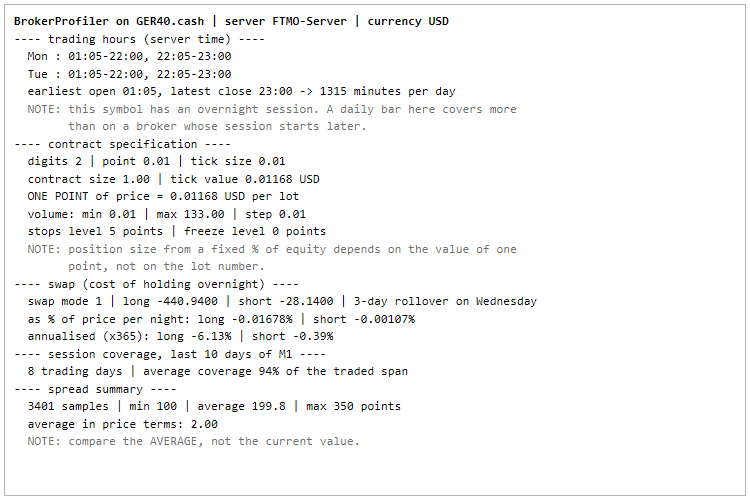
What it displays:
1. Trading hours per weekday, as reported by the server, plus the earliest
open and latest close. A broker without an overnight session produces a
different daily bar to one that does have it – the same price data, but a different range.
2. Contract specifications: contract size, tick size, tick value, and the monetary
value of a single price point. Position size is calculated as a fixed percentage of
equity depends on this value, not on the lot number – the same lot can represent
very different monetary amounts across two brokers.
3. Swap rates for long and short positions, expressed as a percentage of the price per night and annualised, so that the
holding cost can be compared directly across brokers.
4. Session coverage over the last N days of M1 history: how many minutes of the
traded period actually have quotes. Coverage well below 100 per cent indicates gaps within
the session, and any figures measured per day are understated on such a feed.
5. Spread sampling at a chosen interval, with a minimum/average/maximum summary on
removal and an optional CSV file containing every sample.
Inputs:
SpreadSampleSec – spread sampling period in seconds; 0 disables sampling.
CoverageDays - number of days of M1 history used to measure session coverage.
WriteCsv - also write spread samples to a CSV file.
CsvName - CSV file name; if left blank, the file is named profile_<symbol>_<date>.csv
in the common folder.
Usage: attach to the symbol chart on one broker, read the journal, then repeat
on the other broker and compare. The EA places no orders and makes no changes.
Capture price channel breakouts with the Price Channel Expert Advisor. Precise entries and exits. Explore now.
Level up your trading with professional RobotFX expert advisors and indicators. Visit robotfx.org for proven MT4/MT5 tools.
76895


