
New free code from MQL5: indicators, EAs, and scripts for traders.
CRiskCalculator is an object-oriented MQL5 header library designed to handle risk management and volume calculations for Expert Advisors and trading tools . It calculates monetary pip values and precise lot sizes based on a specific account risk amount and Stop Loss distance in pips .
A common issue in automated trading is calculating position sizing on cross-currency pairs (for example, trading GBPJPY on an EUR-denominated account) . This class addresses that challenge by combining native MetaTrader 5 symbol properties with a fallback conversion system for cross-currency pairs .
Key Features
Smooth out market noise with the Heiken Ashi Expert Advisor for MT4 and MT5. Reliable trend-following automation. Details here.
-
Dual-Engine Calculation: Uses native broker properties ( SYMBOL_TRADE_TICK_VALUE and SYMBOL_TRADE_TICK_SIZE ) as the primary calculation method . If those parameters are unavailable or uninitialized by the broker, it automatically falls back to manual base/quote currency extraction and conversion rate queries .
-
Broker Parameter Normalization: Automatically clamps calculated volumes between SYMBOL_VOLUME_MIN and SYMBOL_VOLUME_MAX , and aligns them to SYMBOL_VOLUME_STEP to avoid broker rejection errors (such as TRADE_RETCODE_INVALID_VOLUME ) .
-
Clean OOP Design: Encapsulated inside the CRiskCalculator class with no global scope clutter, making it easy to drop into existing EA projects or custom indicators .
-
Self-Configuring: Automatically detects the current account base currency ( ACCOUNT_CURRENCY ) upon initialization .
Integration Example
To use this class in your Expert Advisor or script, place CRiskCalculator.mqh inside your MQL5/Include/ directory and instantiate the object :
#include <CRiskCalculator.mqh>

// Helper function to render a high-contrast panel on the chart
void DrawChartPanel(const string &lines[])
  {
   int x = 20, y = 30;
   int width = 280, lineHeight = 18;
   int height = (ArraySize(lines) * lineHeight) + 20;

   // 1. Create Background Box (Visible on white, black, or custom charts)
   string bgName = "RiskCalc_BG";
   if(ObjectFind(0, bgName) < 0)
      ObjectCreate(0, bgName, OBJ_RECTANGLE_LABEL, 0, 0, 0);

   ObjectSetInteger(0, bgName, OBJPROP_CORNER, CORNER_LEFT_UPPER);
   ObjectSetInteger(0, bgName, OBJPROP_XDISTANCE, x);
   ObjectSetInteger(0, bgName, OBJPROP_YDISTANCE, y);
   ObjectSetInteger(0, bgName, OBJPROP_XSIZE, width);
   ObjectSetInteger(0, bgName, OBJPROP_YSIZE, height);
   ObjectSetInteger(0, bgName, OBJPROP_BGCOLOR, clrDarkSlateGray);
   ObjectSetInteger(0, bgName, OBJPROP_BORDER_COLOR, clrDodgerBlue);
   ObjectSetInteger(0, bgName, OBJPROP_BORDER_TYPE, BORDER_FLAT);
   ObjectSetInteger(0, bgName, OBJPROP_SELECTABLE, false);

   // 2. Render Text Lines inside the panel
   for(int i = 0; i < ArraySize(lines); i++)
     {
      string lblName = "RiskCalc_Lbl_" + IntegerToString(i);
      if(ObjectFind(0, lblName) < 0)
         ObjectCreate(0, lblName, OBJ_LABEL, 0, 0, 0);

      ObjectSetInteger(0, lblName, OBJPROP_CORNER, CORNER_LEFT_UPPER);
      ObjectSetInteger(0, lblName, OBJPROP_XDISTANCE, x + 12);
      ObjectSetInteger(0, lblName, OBJPROP_YDISTANCE, y + 10 + (i * lineHeight));
      ObjectSetString(0, lblName, OBJPROP_TEXT, lines[i]);
      ObjectSetString(0, lblName, OBJPROP_FONT, "Segoe UI");
      ObjectSetInteger(0, lblName, OBJPROP_FONTSIZE, 9);
      ObjectSetInteger(0, lblName, OBJPROP_COLOR, (i == 0) ? clrYellow : clrWhite);
      ObjectSetInteger(0, lblName, OBJPROP_SELECTABLE, false);
     }

   ChartRedraw(0);
  }

void OnStart()
  {
   // Instantiate the risk calculator
   CRiskCalculator riskCalc;

   string symbol     = _Symbol;
   double riskAmount = 100.0; // Target risk in account currency
   double slPips     = 25.0;  // Stop Loss distance in pips

   // Calculate parameters
   double lotSize      = riskCalc.CalculateLotSize(symbol, riskAmount, slPips);
   double pipValPerLot = riskCalc.GetPipValuePerLot(symbol);

   // Prepare output lines
   string info[6];
   info[0] = "=== RISK & POSITION CALCULATOR ===";
   info[1] = "Symbol: " + symbol;
   info[2] = "Account Currency: " + AccountInfoString(ACCOUNT_CURRENCY);
   info[3] = "Target Risk: $" + DoubleToString(riskAmount, 2);
   info[4] = "Calculated Lot Size: " + DoubleToString(lotSize, 2) + " lots";
   info[5] = "Pip Value (1 Lot): " + DoubleToString(pipValPerLot, 2);

   // Display GUI panel on chart
   DrawChartPanel(info);
  }
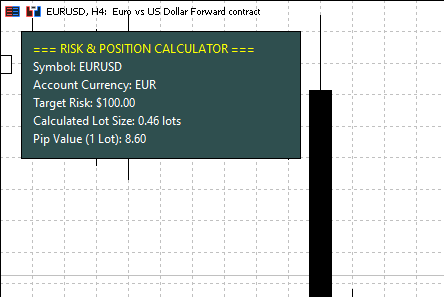
Class Reference
| Method | Return Type | Description |
| GetPipValuePerLot(string symbol) | double | Returns the monetary value of 1 pip for 1 standard lot in the account currency . |
| GetPipValue(string symbol, double volume) | double | Returns the total monetary value of 1 pip for a specified volume . |
| CalculateLotSize(string symbol, double riskAmount, double slPips) | double | Calculates and normalizes the lot size for a target cash risk and Stop Loss in pips . |
Need Custom Development or EA Integration?
If you need custom Expert Advisors, custom indicators, or advanced risk management systems built for MetaTrader 5, feel free to reach out directly via MQL5 Freelance:
👉 Romeo Luvisotto — MQL5 Developer Profile & Freelance Services
Level up your trading with professional RobotFX expert advisors and indicators. Visit robotfx.org for proven MT4/MT5 tools.
77130


