
RobotFX curates the best open-source MetaTrader code to inspire your trading automation.
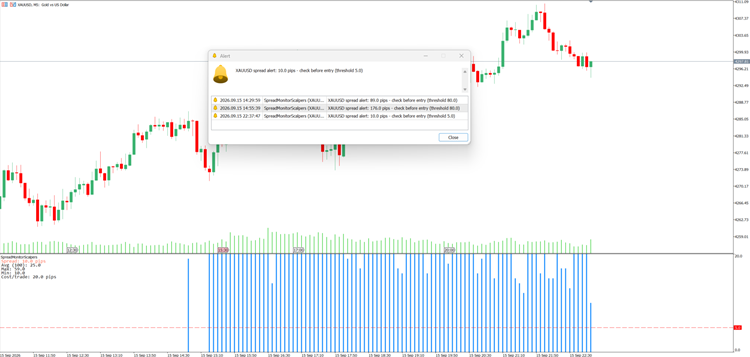
A sub-window indicator for scalpers that plots the live spread as a histogram, draws a horizontal threshold line, and shows current / average / max / min spread over a configurable lookback plus the round-trip spread cost per trade — the number of pips you must clear just to break even. It alerts (popup, log, optional push) when the spread climbs above a threshold you set, with a cooldown so it stays quiet while the spread stays wide. Spread is reported in pips, correct on any symbol via Digits() adaptation (5/3-digit and JPY brokers read right). It reads and displays only — it never sends, modifies or closes an order.
Features
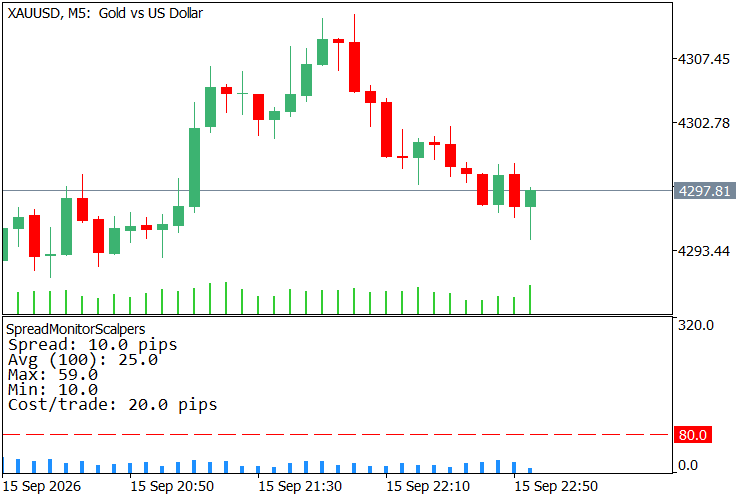
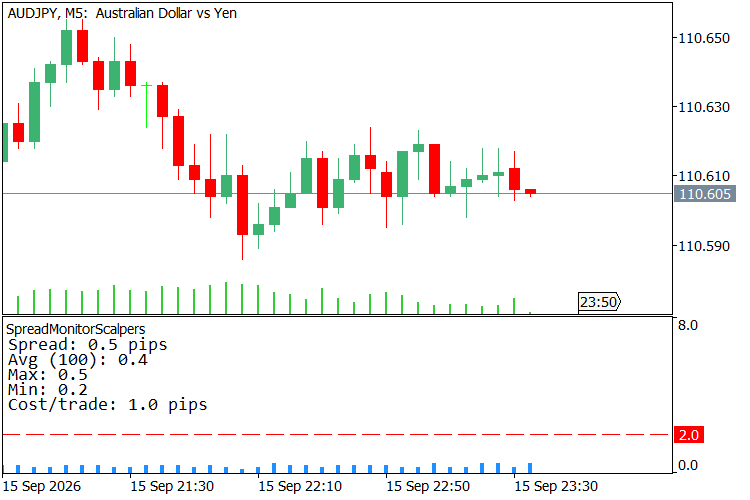
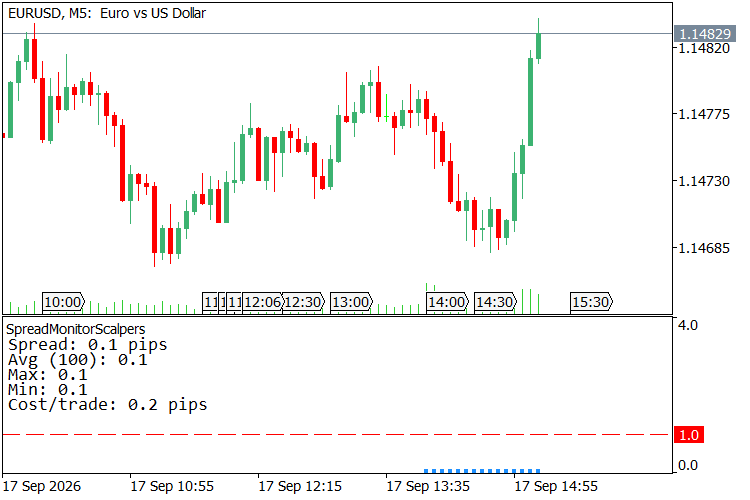
- Spread histogram in a sub-window — the live spread is drawn as a vertical bar in its own pane below the chart, so it never covers candles. MT5 keeps no per-bar spread history, so bars from before you attach the indicator are left empty rather than faked; from the moment you attach it, each new bar records its own spread and the forming bar tracks the live spread tick by tick — and that recorded history stays put for the rest of the session.
- Fixed vertical scale, no flicker — the histogram's Y-axis is pinned ( 0 to 4× your alert threshold by default, or set Histogram scale ceiling (pips) yourself) instead of auto-fitting to visible data, so bar heights and the threshold line stay visually stable tick to tick.
- History survives a timeframe switch — recorded spread is saved to a small file per symbol+timeframe ( Remember spread history , on by default). Switch M5→M15 and back and your M5 bars are still there instead of starting blank; a different symbol always gets its own separate history, never mixed with another chart's.
- Threshold line on the histogram — a dashed horizontal line at your Spread threshold (pips) sits on the histogram, so you can see at a glance whether the current bar is above or below your limit.
- Statistics panel (current / avg / max / min) — a corner panel shows the live spread plus the average, max and min over the last Lookback bars , so a widening spread is visible as a number, not just a taller bar.
- Round-trip cost per trade — spread × 2 (entry + exit) shown in the panel as Cost/trade : the exact number of pips a single trade must clear just to break even. Most free spread monitors stop at the raw spread; this one tells you what it costs you.
- Spread-threshold alert with cooldown — when the spread exceeds your limit you get a popup and a log line ( spread alert: X.X pips - check before entry (threshold Y.Y) ); a configurable cooldown (seconds) stops it from spamming while the spread stays wide.
- Optional push notifications — the spread alert can be pushed to the MetaTrader mobile app ( SendNotification ); off by default.
- Spread in pips, correct on any symbol — the raw point spread from SymbolInfoInteger(SYMBOL_SPREAD) is converted to pips using the symbol's digit count, so 5-digit and 3-digit (JPY) brokers read correctly, and so do metals when you attach it there.
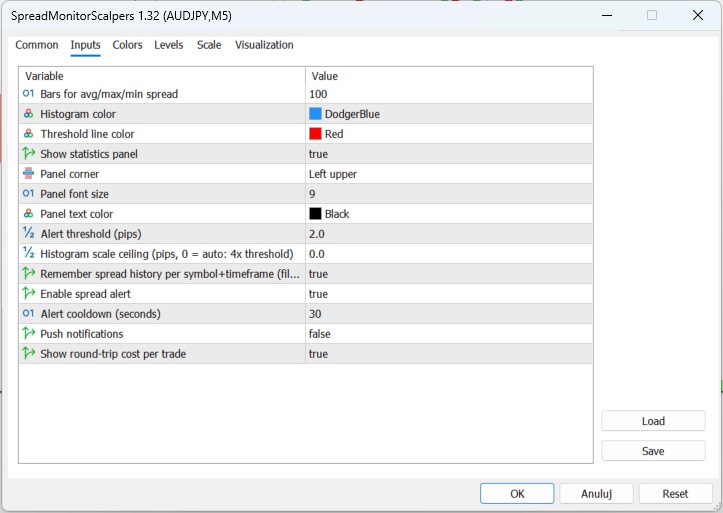
- Configurable panel — selectable data location, font size and text colour. Histogram colour and threshold-line colour are inputs too.
- Single file, no dependencies, no external includes. Compiles with 0 errors and 0 warnings.
How to use
- Attach the indicator to any chart. A spread histogram appears in a sub-window below the chart, a dashed threshold line sits on it, and a statistics panel appears in the corner.
- Set Lookback bars to the window over which you want the average / max / min spread computed (default 100 bars).
- Set Alert threshold (pips) to the level above which you don't want to enter — the histogram bar crosses the dashed line, the panel's Spread: line turns red, and an alert fires when the live spread exceeds it. Histogram scale ceiling (pips) defaults to 4× this threshold; raise it manually if your spread regularly spikes past that.
- Tune Alert cooldown (seconds) so repeated alerts don't spam while the spread stays wide.
- Leave Show cost per trade on to see Cost/trade (round-trip spread) in the panel — the pips you must clear before a trade is in profit (its break-even).
- Optionally turn on Push notifications to receive spread alerts on your phone.
- Leave Remember spread history on to keep your recorded bars across a timeframe switch (or turn it off if you'd rather not write a small file per symbol+timeframe to MQL5\Files ).
Why use it
For a scalper, the spread is not a fee — it is the trade. A 1.5-pip spread is 1.5 pips you must earn before a single position turns green, and a spread that quietly triples around a rollover or a news print turns a good entry into a loss before the candle even forms. The raw spread number in the status bar tells you none of this; a histogram does. This puts the spread in its own pane where it belongs, next to the average and the extremes over your lookback, with the round-trip cost spelled out as a break-even number — the one figure that decides whether a scalping setup is even worth taking. No settings to trade, nothing sent to the broker — just the cost of entering, on the screen, before you click.
Screenshots
Protect profits effectively with the smart Trailing Stop Expert Advisor. Advanced trailing options for MT4/MT5. See it in action.
Complement community code with advanced automation from RobotFX.
76557


