
Explore the latest free tools from the MQL5 community. Here's a new indicator, expert advisor, or script for MetaTrader.
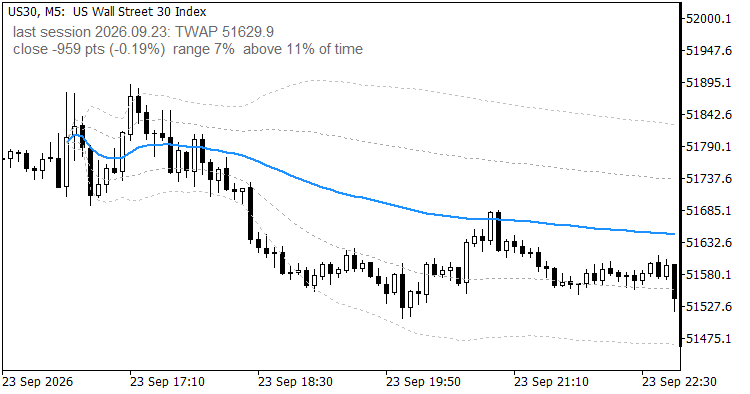
US30 M5 anchored at the New York open; the label shows the last completed session before the next open
Input parameters
Smooth out market noise with the Heiken Ashi Expert Advisor for MT4 and MT5. Reliable trend-following automation. Details here.
| Parameter | Default | Meaning |
| InpSession | Auto | Session anchor: Auto, Frankfurt 09:00, London 08:00, New York 09:30, Tokyo 09:00 or Manual |
| InpManualOpen | 09:00 | Open time in server time, format HH:MM, used by the Manual session |
| InpPrice | Typical | Price held for each bar: Typical (H+L+C)/3, Close, Median (H+L)/2, Weighted (H+L+2C)/4 |
| InpBand1 | 1.0 | Inner band in standard deviations, 0 switches it off |
| InpBand2 | 2.0 | Outer band in standard deviations, 0 switches it off |
| InpShowInfo | true | Show the info label |
| InpInfoCorner | left upper | Corner for the info label |
| InpInfoX | 10 | Info label X offset in pixels |
| InpInfoY | 20 | Info label Y offset in pixels |
| InpInfoColor | DimGray | Colour of the info label |
| InpInfoSize | 9 | Font size of the info label |
Symbol and timeframe
The indicator is built for index CFDs and other symbols with a cash open: GER40, UK100, US30, NAS100, US500, JP225. Timeframes from M1 to H1 are supported. Above H1 a bar covers too much of the session, the buffers stay empty and the label asks for a smaller timeframe. M1 gives the finest time weighting, M5 is a good compromise. On Forex use the manual mode with a time that means something to you.
How it was checked
The buffer was compared with an independent recomputation from the bars, including the gap fill, for complete sessions on GER40, US30 and UK100 on M5 and M1, and for night sessions from 02:00 server time on GER40, UK100, USDZAR, XPTUSD and EURNOK on M1, where minutes without a tick occur. The largest difference in all cases was zero, and every bar before the open was empty.
Limitations
- A session runs from its open to the end of the server day. There is no session close input, so the evening hours of a CFD count into the same average.
- The value depends slightly on the timeframe, because each bar is represented by one price. On the GER40 session of 23 September 2026 the final TWAP was 25454.85 on M5 and 25454.77 on M1.
- Exchange holidays are not known to the indicator. On a day the exchange is closed but the CFD trades, the average starts anyway at the usual minute.
- In the strategy tester the terminal reports the simulated server time as GMT, so the anchors are treated as UTC. The average stays consistent, only the clock behind it shifts.
- Session detection reads the symbol name. Symbols it does not know fall back to Frankfurt, which the info label marks with "auto".
- The indicator is display only. It writes no files and sends no orders.
Quick start
- Attach it to an index chart on M1 or M5 and leave every input at its default. The line starts at the first candle of the current session.
- Check the session in the info label. If the symbol is unknown to the name detection, pick the session yourself in InpSession.
- Read the label before the open for the last session's TWAP, and during the session for where price stands against it.
The code is a free companion of my prop firm utilities in the Market (PropGuardian, PropMirror, PropSizer, PropCorrelation). It runs on its own and needs nothing else.
Thanks for reading. Discover premium MetaTrader solutions at RobotFX.
77558


