
Discover expert developed MetaTrader tools that can complement professional solutions.
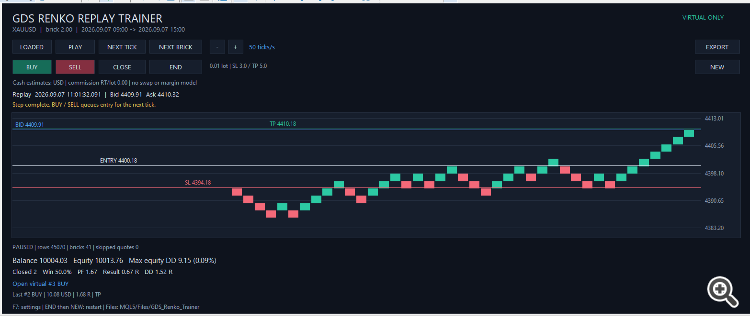
Getting started
Reduce lag and improve accuracy with the NonLagMA Expert Advisor for MT4/MT5. Discover it.
1. Compile the source and attach the EA to a new empty normal chart without indicators or drawing objects. Do not run it in Strategy Tester.
2. Set the historical start, duration and brick size. Brick size is expressed in price units: for example, 2.0 means a price movement of 2.0.
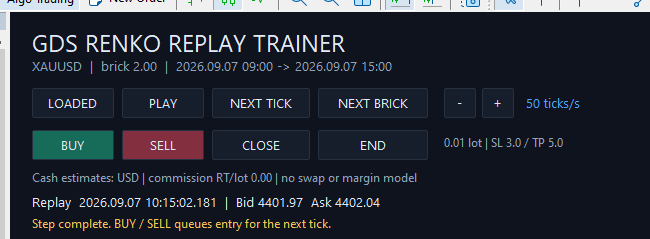
3. Press LOAD, then PLAY or NEXT BRICK.
4. Press BUY or SELL, then advance the replay to execute the virtual entry.
5. Use END to finish the session and NEW to start another. EXPORT saves the current summary.
With the default start set to zero, the trainer selects 09:00 on the previous weekday in broker server time. The default duration is six hours. The selected interval must be fully historical, and tick history must be available from your broker.
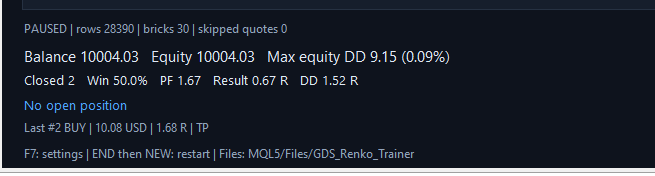
The panel shows balance, equity, maximum drawdown, closed trades, win rate, profit factor and results in R. Trade CSV files and session summaries are saved under MQL5/Files/GDS_Renko_Trainer.
Scope and limitations
One symbol, one virtual position and forward-only replay. No DLL, custom symbol or external indicator is required. No real trading requests are sent, and AutoTrading is not required.
Cash results are estimates using current contract/conversion coefficients frozen at session start. Historical currency conversion, swap, margin, liquidity and execution latency are not simulated. Commission is user-defined. END values an open virtual position at the last available quote and labels the exit SESSION_END. Session resumption and dragging SL/TP are not included in this version.
The historical result is not evidence of a persistent trading edge and is not a promise of future profitability.
Level up your trading with professional RobotFX expert advisors and indicators. Visit robotfx.org for proven MT4/MT5 tools.
77128


