
RobotFX curates the best open-source MetaTrader code to inspire your trading automation.
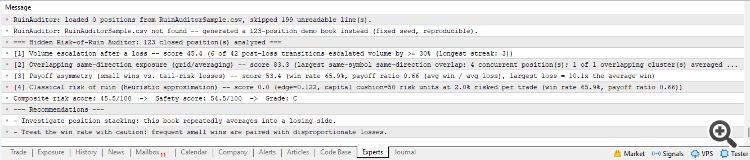
A high win rate and a smooth equity curve cannot tell you whether a strategy is quietly escalating position size after losses or averaging into a losing move. This script answers that question directly from the trade history.
Trade Renko charts automatically using the advanced Renko Expert Advisors. Clean trends, better entries. Discover them here.
The script reads a closed-position CSV and prints a full report in the Experts tab:
- Volume escalation after a loss — the martingale fingerprint.
- Overlapping same-direction exposure — the grid/averaging fingerprint.
- Payoff asymmetry — many small wins next to a disproportionately large loss.
- Classical risk of ruin — a heuristic approximation at your stated risk per trade.
- A composite score (A to F) combining the four dimensions, with written recommendations.
Input. Place a CSV named in the InpCsvFileName input parameter (default RuinAuditorSample.csv) in the terminal MQL5\Files folder, with the header OpenTime,CloseTime,Symbol,Type,Volume,OpenPrice,ClosePrice,Profit and one row per closed position. On the first run, if no file is found, the script generates a reproducible demo book instead and analyzes that, so the output is visible immediately. The companion script RuinExport.mq5 writes that CSV directly from your own account's trade history: run it once as a standalone script, then point RuinAuditor.mq5 at the file it wrote.
Parameters. Every reference threshold (the escalation ratio, the overlap and payoff bands, the risk fraction per trade, the composite weights, and the grade boundaries) is exposed as an input, so the sensitivity of each dimension and the final letter grade can be retuned without editing the code.
Level up your trading with professional RobotFX expert advisors and indicators. Visit robotfx.org for proven MT4/MT5 tools.
75380


