
Discover expert developed MetaTrader tools that can complement professional solutions.
MQTTFive — an MQTT 5.0 client for MQL5
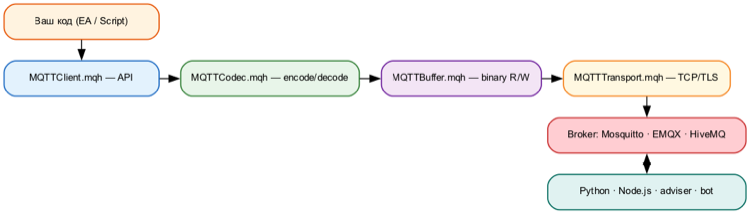
A library (#include) for connecting MetaTrader 5 expert advisors and scripts to MQTT brokers (Mosquitto, EMQX, HiveMQ). It allows you to publish prices and signals, receive commands from external systems and monitor the status of expert advisors.
No DLLs — pure MQL5, with its own socket API. MQTT v5.0 protocol.
Features
- QoS 0, 1, 2 with automatic retry of undelivered messages
- CONNECT/CONNACK properties: session duration, maximum number of packets accepted, maximum number of topic aliases.
- Delayed publication queues
- Topic aliases – reduces traffic on duplicate topics.
- Flow control – quota management for the maximum volume of data received.
- Subscription options: no_local, retain_as_published, retain_handling
- TLS/SSL, binary payload, UTF-8
Unique stair-step trend trading with the Stairsteps Expert Advisor. Innovative approach for consistent results. Learn more.
Installation
- Copy the 5 files from the archive into the MQL5/Include/MQTTFive/ folder
- In the code: #include <MQTTFive/MQTTClient.mqh>
Example – publishing a price
#include <MQTTFive/MQTTClient.mqh>

void OnStart ()
  {
   MQTTClient client;
   MQTTConnectParams params;
   params.Init();
   params.client_id = "price_pub" ;

   if (client.Connect( "127.0.0.1" , 1883 , params))
     {
       double bid = SymbolInfoDouble ( _Symbol , SYMBOL_BID );
      client.Publish( "mt5/price/" + _Symbol , DoubleToString (bid, _Digits ), 0 );
      client.Disconnect();
     }
  }
Example – Subscribing to signals
MQTTClient *mqtt;

void OnSignal( string &topic, uchar &payload[], uint payload_len)
  {
   string msg = CharArrayToString (payload, 0 , ( int )payload_len, CP_UTF8 );
   Print ( "Signal: " , topic, " = " , msg);
  }

void OnStart ()
  {
   mqtt = new MQTTClient();
   mqtt.SetCallback(OnSignal);
   MQTTConnectParams params;
   params.Init();
   params.client_id = "signal_sub" ;
   mqtt.Connect( "127.0.0.1" , 1883 , params);
   mqtt.Subscribe( "trade/signal/#" , 1 );
   while (! IsStopped ())
     {
      mqtt.Loop();
       Sleep ( 100 );
     }
   mqtt.Disconnect();
   delete mqtt;
  }
Main methods
| Connect(host, port, params, useTLS) | Connecting to the broker |
| Disconnect() | Properly terminating the session |
| ForceDisconnect() | Terminate the TCP connection (triggers Will) |
| Publish(topic, payload, qos, retain) | Publish a message |
| Subscribe(topic, qos) | Subscribe to this topic |
| Unsubscribe(topic) | Unsubscribe |
| Loop() | Packet processing, connection maintenance, retries |
| SetCallback(func) | Callback function for incoming messages |
Requirements
- MetaTrader 5 (build 3390+)
- MQTT 5.0 broker (Mosquitto >= 5.0, EMQX, HiveMQ)
Documentation: github.com/chekh/MQTTFive
Licence: MIT
Thanks for reading. Discover premium MetaTrader solutions at RobotFX.
73373


