
Explore the latest free tools from the MQL5 community. Here's a new indicator, expert advisor, or script for MetaTrader.
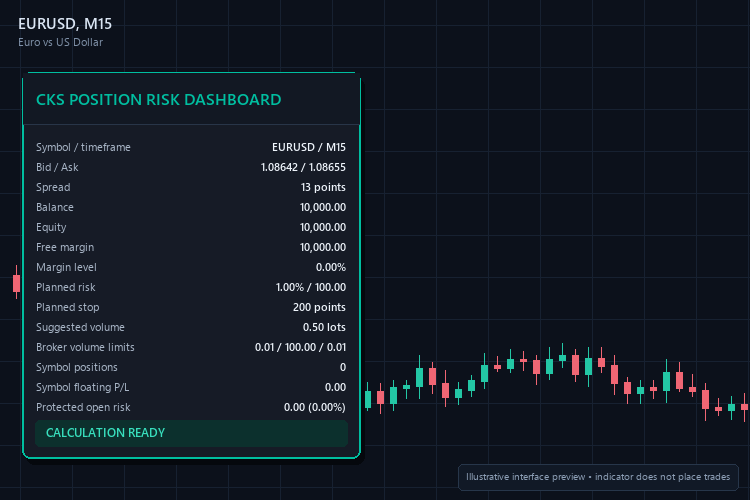
Interface preview. The indicator does not place trades.
CKS Position Risk Dashboard is a lightweight MetaTrader 5 indicator that helps traders review risk before placing an order. It displays account, symbol and open-position information directly on the chart. The indicator is informational only: it does not open, modify or close trades.
Smooth out market noise with the Heiken Ashi Expert Advisor for MT4 and MT5. Reliable trend-following automation. Details here.
Features
- Suggested lot size from a planned risk percentage and stop-loss distance
- Balance, equity, free margin and margin level
- Current bid, ask and spread
- Broker minimum, maximum and step volume
- Open-position count and floating profit or loss for the chart symbol
- Estimated protected risk for positions with a protective stop loss
- Automatic tick-size, tick-value and symbol-digit handling
- Adjustable panel colors, location and refresh interval
- Pure MQL5 with no DLLs or external services
Inputs
- InpRiskPercent — percentage of balance or equity planned for the trade.
- InpPlannedStopPoints — proposed stop distance in broker points.
- InpUseEquity — use equity instead of balance as risk capital.
- InpMaximumSuggestedLot — safety ceiling for the displayed suggested volume.
- InpCorner, InpX, InpY and InpWidth — dashboard position and width.
- Color inputs — panel background, text, accent and warning colors.
- InpRefreshSeconds — dashboard refresh interval.
Installation
Copy the MQ5 file to MQL5/Indicators, compile it in MetaEditor, refresh the Navigator and attach it to any chart.
Notes
The displayed volume is an estimate based on the broker's current tick value and symbol specification. Always confirm final order volume and required margin in the terminal. Positions without a protective stop loss are not assigned a finite protected-risk value.
Version 1.00.
Build better strategies with RobotFX professional tools – check them out.
74913


