
RobotFX curates the best open-source MetaTrader code to inspire your trading automation.
[Upper Band Breakout] -> BUY ENTRY ▲ Baseline (Green) ───► ▼ [Lower Band Breakout] -> SELL ENTRY
-
Setup: Wait for the market to enter a low-volatility period where the Upper and Lower bands compress tightly around a flat baseline.
-
Execution (Long): A candle must close completely above the Upper Band, and the Baseline must turn LimeGreen.
Grid trading done right – try the robust Grid Expert Advisor for controlled risk. Details here.
-
Execution (Short): A candle must close completely below the Lower Band, and the Baseline must turn Crimson.
-
Stop Loss: Place your stop loss on the opposite side of the baseline, or just outside the opposite channel band.
-
Trailing / Exit: Let the trade run as long as the Baseline maintains its color. Exit immediately when the baseline switches color (e.g., Green to Red for a long trade).
Strategy B: Dynamic Mean Reversion (Counter-Trend Scalping)
Best suited for range-bound environments or deep Asian session trading in Forex pairs.
-
Setup: The baseline must be relatively flat, and the bands should be wide, indicating a highly stretched market.
-
Execution (Long): Price punches outside the Lower Band, but the baseline fails to shift to Crimson (signaling a temporary liquidity grab or fakeout). Enter long when a candle manages to close back inside the lower band.
-
Execution (Short): Price punches outside the Upper Band, but the baseline remains Crimson or flat. Enter short when a candle closes back inside the upper band.
-
Target: The take-profit objective is strictly the central Adaptive Baseline.
3. Utilizing the Multi-Symbol Dashboard Matrix
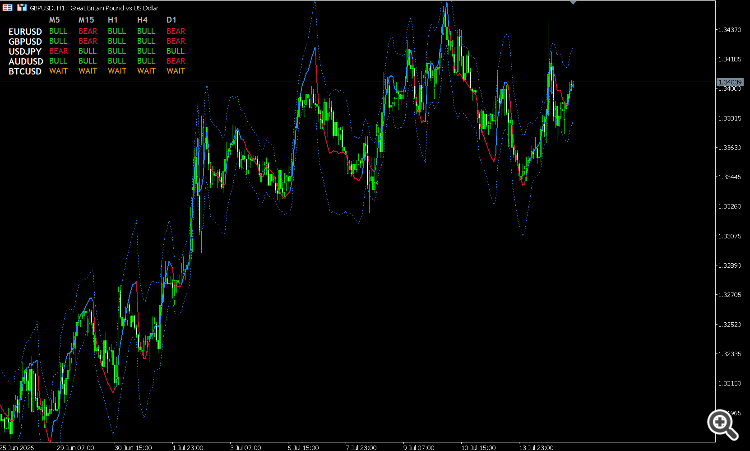
The built-in multi-symbol matrix on your chart acts as your macro-directional filter. It prevents you from "trading against the current."
| Symbol | M5 | M15 | H1 | H4 | D1 | Action |
|---|---|---|---|---|---|---|
| GBPUSD | BULL | BULL | BULL | WAIT | BEAR | Look for M5/M15 continuation longs. |
| BTCUSD | BEAR | BEAR | BEAR | BEAR | BEAR | High-conviction swing short alignment. |
| EURUSD | WAIT | BULL | BEAR | WAIT | BULL | Strictly sit on hands. No clear efficiency. |
-
Directional Confluence: Look for instances where the Higher Timeframe (H4 or D1) matches the entry timeframe (M5 or M15). If H4 says BULL and your M15 chart prints an Adaptive Momentum Breakout long, the probability of success increases dramatically.
-
The WAIT Filter: When a cell turns Orange ( WAIT ), it means the dynamic Alpha has dropped near zero due to pure sideways noise. Do not open new positions on symbols showing multiple WAIT states across intermediate timeframes.
4. Key Risk Management Considerations
⚠️ Adaptive Drawback Alert: Because the indicator uses Kaufman's Efficiency Ratio, during highly erratic "whipsaw" market conditions, the Alpha value will rapidly drop, flattening the center line. In these specific environments, mean-reversion strategies will outperform breakout configurations.
Always customize your inpMultiplier according to the underlying asset:
-
For Forex (5-digit): Keep the multiplier between 2.0 and 2.2 .
-
For Crypto / Metals (Explosive Volatility): Push the multiplier up to 2.5 or 3.0 to filter out normal crypto noise and prevent premature stop-outs.
Complement community code with advanced automation from RobotFX.
74997


