
Discover expert developed MetaTrader tools that can complement professional solutions.
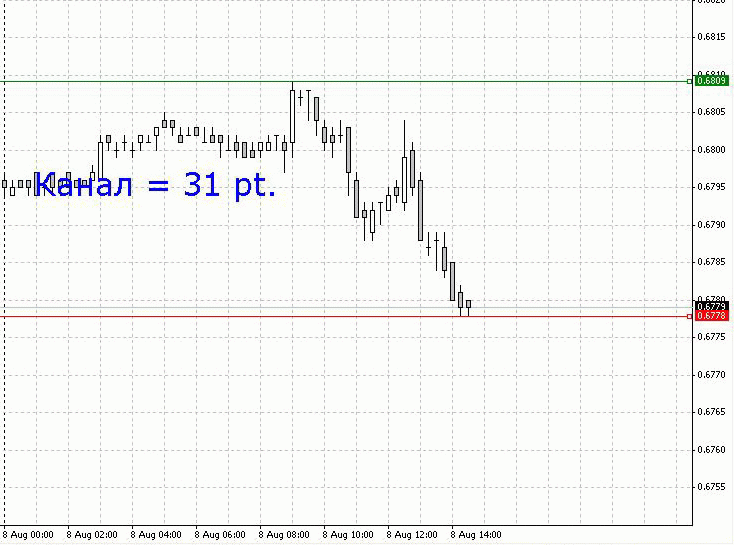
To avoid calculating it manually, the following can be done: using the Lines_Create script create 2 horizontal lines on the chart (it creates green and red lines). Move the green line up and the red line down to the required levels. Then use the Lines_RASST script, which displays a message about the number of points in the distance between the two horizontal lines. (Illustration below.). But there is a nuance.
Due to the fact that the Lines_RASST script has a delay in its code, it is necessary not to simply drop in on the chart, or simply
double-click the script, it is also necessary to make a single left mouse button click on the chart window.
Only in this case the label which tells the distance appears, and automatically disappears 5 seconds after.
If the Lines_RASST script is called and the additional click on the window was not made, then after 5 seconds the script will be unloaded from the memory,
and you will not see anything on the screen, no labels (I do not know why the terminal is done that way). Here is the result of the Lines_Create and Lines_RASST operation.
After all that the Lines_Delete can be launched, which deletes only those two lines from the chart.
Unique stair-step trend trading with the Stairsteps Expert Advisor. Innovative approach for consistent results. Learn more.
Level up your trading with professional RobotFX expert advisors and indicators. Visit robotfx.org for proven MT4/MT5 tools.
7278


