
Discover expert developed MetaTrader tools that can complement professional solutions.
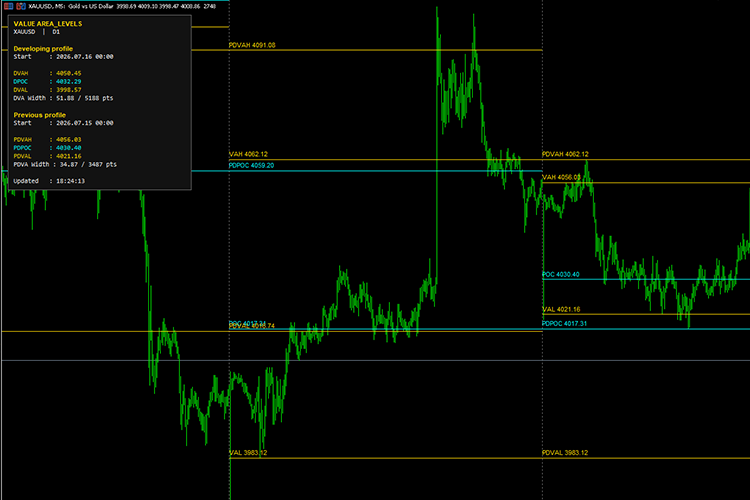
Value Area Levels calculates a price-volume distribution from lower-timeframe candle data and displays the following important market profile levels:
- VAH — Value Area High
- POC — Point of Control
- VAL — Value Area Low
- DVAH, DPOC and DVAL — Developing profile levels
- PDVAH, PDPOC and PDVAL — Previous completed profile levels
The indicator can calculate daily, weekly, monthly, or other timeframe-based profiles while using a separate source timeframe for profile construction.
Grid trading done right – try the robust Grid Expert Advisor for controlled risk. Details here.
For example, the indicator can calculate daily Value Area levels using M15 candle data.
The current profile is updated periodically, while completed historical profiles remain fixed until a full chart refresh or the beginning of a new profile period.
Main Features
Developing Value Area
Displays the Value Area High, Point of Control, and Value Area Low of the currently active profile.
The developing levels are identified as:
- DVAH
- DPOC
- DVAL
These levels update as new market data becomes available.
Previous Profile Levels
Displays the completed Value Area levels of the previous session across the current session.
The previous profile levels are identified as:
- PDVAH
- PDPOC
- PDVAL
These levels may be useful as potential support, resistance, acceptance, rejection, or breakout reference areas.
Historical Value Areas
The indicator can display the completed VAH, POC, and VAL levels for multiple historical sessions.
It can also project each previous session’s Value Area levels into the following historical session.
For example, Monday’s completed Value Area levels can be displayed as previous-day levels across Tuesday’s chart area.
Configurable Profile Timeframe
The profile calculation period can be selected independently from the chart timeframe.
Supported examples include:
- Daily profiles
- Weekly profiles
- Monthly profiles
- H4 profiles
- H1 profiles
Configurable Source Timeframe
A separate lower timeframe can be selected as the data source for profile construction.
For example:
- Profile timeframe: D1
- Source timeframe: M15
Using a lower source timeframe generally creates a more detailed profile but requires more processing.
Tick or Real Volume
The indicator supports:
- Tick volume
- Real volume
When real volume is selected but unavailable or equal to zero, the indicator automatically falls back to tick volume.
Custom Value Area Percentage
The Value Area percentage is configurable.
The default value is 70%, which is commonly used in market profile and volume profile analysis.
Session Separation
Optional vertical lines can be displayed at the beginning of each profile period to visually separate sessions.
The vertical line color, width, and style can be customized.
Level up your trading with professional RobotFX expert advisors and indicators. Visit robotfx.org for proven MT4/MT5 tools.
75056


