
RobotFX curates the best open-source MetaTrader code to inspire your trading automation.
Spread calculator is created to let the trader know and pay attention to the current spread of the currency pair on the chart. This saves the trader from entering a trade with expanded spread which may lead to unnecessary losses.
Imagine entering a trade with 50 pips as spread as at the moment you entered and you are determined to claim 40 or 50 as your profit.
This means that you will need 90 pips to make it through but this will save the trader from entering into such bloated spread trap trade!
Watch in-depth trading tutorials and EA reviews on the RobotFX YouTube channel. Subscribe for free tips.
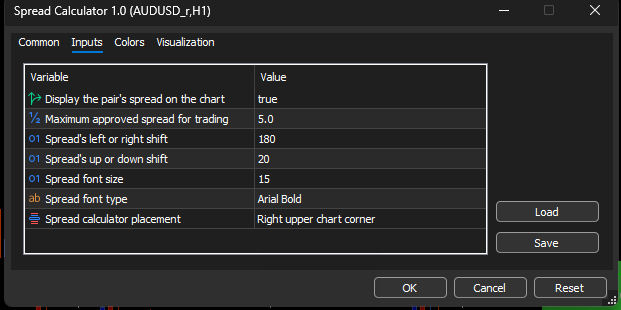
You can set the maximum spread you will always prefer for entering trade, anything more than that is a no go area for you.
It shows RED color to attract the attention of the trader if the spread is more than what you set as your maximum spread for you to take trade.
It changes to GREEN to let the trader know that it is safe if the current spread is within the maximum spread set by the trader in the external parameters as well.
FEATURES IN THE PARAMETERS FOR THE TRADER'S PREFERRED SETTINGS:
HOW IT DISPLAYS ON THE CHART BOTH NEGATIVE AND POSITIVE SPREAD:
POSITIVE SPREAD SHOWS IN GREEN COLOR:

NEGATIVE SPREAD SHOWS IN RED COLOR:

All the settings are written in a simple English that can be understood and mean what they stand for.
Enjoy this tool to save yourself from iller spread that may ruin your trading day unexpectedly..
Build better strategies with RobotFX professional tools – check them out.
74383


