
RobotFX curates the best open-source MetaTrader code to inspire your trading automation.
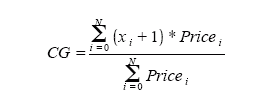
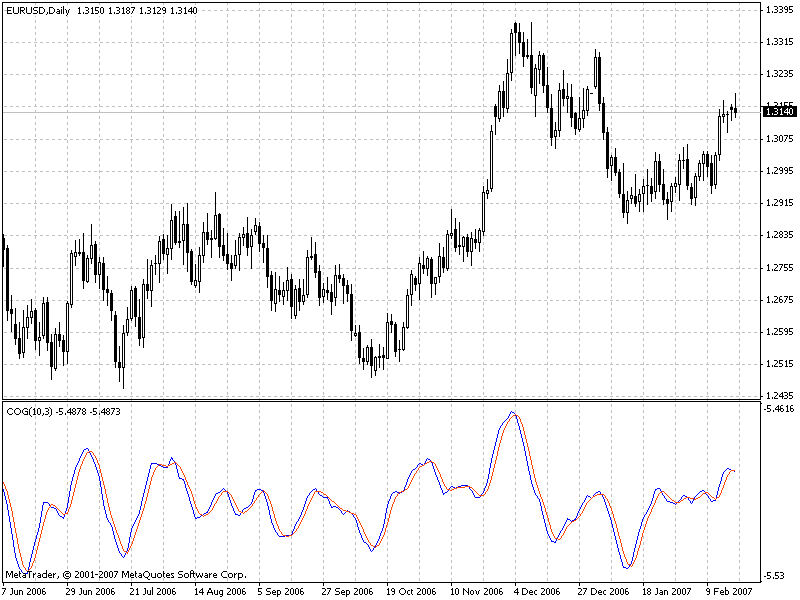
The indicator Center of Gravity allows to identify main pivot points almost without any lag. The idea of calculating a center of gravity appeared from the investigation of lags of different filters with the finite impulse response (FIR) in accordance with the relative amplitude of filter coefficients. SMA (Simple Moving Average) is a FIR-filter, in which all coefficients have one and the same value. As a result the center of gravity of SMA is an exact center of the filter. WMA (Weighted Moving Average) is a FIR-filter, in which the last price change is weighted through the filter length, and so on.
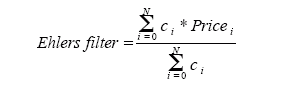
The values of weighting are coefficients of filters. Coefficients of WMA filters can be presented as contours of a triangle. The center of gravity is on the 1/3 of the triangle base length. Thus WMA gravity center is shifted to the right with respect to the center of gravitation of SMA of the same length, which gives us a smaller lag. For all examples with FIR filters the sum of productions of coefficients and the price must be divided by the sum of coefficients for preservation of original prices.
The most famous of such FIR filters is Ehlers filter that can be presented the following way:
Reduce lag and improve accuracy with the NonLagMA Expert Advisor for MT4/MT5. Discover it.
Level up your trading with professional RobotFX expert advisors and indicators. Visit robotfx.org for proven MT4/MT5 tools.
7068


