
RobotFX curates the best open-source MetaTrader code to inspire your trading automation.
The Exp_CronexAC EA is based on the signals generated by the CronexAC oscillator.
The signal is formed when a bar is closing if there is change in cloud color of the indicator.
For a correct operation of the EA, place the compiled indicator file CronexAC.ex5 to terminal_data_folder\MQL5\Indicators.
Recover from drawdowns intelligently with the Auto Recovery Expert Advisor for MT4/MT5. Perfect for hedging strategies. Learn more.
Note that the TradeAlgorithms.mqh library file allows using Expert Advisors with brokers who offer nonzero spread and the option of setting Stop Loss and Take Profit together with position opening. You can download more variants of the library at the following link: Trade Algorithms.
Default Expert Advisor's input parameters have been used during the tests shown below. Stop Loss and Take Profit have not been used during the tests.
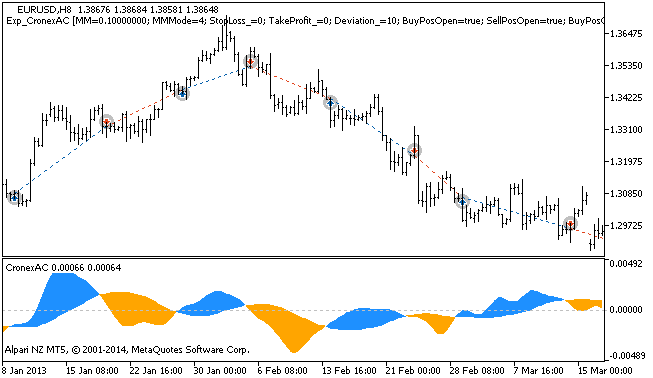
Figure 1 The instances of history of deals on the chart
Testing results for 2013 at EURUSD H8:
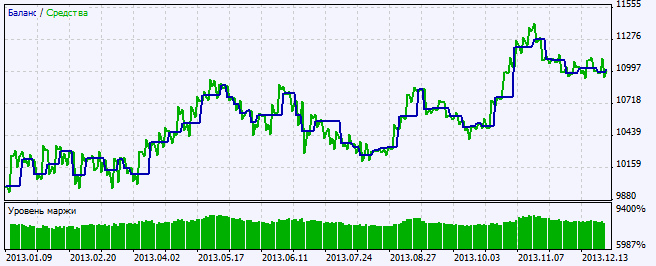
Figure 2. Chart of testing results
Level up your trading with professional RobotFX expert advisors and indicators. Visit www.robotfx.org for proven MT4/MT5 tools.
2396


