
Fresh MQL5 code release – perfect for enhancing your MT4/MT5 strategies.
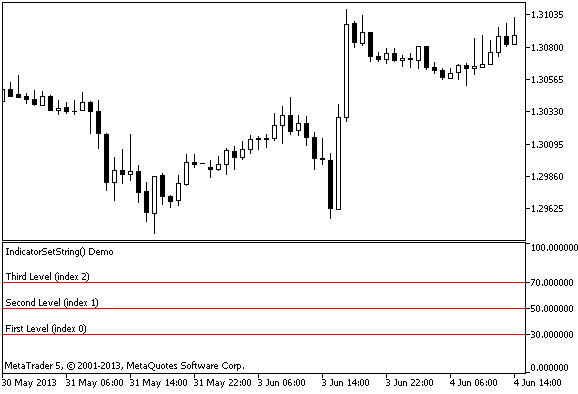
An example of how to use IndicatorSetString(). A simple indicator that shows how to create a label, e.g. "Overbought level" for each level.
Using the #property compiler directives for the indicator, which is drawn in a separate window, you can specify the required horizontal levels, for example:
//--- display three horizontal levels in a separate indicator window
#property indicator_level1 30
#property indicator_level2 50
#property indicator_level3 70
In addition, the IndicatorSetString() function can be used for adding labels to each level and even changing the labels dynamically when necessary:
Recover from drawdowns intelligently with the Auto Recovery Expert Advisor for MT4/MT5. Perfect for hedging strategies. Learn more.
//--- Set descriptions of horizontal levels
   IndicatorSetString(INDICATOR_LEVELTEXT,0,"First Level (index 0)");
   IndicatorSetString(INDICATOR_LEVELTEXT,1,"Second Level (index 1)");
   IndicatorSetString(INDICATOR_LEVELTEXT,2,"Third Level (index 2)");
Note
Numbering of properties (modifiers) starts from 1 (one) when using the #property directive, while the function uses numbering from 0 (zero). In case the level number is set incorrectly, resulting indicator can differ from the intended one.
For example, in order to set description of the first horizontal level use the zero index:
IndicatorSetString(INDICATOR_LEVELTEXT, 0, "First Level")
  //- Index 0 is used for setting the text description of the first level.
Build better strategies with RobotFX professional tools – check them out.
1760


