
RobotFX curates the best open-source MetaTrader code to inspire your trading automation.
EMA_Prediction_HTF_Signal shows information about trend direction based on the data of the EMA_Prediction indicator on a selected bar as a graphic object with a colored indication of trend or deal direction and gives alerts or audio signals and sends push notifications on the smartphone if signal to conduct a deal appears.
The indicator gives alerts and push notifications only if the value of the input parameter:
input uint SignalBar=0; // The bar number to get a signal (0 - current bar)
is greater than one. For the zero bar sound signals and Push-notifications are useless because the signal of the indicator on the zero bar can change and disappear!
Protect profits effectively with the smart Trailing Stop Expert Advisor. Advanced trailing options for MT4/MT5. See it in action.
All input parameters can be divided into three large groups:
- Input parameters of EMA_Prediction:
input string Symbol_="";                               // Financial instrument

input ENUM_TIMEFRAMES Timeframe=PERIOD_H6;             // Indicator timeframe for indicator calculation
input uint               FastMAPeriod=1;               // Fast MA period
input ENUM_MA_METHOD    FastMAType=MODE_EMA;           // Averaging of the fast MA
input ENUM_APPLIED_PRICE FastMAPrice=PRICE_CLOSE;      // Price of the fast MA
input uint               SlowMAPeriod=2;               // Slow MA period
input ENUM_MA_METHOD    SlowMAType=MODE_EMA;           // Averaging of the slow MA
input ENUM_APPLIED_PRICE SlowMAPrice=PRICE_CLOSE;      // Price of the slow MA
- EMA_Prediction_HTF_Signal indicator input parameters that are necessary for the indicator visualization:
//---- settings of the visual display of the indicator
input uint SignalBar=0;                                // Bar number to get a signal (0 - current bar)
input string Symbols_Sirname=INDICATOR_NAME"_Label_";  // Names of the indicator labels
input color UpSymol_Color=Lime;                        // Color of the growth symbol
input color DnSymol_Color=Magenta;                     // Color of the fall symbol
input color IndName_Color=DarkOrchid;                  // Color of the indicator names
input uint Symbols_Size=60;                            // Size of the signal symbols
input uint Font_Size=10;                               // Font size of the indicator name
input int X_1=5;                                       // Horizontal shift of the name
input int Y_1=-15;                                     // Vertical shift of the name
input bool ShowIndName=true;                           // Display of the indicator name
input ENUM_BASE_CORNER  WhatCorner=CORNER_RIGHT_UPPER; // Corner
input uint X_=0;                                       // Horizontal shift
input uint Y_=20;                                      // Vertical shift
- EMA_Prediction_HTF_Signal indicator input parameters that are necessary for triggering alerts and audio signals:
//---- Settings of alerts
input ENUM_ALERT_MODE alert_mode=OnlySound;  // Option of triggering indication
input bool Push=true;                        // Allow push notifications
input uint AlertCount=0;                     // Number of produced alerts
In case several EMA_Prediction_HTF_Signal indicators are to be used on one chart, each of them should have its own Symbols_Sirname (indicator labels names) string variable value.
Place the indicator compiled file EMA_Prediction.mq5 to the terminal_data_folder\MQL5\Indicators\ of the client terminal.
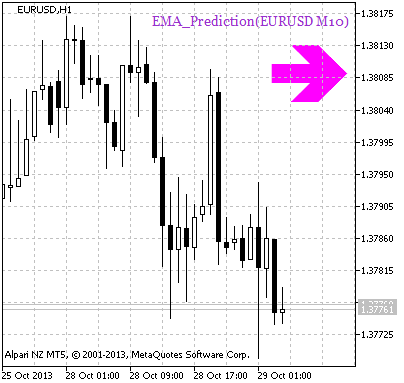
Fig. 1. A signal of trend continuation based on the data of the EMA_Prediction_HTF_Signal indicator
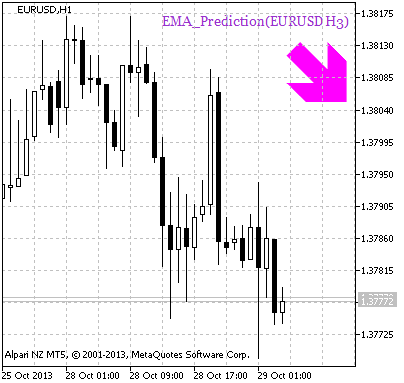
Fig. 2. A signal to open a position based on the data of EMA_Prediction_HTF_Signal
Thanks for reading. Discover premium MetaTrader solutions at RobotFX.
1938


