
New free code from MQL5: indicators, EAs, and scripts for traders.
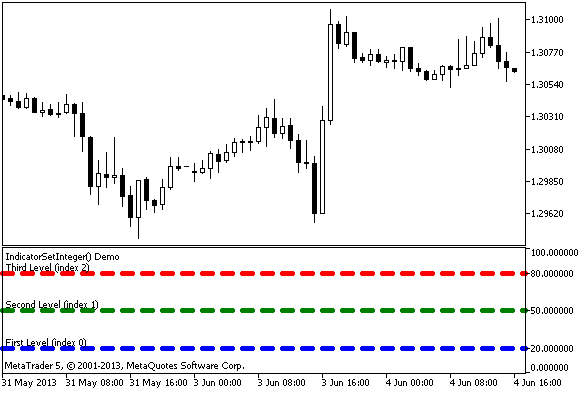
An example of the IndicatorSetInteger() function. A simple indicator that shows how to create a label, e.g. "Overbought level" for each horizontal level.
Using the #property compiler directives for the indicator, which is drawn in a separate window, you can specify color, style and width of horizontal levels, for example:
//--- Set showing of three horizontal levels in a separate indicator window
<s1p>#property indicator_level1 20
#property indicator_level2 50
#property indicator_level3 80
//--- Set the width of horizontal levels
#property indicator_levelwidth 5
//--- Set the color of horizontal levels
#property indicator_levelcolor clrAliceBlue
//--- Set the style of horizontal levels
In addition, the IndicatorSetInteger() function can dynamically set the style for each level
Classic MACD strategy made fully automatic – the MACD Expert Advisor for MT4 handles it all. Check it out.
//--- Set the color of the level
      IndicatorSetInteger(INDICATOR_LEVELCOLOR,level,level_color);
      IndicatorSetInteger(INDICATOR_LEVELSTYLE,level,level_style);
Styles of horizontal lines can be set by the ENUM_LINE_STYLE enumeration:
|
Identifier |
Description |
|
STYLE_SOLID |
Solid line |
|
STYLE_DASH |
Dashed line |
|
STYLE_DOT |
Dotted line |
|
STYLE_DASHDOT |
Dash-dot line |
|
STYLE_DASHDOTDOT |
Dash - two dots |
Note
Numbering of properties (modifiers) starts from 1 (one) when using the #property directive, while the function uses numbering from 0 (zero). In case the level number is set incorrectly, resulting indicator can differ from the intended one.
For example, in order to set width of the first horizontal line use index zero:
//--- index 0 is used to set width of the first level
IndicatorSetInteger(INDICATOR_LEVELWIDTH, 0, 5);
Level up your trading with professional RobotFX expert advisors and indicators. Visit www.robotfx.org for proven MT4/MT5 tools.
1761


