RobotFX curates the best open-source MetaTrader code to inspire your trading automation.
Attach the EA to any live or demo chart, enable Algo Trading, and use the panel buttons or keyboard hotkeys to trade. CommandDesk is not an automated strategy — it will show zero trades in Strategy Tester.
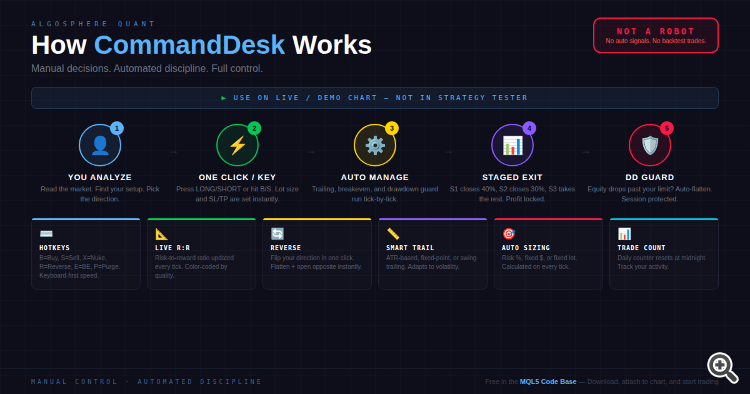
═══ FEATURES ═══
▸ One-Click Execution
Press LONG or SHORT on the panel. Lot size is calculated instantly from your risk settings, SL and TP levels are placed automatically, and the position is registered for staged exit tracking.
▸ Keyboard Hotkeys
Trade without touching the mouse. B = Buy, S = Sell, X = Flatten all positions, R = Reverse direction, E = Lock breakeven, P = Purge pending orders. Hotkeys can be disabled in settings.
▸ Staged Multi-TP Exits
Set up to three exit stages with custom close percentages (default: 40% at Stage 1, 30% at Stage 2, remainder at Stage 3). Stage state is encoded in the order comment and survives EA restarts.
▸ Adaptive Trailing Stop
Three trailing algorithms: fixed-point distance, ATR-scaled distance (configurable period and multiplier), or previous-bar swing high/low. Broker stops level and freeze level are respected automatically.
▸ Auto Breakeven
When profit reaches your configured threshold (in points), the SL is moved to entry price plus a safety offset. The "Lock B/E" button applies breakeven instantly to all in-profit positions.
▸ Drawdown Guard
Set a maximum drawdown percentage from your session equity peak. CommandDesk monitors equity on every tick. When the limit is breached, all positions and pending orders are auto-flattened. New orders are blocked until equity recovers. Disabled by default — enable it in inputs.
▸ Reverse Position
One click or press R to close your current net direction and immediately open the opposite side. Net direction is calculated from all open positions.
▸ Live R:R Display
Risk-to-reward ratio is calculated from your SL distance and furthest TP stage, updated every tick. Color-coded: green for 2:1 or better, yellow for 1:1+, red below 1:1.
Capture price channel breakouts with the Price Channel Expert Advisor. Precise entries and exits. Explore now.
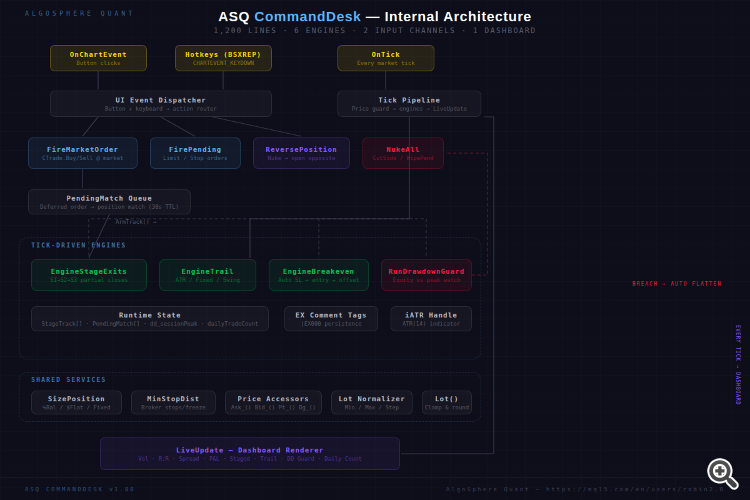
▸ Daily Trade Counter
Tracks how many market orders you have fired today. Resets automatically at midnight server time.
▸ Intelligent Position Sizing
Three modes: fixed lot, percentage of balance at risk, or flat dollar amount at risk. Volume is recalculated on every tick based on the current SL distance and account balance.
▸ Full Pending Order Suite
Buy Limit, Sell Limit, Buy Stop, and Sell Stop with automatic SL/TP placement. All distances are validated against the broker's minimum stops level.
▸ Live Dashboard
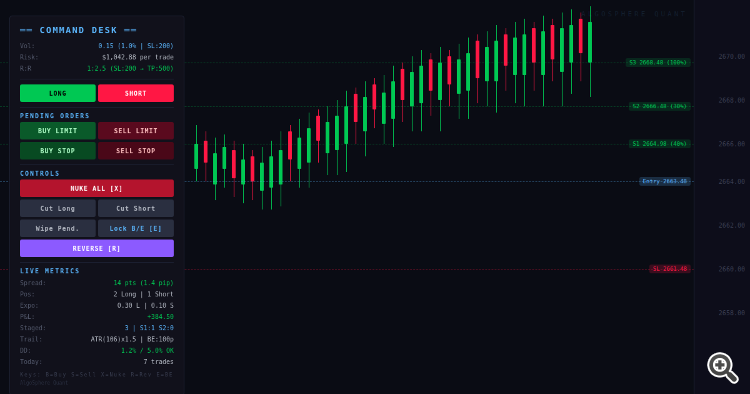
Real-time spread (color-coded by width), position count by direction, directional lot exposure, floating P&L with swap and commission, staged exit tracker, trailing configuration, drawdown guard status, and daily trade counter — all rendered on a dark-themed overlay panel.
═══ IMPORTANT ═══
⚠ This is a manual trading panel. It requires you to click buttons or press hotkeys to open trades. It does NOT generate signals or auto-trade. Strategy Tester will show 0 trades — this is expected.
⚠ Hotkeys are active when the chart window has focus. If you type in other MT5 windows, hotkeys will not fire. Disable hotkeys in the input settings if you prefer mouse-only operation.
═══USAGE ═══
1. Download and place ASQ_CommandDesk_v1.00.mq5 in your MQL5/Experts folder
2. Compile in MetaEditor (no external dependencies)
3. Attach to any chart on a live or demo account
4. Enable Algo Trading in the MT5 toolbar
5. Configure risk settings, trailing mode, and drawdown guard in the Inputs tab
6. Click LONG/SHORT or press B/S to execute
═══ FILES ═══
ASQ_CommandDesk_v1.00.mq5 — Main EA source (1,200 lines)
═══ COMPATIBILITY ═══
MetaTrader 5 Build 4000+
Any symbol, any timeframe
Hedging and Netting account types
——————————————————
AlgoSphere Quant — Precision-engineered trading tools.
Thanks for reading. Discover premium MetaTrader solutions at RobotFX.
71583Best MetaTrader Indicators + Profitable Expert Advisors


