
RobotFX curates the best open-source MetaTrader code to inspire your trading automation.
Overview
The Imbalance Finder is a chart indicator for MetaTrader 5 that automatically detects Fair Value Gaps (FVGs), also known as imbalances and visually tracks their lifecycle on the chart. It identifies both bullish and bearish imbalances and monitors in real time whether price has tapped into (partially filled) or completely filled each gap.
Fair Value Gaps are three-candle patterns where the wicks of the first and third candle do not overlap, leaving a price "gap" at the middle candle. These zones frequently act as support/resistance and are widely used in Smart Money Concepts (SMC) trading methodologies.
How It Works
Detection Logic
The indicator examines every completed bar and compares the high/low of the surrounding candles:
Watch in-depth trading tutorials and EA reviews on the RobotFX YouTube channel. Subscribe for free tips.
- Bullish FVG: The low of bar [i] is above the high of bar [i-2]. The gap zone spans from high[i-2] (bottom) to low[i] (top) and is drawn at bar [i-1].
- Bearish FVG: The high of bar [i] is below the low of bar [i-2]. The gap zone spans from high[i] (bottom) to low[i-2] (top) and is drawn at bar [i-1].
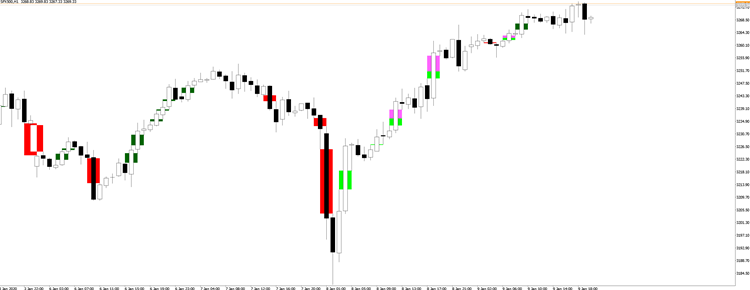
Tapped vs. Filled
Once an imbalance is detected, the indicator continuously monitors whether subsequent price action interacts with the zone:
- Tapped: Price has entered the imbalance zone but has not fully traversed it. For a bullish FVG, this means price dropped into the gap from above but did not reach the bottom edge. The tapped portion is highlighted in a separate color.
- Filled: Price has completely crossed through the imbalance zone, reaching the opposite edge. The entire rectangle changes color to indicate the gap is no longer active.
This distinction is useful because a tapped-but-unfilled FVG often still acts as a support/resistance zone, while a fully filled FVG is considered consumed.
Input Parameters
| Parameter | Default | Description |
|---|---|---|
| Bullish Imbalance Color | Lime | Rectangle color for active bullish FVGs |
| Bearish Imbalance Color | Orange | Rectangle color for active bearish FVGs |
| Show Tapped / Filled Imbalances | true | Toggle visibility of tapped/filled overlays |
| Tapped/Filled Bullish Color | DarkGreen | Color applied when a bullish FVG is tapped or filled |
| Tapped/Filled Bearish Color | Red | Color applied when a bearish FVG is tapped or filled |
Indicator Buffers
The indicator exposes 7 buffers (no plots drawn; data only) that can be read by Expert Advisors or other indicators:
| Buffer | Index | Values |
|---|---|---|
| Bullish Imbalance | 0 | 1 = FVG present, EMPTY_VALUE = none |
| Bearish Imbalance | 1 | 1 = FVG present, EMPTY_VALUE = none |
| Tapped Flag | 2 | 1 = partially tapped |
| Tapped Until Price | 3 | Price level reached inside the gap |
| Filled Flag | 4 | 1 = completely filled |
| Candle Interaction | 5 | 1 = tapped, 2 = filled (on the interacting bar) |
| Interaction Type | 6 | 1 = bullish FVG, 2 = bearish FVG |
Reading the Chart
- Active imbalances appear as colored rectangles spanning three bars.
- When price taps into a zone, a second rectangle in the tapped/filled color overlays the portion that was penetrated.
- When price fills the entire zone, the original rectangle is replaced by a single rectangle in the filled color.
- Set "Show Tapped / Filled Imbalances" to false if you only want to see active (untouched) FVGs.
Notes
- The indicator recalculates all imbalances and their status on first load (historical data). On subsequent bars, only the latest bar is checked for new imbalances, and all open imbalances are monitored against the current tick.
- Object names are prefixed with ImbalanceUp- and ImbalanceDn- to avoid conflicts with other indicators or manual drawings.
- Removing the indicator cleanly deletes only its own chart objects.
Thanks for reading. Discover premium MetaTrader solutions at RobotFX.
71540


