
RobotFX curates the best open-source MetaTrader code to inspire your trading automation.
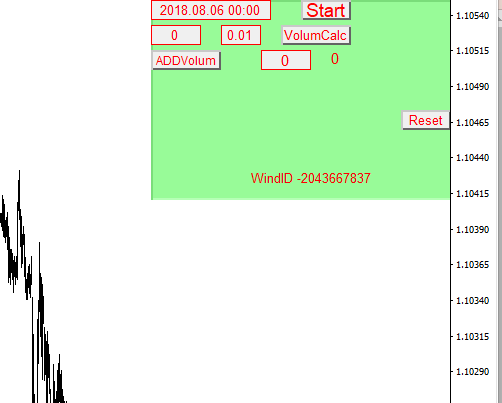
The box contains the following tools: 1. Integration of the signal generated by the ROOT analyzer a. Analyzed candlestick time b. Fibonacci number. This allows you to construct market levels for both Buy and Sell orders. c. Volume calculator and integrator. Once this information is correctly integrated from the Root Analyzer, it can be processed by pressing the STart button. 2. Buttons to select Buy or Sell depending on the situation (trader's choice). All orders are LIMIT orders. 3. Take Profit and Trail Stop position buttons. These buttons are necessary for proper trading manipulation.
Experience adaptive trading with the Fluid Expert Advisor for MT4/MT5. Dynamic money management and trend detection. Click for info.
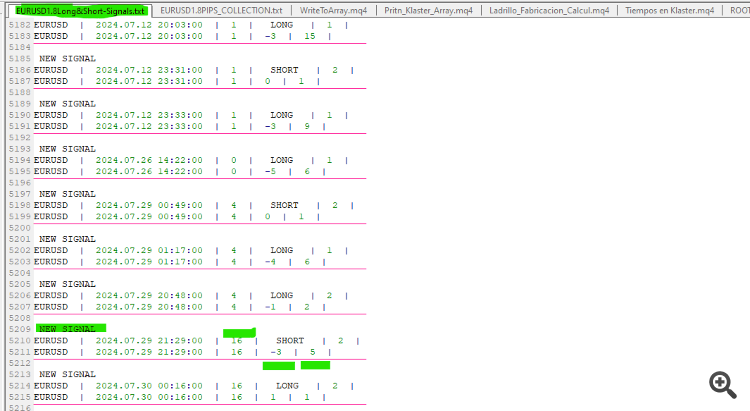
How to Choose a Signal

The signal range is from 1 to infinity. To choose a signal, start with a value of 15 or higher.

The following image shows how to choose a signal from the ROOT analyzer.

Signals

To run the Magic Box, we use:

1. Analysis time according to the signal. In this example, it's 2024.07.29 21:29:00

2. Number 16

3. Number -3 indicates a BOOL market.

4. Number 5 indicates a BEAR market.

The difference is -3 + 5 = 2. Positive market pressure means a buying trend. A negative difference indicates a selling trend.

However, further research into the signals and their behavior is recommended.
Build better strategies with RobotFX professional tools – check them out.
71522


