
Fresh MQL5 code release – perfect for enhancing your MT4/MT5 strategies.
Script for historical data export.
Problems with history in MetaTrader 4? Load the detailed history of any depth from MetaTrader 5!
Unique stair-step trend trading with the Stairsteps Expert Advisor. Innovative approach for consistent results. Learn more.
Step 1: Set up
Load script in the "terminal_data_folder\MQL5\scripts\".
Load libraries CheckHistory and String to the "terminal_data_folder\MQL5\Include\komposter\".
Compile the script.
Step 2: Set the depth of the history
Go to the menu "Tools - Options" (Ctr+O), or on the tab "Charts" specify how many bars you want to export ("Max. bars in the window"). History of М1 per one year it is about 370 000 bars.
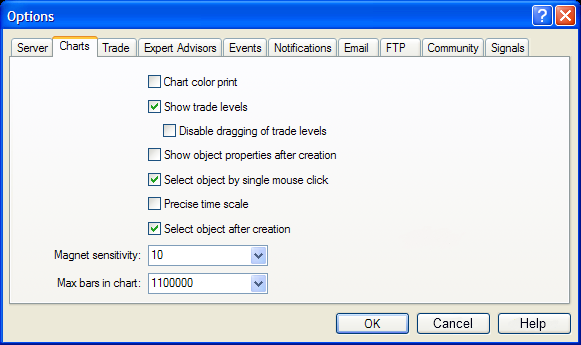
Click "ОК" and restart МТ.
Step 3: Set the instruments list
If you want to load the history on many parameters at once, add them to "Market Watch", and hide the unnecessary instruments:

Step 4: Run script
Drag the script to any chart and set the external variables value:
-
SymbolsList: A list of symbols divided by a comma (for example, "EURUSD,GBPUSD").
If you set "all", all the characters from the "Market Watch" will be used; -
TimeFramesList: time frame list divided by a comma (for example, "M1,M5,M15").
If set "all", all the МТ4 time frames smaller D1 will be used . -
BarsToDownload: number of bars to export.
If set 0, all bars visible on the chart will be exported ("Max. bars in the window").
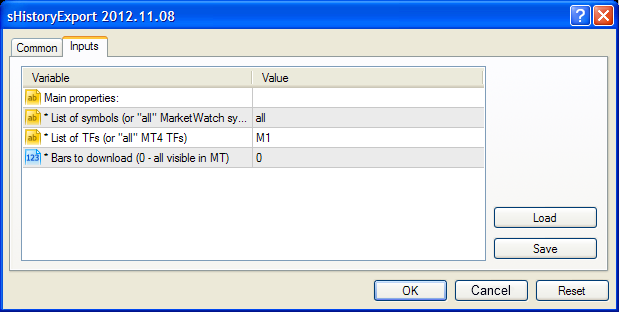
Click "ОК", and waiting for the shutdown message . The progress you can follow on the "Expert Advisors" tab of the terminal:
2013.03.28 11:42:55
2013.03.28 11:43:25
2013.03.28 11:43:27
2013.03.28 11:43:55
2013.03.28 11:43:57
2013.03.28 11:44:26
2013.03.28 11:44:28
2013.03.28 11:44:56
2013.03.28 11:44:59
2013.03.28 11:45:27
2013.03.28 11:45:31
2013.03.28 11:46:00
2013.03.28 11:46:01
2013.03.28 11:46:31
2013.03.28 11:46:33
2013.03.28 11:47:03
2013.03.28 11:47:04
2013.03.28 11:47:33
2013.03.28 11:47:33
2013.03.28 11:47:33
If you set larger number of instruments and/or time frames and/or loaded bars, script can work very long or in general hang due to lack of core memory! Adequately assess the potential of your hardware.
Step 5: Done!
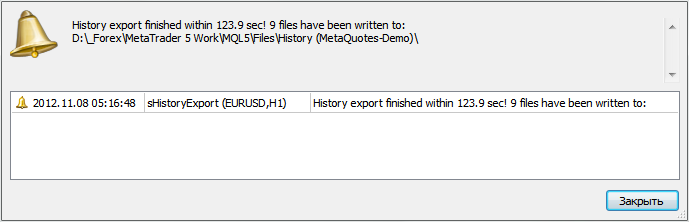
Loading all the necessary history, the script displays a window with information and exits. The name of the folder where the files are stored, you can copy directly from the Alert window:
csv-files, written by a script, ready to import in MetaTrader 4 ("Quotes archive - Import"):

The history of changes
2013.03.25:
-
[*] If there is no sufficient depth history by the instrument/timeframe on
the server, the script will download and save the whole available
history (before it outputted an error and didn't save anything).
2013.03.28:
- [+] Write to "hst" is added.
Build better strategies with RobotFX professional tools – check them out.
1252


