
Fresh MQL5 code release – perfect for enhancing your MT4/MT5 strategies.
Perfecto, esto es el CodeBase. Basándome en los requisitos que muestra la pantalla, aquí va el texto que debes pegar en ese campo:
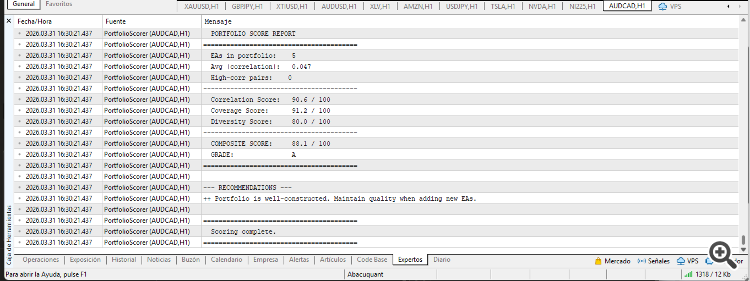
Portfolio Scorer evaluates multi-EA portfolios by measuring three dimensions: inter-strategy correlation, temporal coverage, and asset class diversity. It produces a composite grade from A+ to F.
The script reads daily P&L data from CSV files located in the MQL5\Files\ folder. If no files are found, it automatically generates sample data for five EAs (forex, index, metal, energy, and forex-JPY) so the user can see the full output immediately.
Watch in-depth trading tutorials and EA reviews on the RobotFX YouTube channel. Subscribe for free tips.
Input parameters:
InpFileList — comma-separated list of CSV filenames to analyze. Default: EA_EUR.csv, EA_NDX.csv, EA_XAU.csv, EA_OIL.csv, EA_JPY.csv.
InpSeparator — delimiter character used to split the file list. Default: comma.
InpMinDays — minimum number of trading days required per EA to be included in the analysis. Default: 60.
InpCorrThresh — absolute correlation threshold above which a pair is flagged as dangerously correlated. Default: 0.35.
InpWeightCorr — weight assigned to the correlation dimension in the composite score. Default: 0.50.
InpWeightCov — weight assigned to the coverage dimension. Default: 0.25.
InpWeightDiv — weight assigned to the diversity dimension. Default: 0.25.
Output (Experts tab):
Full NxN Pearson correlation matrix with threshold flags. Hour-by-hour coverage map (0-23 UTC) showing active EAs per hour. Weekday coverage breakdown (Mon-Fri). Composite score report with individual dimension scores and letter grade. Actionable recommendations based on detected weaknesses.
CSV format expected: Each file must have a header row followed by one row per trading day with four columns: Date, DailyPnL, TradeHour, TradeWeekday. A companion function (ExportDailyPnL) for generating these files from EA backtests is described in the accompanying article.
Attach the script to any chart and run. No specific symbol or timeframe is required — the script operates on CSV data, not on chart prices.
Thanks for reading. Discover premium MetaTrader solutions at RobotFX.
71307


