
Explore the latest free tools from the MQL5 community. Here's a new indicator, expert advisor, or script for MetaTrader.
The indicator allows to perform any arithmetic action with prices of two symbols and plot result on any other chart.
It allows to calculate the crosses (using multiplication and division), spread (subtract) or just to plot the other symbol's data on the chart.
Protect profits effectively with the smart Trailing Stop Expert Advisor. Advanced trailing options for MT4/MT5. See it in action.
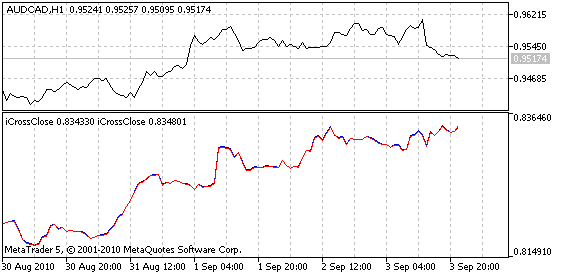
Fig. 1. The indicator iCrossClose. The EURGBP itself (blue) and its estimated values (red, caluclated using the EURUSD and GBPUSD) are presented on the lower chart
By default, it plots the cross of EURGBP, calculated using the values of EURUSD and GBPUSD (Fig. 1)
- S1_Symbol - Symbol 1;
- S1_Invert - Flag to invert the value of symbol 1 (value=1.0/value);
- S1_K - Multiplication coefficient of the symbol 1 (value=K*value);
- S1_Plus - Addition to the symbol 1 (value=Plus+value). The operations priority is the following: invert, multiplication, addition;
- S2_Symbol - Symbol 2;
- S2_Invert - Flag to invert the value of symbol 2;
- S2_K - Multiplication coefficient of the symbol 2;
- S2_Plus - Addition to the symbol 2;
- R_ArithmeticAction - Arithmetic Action;
- R_Invert - Flag to invert the result of Arithmetic Action result;
- R_K - Multiplication coefficient for the result;
-
R_Plus - Addition to the result.
Notes:
- To plot the other symbol's data as it is, you must specify the same values of the S1_Symbol and S2_Symbol, S2_K=0, R_ArithmeticAction=Add, and default values for the other parameters.
- Until the data isn't ready, it waits for a new tick and prints the message "Please wait...". You can also switch the timeframes to use it at weekends,
Build better strategies with RobotFX professional tools – check them out.
183


