
New free code from MQL5: indicators, EAs, and scripts for traders.
ASQ Spread Logger — Track Every Pip of Spread
AlgoSphere Quant — Precision before profit.
ASQ Spread Logger is a lightweight indicator that monitors spread in real time and gives you the data to make better entry decisions. Whether you scalp during tight sessions or avoid news spikes, this tool shows you exactly what your broker is charging — and logs it for later analysis.
Trade the powerful Traders Dynamic Index strategy automatically with this dedicated TDI Expert Advisor. More details.
What it does
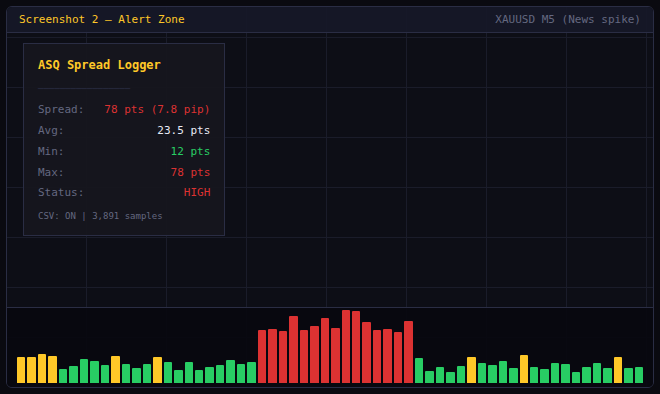
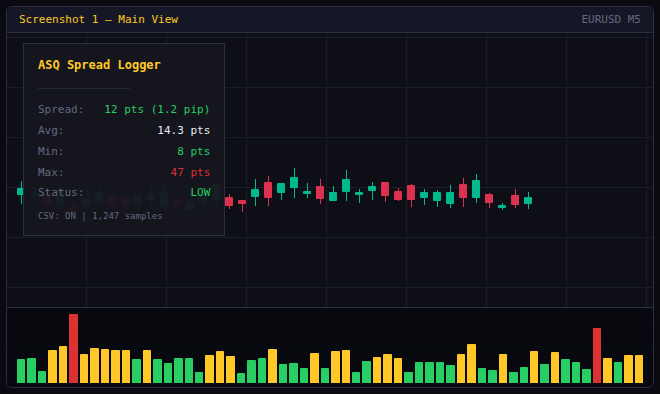
The indicator draws a color-coded histogram in a separate window: green when the spread is low, gold when it is moderate, and red when it exceeds your threshold. A clean on-chart panel displays the current spread in both points and pips, the rolling average, the minimum and maximum over your chosen window, and the current status level.
Every data point can be logged to a CSV file (DateTime, Symbol, Spread, Bid, Ask, Avg, Min, Max, Status) so you can analyze spread behavior across sessions, days, or brokers in Excel or Python. Three logging frequencies are available: every tick, every second, or once per new bar.
When the spread exceeds your high threshold, the indicator fires an alert with configurable cooldown. Push notifications and email alerts are also supported.
Features
- Color-coded spread histogram (green / gold / red) in a separate window
- On-chart statistics panel: current spread, average, min, max, status
- CSV export to MQL5/Files/ with full bid/ask and status data
- Three logging modes: every tick, every second, every new bar
- Configurable low/high thresholds in points
- Threshold reference lines on the histogram
- Alert popup + optional push notification + email
- Alert cooldown to prevent spam
- Panel corner, offset, font, and color customization
- Automatic pip conversion for 3/5-digit brokers
- Minimal CPU usage — single-file, no external dependencies
Use cases
- Scalping: enter only when the spread is below your threshold
- News trading: monitor spread expansion before and after high-impact events
- Broker comparison: log spread data across multiple brokers and compare in Excel
- Session analysis: identify which hours offer the tightest spreads
- Prop firm compliance: document that you traded during acceptable spread conditions
Parameters
Spread Thresholds: Low threshold, High threshold (points). CSV Logging: Enable/disable, frequency (tick/second/bar), custom filename. Statistics: Rolling window size. Alerts: Enable, push, email, cooldown in seconds. Display: Panel on/off, corner, offset, font size, colors for background, text, header, good/warn/bad levels, threshold lines, max bars.
Installation
- Download ASQ_SpreadLogger.mq5
- Place in MQL5/Indicators/
- Compile in MetaEditor (zero dependencies)
- Drag onto any chart
Compatibility
MetaTrader 5, all brokers, all instruments (Forex, Metals, Indices, Crypto), all timeframes.
Free and open-source under the AlgoSphere Quant brand.
Level up your trading with professional RobotFX expert advisors and indicators. Visit www.robotfx.org for proven MT4/MT5 tools.
71237


