
Discover expert developed MetaTrader tools that can complement professional solutions.
Info Tab
Experience adaptive trading with the Fluid Expert Advisor for MT4/MT5. Dynamic money management and trend detection. Click for info.
This tab shows the chart and full information on symbol
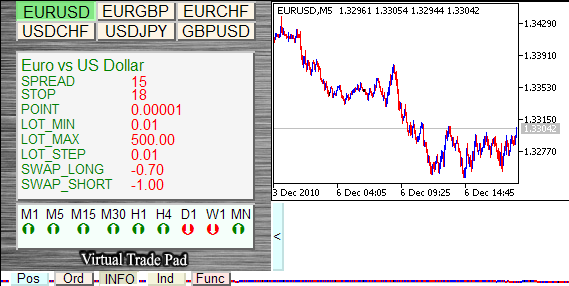
- Spread, Minimal Stop level, Point size, Minimal trade voluime, Maximal allowed trade volume, Lot step, Swap for long positions, Swap for short positions,
- It also shows the candle type for the all standard timeframes:
- The color is green if the current price is higher than opening price
- The color is red if the current price is lower than opening price.
- Click the timeframe button to show the chart on the right side (the symbol can be selected).
Ind Tab
This tab shows the state of the indicators
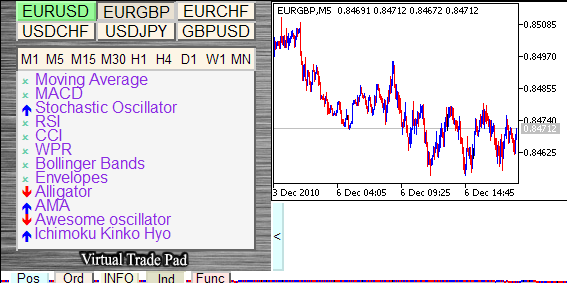
- The blue arrow indicates to buy
- The red arrow indicates to sell
- By click on the timeframe button you will see the chart of the symbol on the specified timeframe. The symbol and timeframe can be set on the Panel
Func Tab
This tab show the useful functions
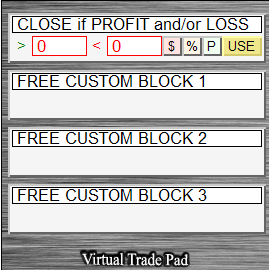
This tab allows to close or delete all the positions/orders, dependent on the specified deposit level (Percents/USD/Points).
Example: You need to close all positions, but you don't want to lose the profit. You just set the From and To levels, specify the position closing/order deleting rule, and click the USE button. It will close all positions when the specified parameter out the range.
- >0 - If higher than (0 - not used!!!)
- <0 - If lower than (the parameter value can be negative) (0 - not used!!!)
- $ - Calculate in USD
- % - Calculate in % of Balance
- P - Calculate in Points
- USE - Enable this option
Other features:
- If position has been opened successfully,it will play the sound, similar to the sound of the client terminal when position is open.
- In the case of error, it will play the error sound
- You cannot set the stop level to 0 or lower than minimal allowed stops level at trade server.
- There is a button to minimize the panel.
References:
I have used the following references when preparing the "VirtualTradePad" Control Panel:
- ChartinChart Expert Advisor (Standard Expert Advisor of MetaTrader5 client terminal)
- 20 Trade Signals in MQL5 (the trading tactics of IND Tab)
-
Migrating from MQL4 to MQL5
- A set of functions from "Expert Advisor template", developed for internal use.
Thanks for reading. Discover premium MetaTrader solutions at RobotFX.
223


