
Discover expert developed MetaTrader tools that can complement professional solutions.
The "Engine" behind the FFC Canvas Calendar.
🔌 What is this?
This is NOT a trading robot. It is a Utility Expert Advisor designed solely to download economic news data for the FFC Calendar Indicator.
Why is it needed?
In MQL4, indicators are not allowed to use the secure WebRequest function. To avoid forcing you to enable dangerous "DLL Imports", we created this helper EA. It runs silently in the background, fetches data securely from the official source, and saves it for the indicator to display.
🚀 Benefits
- ✅ 100% Native: Uses MQL4's built-in WebRequest .
- ✅ Safe: No DLL imports required.
- ✅ Efficient: You only need ONE instance running to serve all your charts.
📚 Setup Instructions (One-Time)
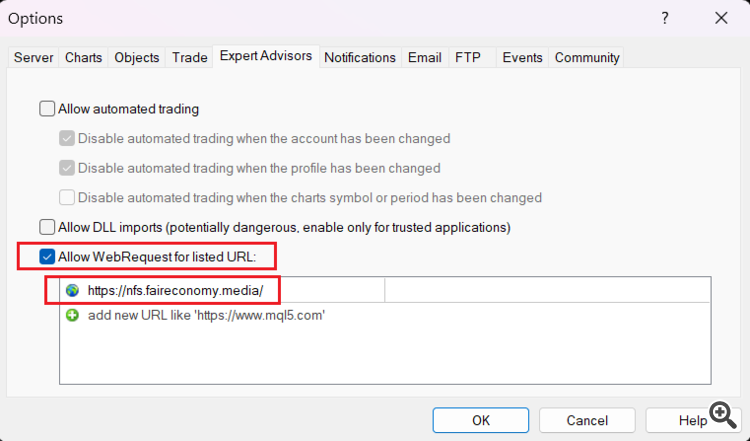
Step 1: Allow WebRequest
Go to Tools -> Options -> Expert Advisors:
- Check "Allow WebRequest for listed URL".
- Add this exact URL: https://nfs.faireconomy.media/
- (Note: "Allow DLL imports" can remain unchecked).
Step 2: Run the Feeder
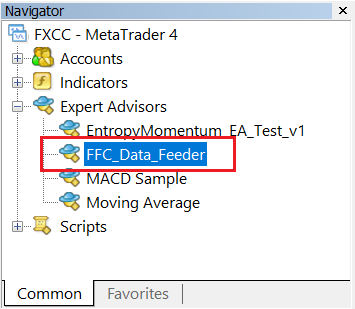
- Open ONE empty chart (e.g., EURUSD M1).
- Drag this FFC_Data_Feeder EA onto the chart.
- You will see a dashboard confirming the connection status.
Step 3: Get the Indicator
Once this Feeder is running, download and attach the visual indicator FFC 2.0 Calendar from the Indicators section to see the news panel on your trading charts.
Free Open Source Utility. Part of the MQL Trading Tools suite.
Grid trading done right – try the robust Grid Expert Advisor for controlled risk. Details here.
Level up your trading with professional RobotFX expert advisors and indicators. Visit www.robotfx.org for proven MT4/MT5 tools.
68215


